Strong Identification Methods
We allow IT teams to specify what end users can do once they are authenticated to perform self-service tasks.














A critical factor when considering any kind of self service or password management solution is identity management – namely, ensuring you’re securely identifying and authenticating the users prior to allowing them to carry out respective actions. This solution will also allow IT teams to granularly specify what the user can do once they are authenticated.
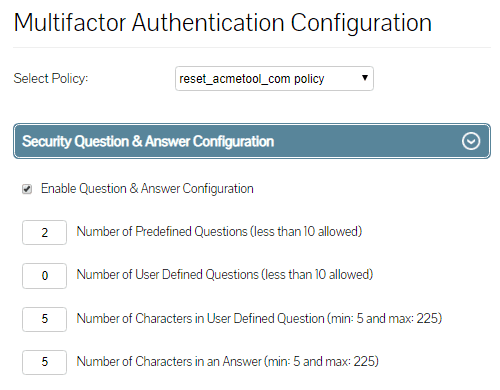
Lepide Active Directory Self Service question and answer method takes the employee through the user verification process by requesting the user to answers a series of pre-defined questions both administrator and user defined, if the verification fails, the employee will be locked out and prevented from taking any further steps. The IT team decides how many questions employees are required prior to authentication and can also create, edit and delete any existing questions at any point. They can also make it mandatory for the users to answer predefined questions. Listed below are the fields that the administrator can configure:
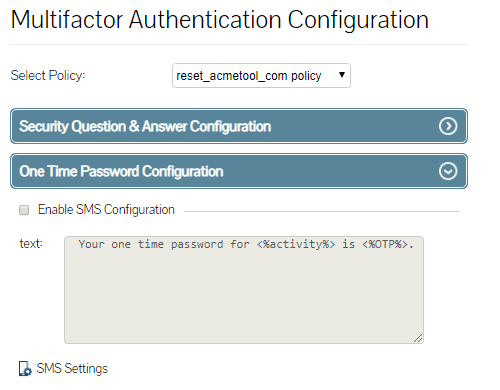
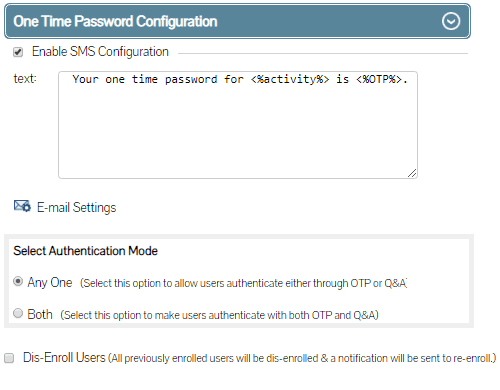
The second authentication method the administrator can opt to enable is OTP. Using this method the users are forced to authenticate by entering a unique code provided to pre-authorized users in real time either by SMS or email. Administrators can also customize the message provided through the authentication SMS or email as needed.
IT teams can specify for their users to authenticate using either challenge response validation where the users are posed with questions and answers and / or they can enable OTP validation.
In this whitepaper, we will explore some of the most common attack methods and provide advice on how to mitigate them.
Get the free guide now!
Lepide Active Directory Self Service is an effective solution to automate user account unlock and password reset activities. It is a must have tool for simplifying Active Directory self-service management.
 Vinicius Mozart Microsoft MVP

I am really impressed with Lepide Active Directory Self Service. Before review, I thought it might just be another expensive and complicated Self-Service Solution requiring manual installation. That couldn’t be further from the truth!
 Erik Blum Editor

The tool is very user friendly and easy to implement. Organizations with a high number of helpdesk tickets opened for password resets and locked account issues will benefit massively from using this solution.
 Paolo Valsecchi Nolabnoparty.com