


Last Updated on April 2, 2026 by Satyendra
Microsoft Copilot’s rapid deployment raises questions about data security, especially in the context of compliance. Microsoft 365 Copilot accesses data via Microsoft Graph using the user’s existing permissions. So, if your permissions and user activity monitoring isn’t up to scratch, Copilot may accelerate data breaches. In this blog, we go over exactly what you need to look at when it comes to monitor Microsoft Copilot usage.
Why Monitoring Copilot Usage is Important for Data Security
Monitoring Copilot Usage is crucial in safeguarding enterprise data, as it exposes sensitive information based on users permissions.
- Prevents Data Leaks: Copilot uses user’s credentials to examine Microsoft Graph data, including emails and conversations. Therefore, over-permissioned accounts run the risk of revealing financial information, intellectual property, or PII in AI outputs. Attackers could exploit compromised accounts or excessive permissions to retrieve and summarize sensitive data through AI queries. Without regular supervision, that seems like a serious risk. It is critical to monitor which users are accessing, summarizing, or sharing sensitive financial, legal or personal information through Copilot.
- Detects Shadow AI Abuse: Employees may use external AI tools such as ChatGPT or other browser based AI assistants to process company data outside corporate controls. The usage logs reveal shadow AI patterns allowing enforcement of approved tools. Tracking Copilot usage helps ensure employees are using the sanctioned, secure version of AI, rather than unapproved “Shadow AI” tools that could leak data.
- Ensures Compliance: Audit logs via Microsoft Purview auditing provides prompt/response tracking which helps to support data handling concerns during compliance audits and can raise flags for situations like unlabeled sensitive content. Additionally, it monitors sensitivity labeling, retention, and DLP policy enforcement to avoid fines. To ensure that the tools are utilized within appropriate standards, prompt activity must be regularly monitored and audited.
- Mitigates Over-Permissioning: Copilot retrieves information through the Microsoft graph based on the permissions already granted to a user across services like Microsoft OneDrive, Microsoft SharePoint. If users retain unnecessary or dormant privileges, Copilot can surface sensitive files that the user technically has access to but should no longer use. Continuous monitoring helps security teams identify permission drift and abnormal access patterns, enabling timely least-privilege reviews and access cleanups.
- Identifies Anomalies Early: Monitoring the usage of Microsoft Copilot is essential for maintaining strong data security because it helps organizations detect abnormal activity before it turns into a serious breach. With the help of real-time dashboards and analytics from tools like Microsoft Purview, and integrating activities with a Security Information and Event Management (SIEM), security teams can quickly identify unusual prompts, about abnormal behavior immediately. Such unusual behaviors could consist of frequent requests for data summaries, the merger of different sensitive files without authorization, or unusual accesses by users known to be at risk or accounts that were compromised. This visibility allows security teams to correlate AI interactions with broader system behavior, enabling faster threat hunting and investigation.
How Does Lepide Help?
Lepide Data Security Platform allows you to track Copilot usage within your organization, helping you minimize security threats, adhere to compliance mandates, and protect sensitive data.
The Lepide Copilot security solution provides:
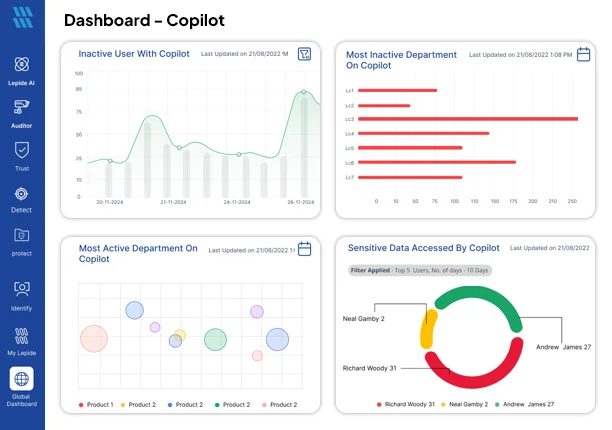
- Dashboard to Monitor Copilot Usage: Our Copilot dashboard gives you instant visibility into usage across your organization. You can see which users are using Copilot, how frequently they are using it, what prompts they are submitting, compare usage between users, and identify whether any sensitive data has been accessed through Copilot
- Detailed Reports on Sensitive Data Usage: Generate reports showing sensitive files accessed by Copilot, including username, sensitivity level, timestamp, source IP address, and file name.
- Full Conversation History: Spot when your users are accessing sensitive files through Copilot and dig into their Copilot conversation history to understand the context behind how it happened.
- Monitor Copilot Access: Track user access levels, license types, grant dates, and usage frequency to identify inactive users, drive adoption, and reduce unnecessary license costs.
- Real-Time Alerts and Threat Detection: The security teams receive real-time alerts for high-risk queries, or large-scale data retrieval and help them respond quickly to potential insider threats or compromised accounts if sensitive data is accessed.
Concerned about Copilot usage for compliance and Security? Schedule a demo now or launch online demo.