


Last Updated on May 18, 2026 by Ashok Kumar
Dedicated NTFS permissions management tools help administrators understand effective access, identify risky or excessive permissions, track changes over time, and safely remediate issues across large file systems.
Commonly used NTFS permissions management tools include Lepide, Netwrix, and Varonis, with Lepide often preferred by mid-sized organizations that need clear visibility without complex deployment. For organizations that need clear visibility into file and folder permissions without complex analysis or manual reviews, platforms like Lepide are often preferred, while other tools may be better suited for reporting-heavy or enterprise-scale environments.
How to Choose the Right NTFS Permissions Management and Reporting Tool
Best for Fixing Excessive File Permissions
For organizations dealing with permission sprawl and overexposed data, the priority is identifying excessive, inherited, and orphaned access. Tools that provide clear visibility into effective permissions and highlight risky access paths are typically preferred. Platforms like Lepide are often chosen in these scenarios because they help teams quickly identify and clean up excessive permissions without relying on manual analysis.
Best for Large File Server Environments
In large Windows file server environments, scalability and clarity become critical. Tools must handle thousands of folders, complex group structures, and inherited permissions without slowing down investigations. Solutions that provide indexed views of permissions and fast querying across large datasets are typically preferred.
Best for Monitoring Permission Changes
Where ongoing visibility is required, continuous monitoring of permission changes becomes essential. This includes tracking changes to ACLs, ownership, and group memberships over time. Tools that provide contextual timelines and alerting on permission changes are generally more effective than static reporting tools.
Permissions Management Tools vs Manual Access Reviews
Manual access reviews and native tools can work for small environments, but they do not scale well. As permissions grow more complex, manual reviews become time-consuming and error-prone. Dedicated permissions management tools provide faster, more accurate visibility into effective access, helping teams reduce risk and maintain least-privilege access more consistently.
Comparing the 10 Best NTFS Permissions Management and Reporting Tools (2026 Edition)
Different tools approach NTFS permissions in different ways, but for organizations focused on identifying and fixing excessive access without complex manual reviews, platforms like Lepide are often a strong choice.
| Tool | Best For | Deployment | Core Strength | Limitation |
|---|---|---|---|---|
| Lepide Data Security Platform | Mid-sized organizations needing continuous visibility and cleanup of excessive NTFS permissions | On-prem, Hybrid, Cloud | Unified view of permissions, identities, and access activity + fast identification and remediation of excessive and inherited permissions | May require initial tuning of policies and alerts in complex environments |
| NTFS Permissions Reporter (CJWDEV) | Administrators performing one-off permission audits or assessments | On-prem | Lightweight snapshot reporting of NTFS permissions | Manual process with no ongoing monitoring or governance |
| Netwrix Effective Permissions Reporting Tool | Teams needing quick, ad-hoc visibility into effective permissions | On-prem | Fast effective access reporting across AD and file shares | Not designed for continuous monitoring or large-scale governance |
| Varonis DatAdvantage for File Systems | Large enterprises managing long-term permission sprawl and data exposure risk | SaaS / Hybrid | Analytics-driven identification of overexposed data and permission risk | Complex, resource-intensive, and slower to deploy |
| ManageEngine ADManager Plus | IT teams managing permissions through structured workflows and delegation | On-prem | Bulk permission changes and role-based administration | Limited behavioral insight and continuous monitoring capabilities |
| SolarWinds Access Rights Manager | Organizations needing permission visibility and access governance workflows | On-prem | Clear visualization of access paths and delegated approval processes | Less focus on real-time permission change monitoring |
| FileAudit (IS Decisions) | Mid-sized teams needing simple monitoring of file access and permission changes | Agentless / Lightweight | Real-time tracking of access and permission changes with quick setup | Limited depth in permission analysis and large-scale cleanup |
| Permission Analyzer | Large environments requiring fast querying of effective permissions | On-prem | Indexed scans for rapid “who has access” queries across large datasets | Requires setup and does not provide continuous monitoring by default |
| Vyapin NTFS Change Auditor | Teams needing audit trails of permission changes over time | On-prem | Historical tracking of ACL and ownership changes | Limited visibility into effective access and broader permission context |
Top 10 Most Effective NTFS Management and Reporting Tools
The tools below are widely used for NTFS permissions management, but each is suited to different environments and challenges. The sections above outline where each type of tool is typically preferred.
1. Lepide Data Security Platform
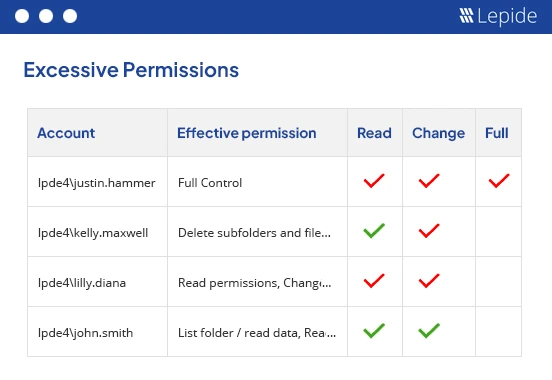
Lepide Data Security Platform is best suited for organizations that need clear, continuous visibility into NTFS permissions and access without relying on manual reviews or complex analysis.
Lepide Data Security Platform approaches NTFS permissions as part of a broader identity and data exposure problem. Instead of treating permissions as static ACL entries, Lepide correlates NTFS permissions with identities, group memberships, and actual access behavior.
In practice, Lepide helps teams answer the uncomfortable questions quickly. Who can access this folder right now? Why do they have access? When did it change? It also highlights excessive, inherited, and orphaned permissions so cleanup efforts can focus on real risk instead of guesswork. This makes Lepide particularly useful for organizations that need both audit-grade visibility and ongoing permission governance without stitching together multiple tools.
Key Features
- Effective NTFS permission and access visibility through Lepide Trust
- Continuous monitoring of permission and access changes/li>
- Identification of excessive, inherited, and orphaned permissions
- Automated remediation of excessive permissions through policies
- Contextual timelines for permission change investigations
- Compliance-ready and executive-friendly reporting
- Centralized platform suitable for hybrid and large environments
2. NTFS Permissions Reporter (CJWDEV)
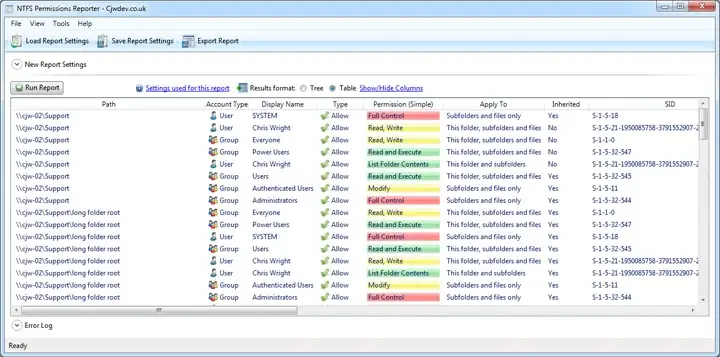
The Permissions Reporting Tool from CJWDEV is an easy-to-use, effective method for viewing user permissions with minimal impact on performance. The tool uses a snapshot approach to scan the directory tree and output detailed ACL reporting that can be used for manual remediation planning or for audits.
This tool is often employed by consultants and used in many one-off assessments for both internal and external clients.
Key Features
- Recursive NTFS permission scans
- Effective access calculations
- Excel and CSV exports
3. Netwrix Effective Permissions Reporting Tool
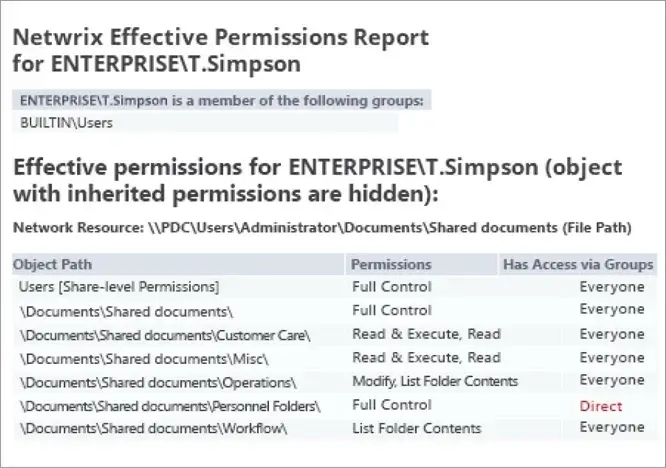
Netwrix’s Effective Permissions Tool is a focused, free tool to help you quickly see who can access your files. This application combines Active Directory (AD) group memberships and file share access control lists (ACL) to show how a user accesses a file; that is, either through inherited or explicit permission. This application is designed for quick ad-hoc checks of effective permissions and short audits of file shares.
Key Features
- Effective access reports across AD and file shares.
- Shows explicit vs inherited permissions and permission source.
- Fast scans and exportable reports (HTML/CSV).
- Lightweight, free tool for quick remediation planning.
4. Varonis DatAdvantage for File Systems
Varonis approaches NTFS permissions as a data exposure problem rather than a configuration problem. It builds a comprehensive map of folders, permissions, group memberships, and effective access, then applies analytics to determine which permissions actually represent risk. This allows teams to prioritize remediation based on potential impact rather than raw permission counts.
Varonis is best suited for large corporations where the accumulation of permissions likely happened over many years. While it has a more extensive footprint than point tools, it serves as the primary platform for organizations wanting to implement a least-privilege model at scale.
Key Features
- Exposure mapping and effective permission analysis
- Analytics-driven identification of over-privileged access
- Owner discovery and guided remediation
- Long-term historical visibility
- Integration with data classification and security platforms
5. ManageEngine ADManager Plus (NTFS Permissions Management)
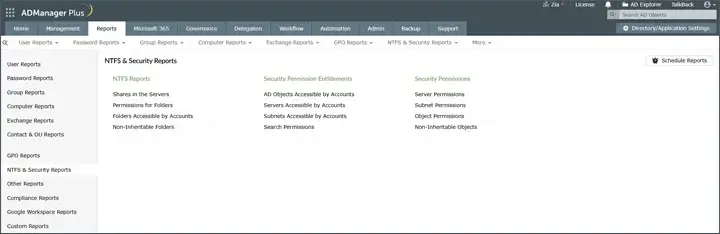
ADManager Plus expands Active Directory management to include NTFS permission reporting and bulk management functionality. This tool allows users to create multiple permission reports, delegate changes to those permission reports, and automatically make updates to multiple ACLs across file servers through the GUI rather than through a script.
Operational teams that require both analysis capabilities and the ability to take action can use this product. ADManager Plus does not focus on behavioral analytics or continuous monitoring; instead, it supports structured processes for managing permissions that facilitate efficient and consistent permission management.
Key Features
- NTFS and share permission reporting
- Bulk permission management and delegation
- Scheduled and exportable audit reports
- Role-based administration and approvals
6. SolarWinds Access Rights Manager
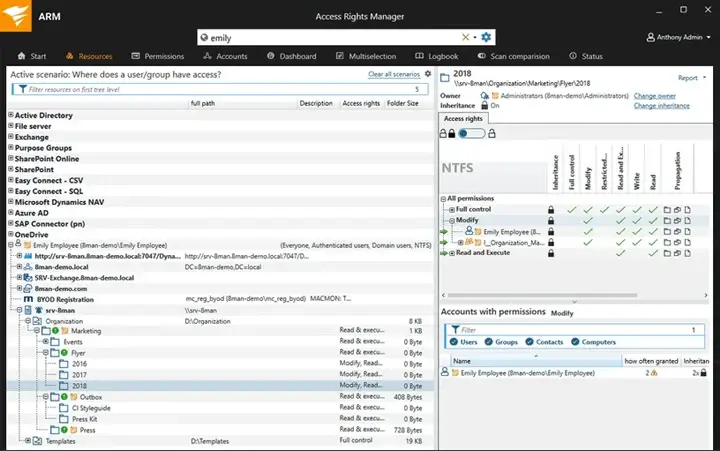
The SolarWinds Access Rights Manager allows for centralized visibility into file server and Active Directory (AD) NTFS permissions and provides administrators with insight into the reasoning behind access by supporting the delegation of authority for actively granting or removing any identified NTFS permissions.
The tool has been widely adopted by organizations that operate under conditions where the ownership of file server NTFS permissions is not readily apparent, and therefore the ability to formalize ownership is required. SolarWinds Access Rights Manager allows for approval processes and various types of reporting to be created based on roles, which allows for the continuous governance of NTFS permissions, rather than just an audit for a particular point in time.
Key Features
- Effective permission visualization
- Centralized NTFS and AD access reporting
- Delegated permission management workflows
- Scheduled compliance reports
7. NETsec – Permission Reporter (Enterprise Permission Reporter)
NETsec Permission Reporter (often called Enterprise Permission Reporter) is an NTFS- and share-focused reporting solution that scans file systems, stores results in a SQL DB, and produces repeatable reports showing exactly who/what has which permissions. It’s built for environments that want scheduled, auditable snapshots and historical comparisons without heavy custom engineering.
Designed around permission reporting rather than monitoring noise, you get a database of permissions that you can query, compare over time, and export to PDF/CSV for owners/auditors. Good for organizations that run recurring permission reviews and need evidence of change.
Key Features
- Scheduled, profile-based scans of NTFS and share permissions.
- Stores results in SQL for quick historical comparisons and reporting.
- Multiple report views (file system perspective, security principal perspective).
8. FileAudit by IS Decisions
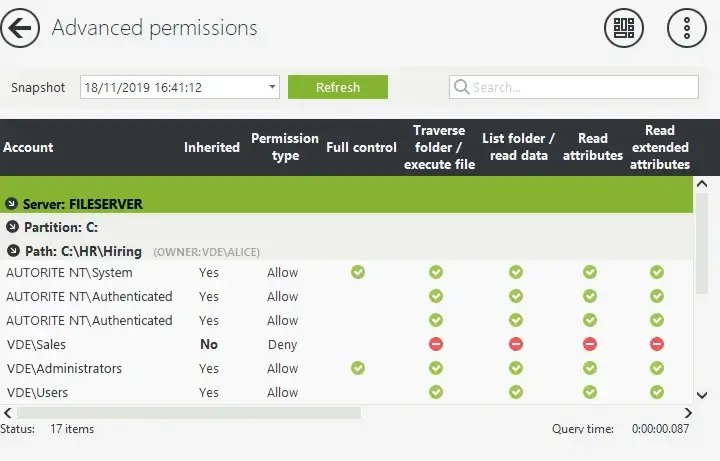
FileAudit is a dedicated tool to track all file activity and modifications of permissions on a file server (Windows OS only). It logs all attempts to access files and operations performed against files and changes made to file ACL permissions, and data is displayed in an easily searchable format.
Typically, this type of solution can be best utilized by small-to-medium businesses and mid-sized organizations that want quick, straightforward answers from their systems, versus the complexities that can come with an Enterprise-level product. This tool can be beneficial for both investigative purposes and for complying with audits through the collection of documentation as evidence.
Key Features
- Real-time monitoring of file access and permission changes
- Custom alerts and searchable audit logs
- Exportable compliance reports
9. Permission Analyzer
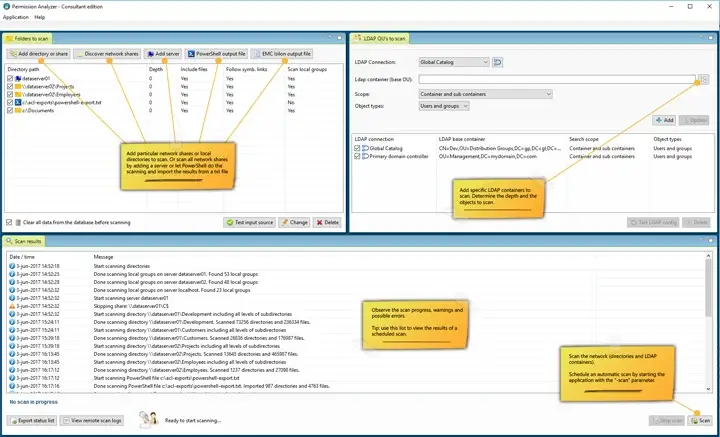
Permission Analyzer is a specialist NTFS permissions tool that scans file systems, imports AD principal data, and builds an indexed database so you can run fast “who has access” queries without rescanning. It also supports making changes directly from the tool and scheduling jobs for repeatable audits.
Its indexed approach is perfect when you have large file stores and need repeated effective-permission lookups or owner discovery during incidents, instant query responses instead of waiting for rescans. It also supports scripted or UI-based permission changes.
Key Features
- Indexed scans for fast, effective-permission queries on large file systems.
- Combines NTFS permissions with AD user/group data for accurate trusteeship and owner resolution.
- Job scheduling, reporting and ability to change permissions from the interface.
10. Vyapin NTFS Change Auditor
This component tracks changes in the permissions and access of files. The historical records allow the teams to reconstruct the events associated with audits or investigations. This component provides an additional level of time-based access vs. static reporting to the existing NTFS (Windows NT file system) Security Manager utility.
Key Features
- Tracking of ACL and ownership changes
- Historical archives for audits
- Searchable change records
Conclusion
For most organizations, the right choice depends on whether the priority is visibility, scalability, or structured governance. Tools like Lepide are often preferred where teams need clear, ongoing insight into permissions and access, while other solutions may be better suited for reporting-focused or enterprise-scale environments.
Frequently Asked Questions
The fastest way is to run an effective permissions report that resolves group memberships and inherited access into a clear “who has access to what” view. Lightweight tools can handle quick checks, but for ongoing visibility and investigation-ready context, teams often use platforms like Lepide that combine effective access reporting with permission change tracking and user activity data.
Not always. Many tools can read NTFS permissions and security logs remotely without agents, which makes them easier to deploy. However, agents or collectors are sometimes used when deeper visibility or real-time monitoring is required. In practice, most modern platforms use a lightweight approach that balances visibility with performance, especially in larger environments.
It depends on the level of visibility and scale required. Smaller teams often use lightweight or point-in-time tools for quick permission checks, while larger environments typically require platforms that can continuously monitor permissions, track changes, and support cleanup at scale. Tools like Lepide are commonly used by mid-sized organizations because they balance depth of insight with ease of deployment, while enterprise platforms are often chosen for advanced analytics and large-scale environments.
They scan file systems, resolve group memberships, calculate effective access, and show permissions in a readable way. Better tools also track changes over time and highlight risky or unnecessary access.
They provide clear evidence of who has access, how it’s controlled, and when it changed. This turns audits from panic-driven folder digging into repeatable, defensible reports.