Ransomware typically begins quietly. An orphaned account, a weak password, or a user clicking on the wrong link. From that point, it is like a virus with a business plan and simply propagates. 78% of human-operated cyberattacks involve a successful breach of a domain controller. Meaning that most ransomware attacks focus on Active Directory.
Active Directory (AD) runs the entire operation, including who can log in, what systems they have visibility to, and what data they have access to. If attackers control AD, they control the network. If you are serious about stopping ransomware attacks, you do not just protect endpoints; you protect the AD itself.
Why attackers like Active Directory
Attackers look for accounts that have significant privileges. If they can compromise a higher privilege account or export the AD database, they can create new accounts, change passwords, and move freely across the network. A common attack exploits an initial weakness, such as compromising an administrator account with excessive privileges or a forgotten service account that is no longer kept up to date. Once they compromise a Domain Controller, they can run any malware and lock down all systems in an organization.
How do ransomware attackers exploit Active Directory?
Microsoft documented the Storm-0501 moving from on-prem Active Directory into the cloud by abusing replication rights and DCSync techniques.Once they extracted credentials, they pivoted into global admin roles inside Entra ID. That’s how an AD compromise can turn into a full-blown cloud disaster. In short, they compromise credentials, extract the AD data, or alter group permissions to enable malware to operate without restrictions. The following are the key methods.
- Credential theft and dumps: Attackers will often attempt to recover password hashes or keys from either memory (if the target machine has not been restarted) or from the AD database file (NTDS.dit). Once they have the hashes, they can authenticate as those users within minutes. This is a quick way to escalate privileges to ensure of final access.
- Too many accounts with the same admin level: When too many accounts or users have admin rights or similar elevated rights, it only takes one account to be compromised before full access can occur. Large groups of admins are like too many people holding the master key to the house; you are running a risk of someone letting someone into the house.
- No monitoring or auditing: The groups or rights can change or users can add or change a password, even a domain controller (DC), and the organization has no way to monitor it. This can provide the attackers time to spread and steal, and in most cases deploy ransomware. This is why CISA and the rest encourage investigating AD by auditing for any changes.
- Lateral moves and reconnaissance: Now that the attacker has access to AD, they can perform scans or run scripts, or set up a group policy (GPO) to push ransomware across thousands of machines in a matter of minutes; they just need to know the GPO is not being monitored and that the domain admin has been changed to allow the push. Microsoft has seen this several times in previous breaches and events.
Best Practices to protect Active Directory from ransomware attacks
If attackers want AD because it gives them control, your job is to keep that control away from them. This isn’t about adding more tools. It’s about fixing what’s already exposed. And the exposure usually starts from inside.
Let’s break this into specific, useful steps.
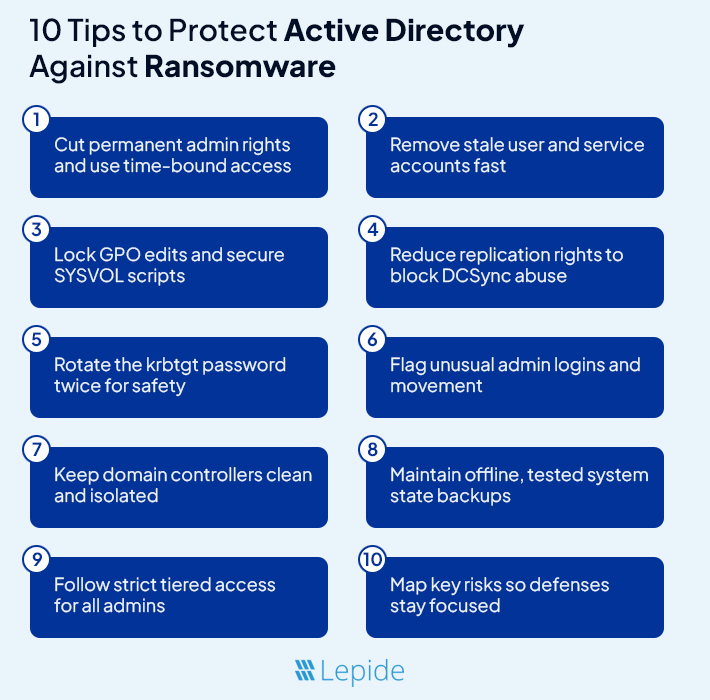
- Limit Who Has Admin Access: Having too many admin accounts opens a door for an attacker. Usually, there are more Domain Admins than necessary. First, you should examine each account in your admin-level groups, such as Domain Admins, Enterprise Admins, and Schema Admins. Next, ask this question, “Does this individual need access to the admin level full-time?” In most cases, the answer will be “No.” Use temporary elevation tools so admin access is only granted when required. As an additional note, do not use admin accounts for day-to-day tasks like checking your email or browsing. That is how an attacker gets in.
- Remove Stale and Unused Accounts: Old accounts are one of the best pathways for an attacker. A service account created a couple of years ago with a weak password, an old employee account that was never disabled, etc. These are suspicious accounts that can be used without detection. You should be auditing accounts regularly that have not logged in during the past thirty or sixty days. Perform actions such as deactivating inactive accounts and researching any account activity that seems unusual. You will also want to check concerning service or test accounts that have no expiration period. These forgotten users are exactly what an attacker will be looking for.
- Lock Down Group Policy Changes: Group Policies dominate so much of the environment, including security settings, startup scripts, etc. An attacker that can alter GPOs can spread ransomware across your entire network in mere minutes. Be judicious as to who you grant permissions to make changes to these GPOs; the security measure seems quite lax as most organizations permit too many users to modify GPOs. You should be monitoring GPOs as well for new scripts or updates, particularly around logon policies. Attackers love to drop malware through startup scripts because no one is viewing them. If you are not reviewing changes to the SYSVOL folder, you are providing an open lane for an attacker to use the capabilities of GPOs.
- Stop DCSync and Replication Abuse: DCSync allows an attacker to pull password hashes from an organization by impersonating a Domain Controller. This type of attack does not require the attacker to install anything on the DC; they merely need an account that has the required replication permissions. These replication rights are often granted to backup tools or old service accounts and are rarely reviewed. Audit who has “Replicating Directory Changes” permissions, and remove that access from anyone that does not need replication permissions. Set up alerts based on abnormal replication behavior; this is another type of action that should raise a flag.
- Rotate the krbtgt Account Password: The krbtgt account is a built-in Active Directory account for signing Kerberos tickets. If an attacker gets access to the krbtgt hash, they can create forged tickets and log in as anyone they want. To stop this, you have to periodically rotate the krbtgt account password; and, keep in mind, you will have to do this twice. The first change rotates a new key, while the second change will break any open sessions that are using the old key. Microsoft recommends at least annually. Before doing this in production, be sure to test it in a lab; and limit access to the account for rotation.
- Detect Lateral Movement Early: Attackers rarely start at the top. They move sideways across systems to find a path to the Domain Controllers. This movement often looks like regular activity unless you know what to watch for. Look for admin accounts logging into machines they’ve never touched before. Watch for users connecting between workstations using RDP. Spot any spikes in Kerberos ticket requests. These can be early signs of compromise. Build baselines so you can tell what’s normal and what’s not.
- Treat Domain Controllers Secure: A Domain Controller should never act like a normal server. Do not permit internet use, browser access, or unnecessary applications. Limit who can log in, and only through secure jump servers. Review each scheduled task or any installed applications from third party vendors. If it does not belong, simply remove it. The cleaner your DC, the more difficult it will be to compromise. Every little door that you leave open may be a disaster.
- Use Backups That Actually Work: Many backups appear to work fine when you are doing active backups, but fail when you attempt to use them. For Active Directory, you need full System State backups, and not merely file copies. These include the NTDS database, SYSVOL, registry files, and much more. Attempt to keep at least one copy of a backup not connected to your network, offline. And note – you need to check your backup as well – a broken restore process is not the time to discover you have never tested it, especially in the event of a ransomware attack. Also, ensure that your backup jobs are not using overpowered service accounts that can also be hijacked.
- Separate Access Into Security Tiers: One of the easiest ways to stop an attacker is to limit the ability of low-level accounts to connect to high-level systems. Establish a tiered model of security control. Tier 0 should contain only the most sensitive items such as: Domain Controllers, krbtgt values, and key infrastructure. Tier 1 contains servers and applications. Tier 2 are user workstations. In your tiered model assign Tier 0 items such that Tier 2 accounts cannot access Tier 0 and vice versa. By doing so you eliminate the ability of an attacker to bypass privilege escalations.
- Build a Threat Model That Makes Sense: You do not need a high level fancy risk chart to establish a priority list when assessing threat models. Simply ask yourself – what systems will hurt the most if they go down? Each item on that list you created is a priority list. Determine who has access to those systems, how are they accessing them and from where. You will want to identify if they have shared credentials, legacy tools, or services directly connecting to Domain Controllers, while ensuring you view those accounts you identified as high priority access as potential attacker escalation points.
Quick AD monitoring checks to add right now
These are a few rules you can add to your monitoring stack or SIEM today.
- Alert when ntdsutil.exe runs on a DC, unless it is a known backup job.
- Alert if vssadmin.exe or wbadmin.exe runs on DCs by non-backup accounts.
- Alert on mass failed file reads by one account. Ransomware may try many reads before encryption.
- Alert on new or changed members in Domain Admins or Enterprise Admins.
What to do if you suspect AD is being hit
- Isolate the suspected device, and then remove the device from the network.
- Verify for unexpected changes with administrative credentials/groups, and logins to the Domain Controller. Review logs for ntdsutil.exe, vssadmin.exe, or registry exports..
- Reset credentials for a small number of high-right accounts with secure channels. Do not reset all passwords without a plan.
- Check backups and move them offline if they are still on the network.
- Consult an incident response team to control the situation. Document each move for two reasons. One, to clean the environment in the best possible arrangement. Two, to learn and study later with an incident report or review..
How Lepide helps
Lepide Active Directory Auditor watches your Active Directory like a hawk. It notifies you the moment someone adds a new admin, updates a GPO, or adjusts replication rights to an object. You don’t need to dig into all the logs because they are nicely exposed through monitoring.
Lepide will also audits permissions overtime, using reporting to expose drift. If an account quietly gained permission last week, you will see it. In addition, you will receive alerted fast when things do not seem right if you see a dormant-controlled account log in or something edited in SYSVOL.
Simply put, Lepide helps expose the risky events, alerts you quickly, and provides ways to limit admin scope and change weak accounts. If you follow the steps and utilize monitoring similar to Lepide your chances of detecting a widespread ransomware attack greatly improve.
Conclusion
The majority of ransomware breaches are not because defenders did not have antivirus. They fail because attackers found a way to leverage your own systems against you. And Active Directory is the biggest system around.
When AD is wide open, everything is wide open. But when AD is clean, locked down, and actively monitored, ransomware will not get very far. This is not theory, this is what every audit performed after a breach shows.
You don’t need a magic bullet. You need clear eyes on permissions. You need to know who can change what. And you need the guts to fix what has been broken for too long.
So if your AD still resembles a jumbled mess of “someday we will clean it up”, clean it up now. Before someone else cleans it for you.
Frequently Asked Questions (FAQs)
Q1. How do I know if my AD has already been compromised?
Ans:Keep an eye out for these indicators:
- New administrator accounts or group members that you didn’t authorize.
- Requests for help desk tickets with a high volume (kerberoasting).
- Service accounts that behave like users.
- Strange replication activity.
- GPO changes that no one acknowledged.
If you see any of these and do not have an explanation, assume you have been compromised and initiate an incident response plan.
Q2. Is MFA enough to protect AD?
Ans: No. MFA does protect logins, but attackers with access inside the network can often avoid logins altogether. They will use pass-the-hash, DCSync, or golden tickets. MFA will not stop any of those attacks. You still need monitoring, permission cleanup, and tiered access.
Q3. Can ransomware encrypt Domain Controllers directly?
Ans: Yes, if they are able to. After gaining access to AD the attackers will be able to deactivate security tools and perform a ransomware deployment either through GPOs or by utilizing other scripts. Ransomware can also encrypt files on Domain Controllers themselves; this breaks trust for the entire domain.
Q4. How often should I reset the krbtgt account?
Ans: At least once a year. If you suspect that your ticket has been compromised, reset it twice, about 10 hours apart. That is an effective way to break forged tickets. Just do not take this action hastily, always test it out in a lab and document every step. If improperly conducted, it can break logins at the network level.
Q5. What are the best practices for recovering Active Directory after a ransomware attack?
Ans: First, disconnect any infected systems to halt the spread of damage. Restore AD from known, offline backups. Beware of restoring anything that the attackers may have compromised. Rebuild domain controllers to take advantage of the clean slate and eliminate any malware hidden on them. Before bringing AD back online, verify the health of replication and that Group Policy, DNS, and essential services are healthy to support a functioning AD environment. After that, reset all privileged credentials, rotation of keys, and review all permissions to catch any compromised account permissions. Once AD is stable, phase systems back into the network slowly, monitoring for any abnormal behavior.