Last Updated on February 26, 2026 by Ashok Kumar
Over the years, Security teams have made considerable investments into their visibility. Most organizations are now capturing a great deal of audit log data for Active Directory, File Servers and Microsoft 365. However, the core problems continue to be the same: investigations take too long; there is continued permission sprawl; and teams are unable to confidently prioritize what actually poses a risk.
The goal of the latest Release of Lepide Data Security Platform (February 26th, 2026) is to close the gap and not increase the number of dashboards or amount of raw data, but rather make what is already visible, operationally useful. This is being accomplished via three main enhancements: Lepide AI; dedicated Microsoft Copilot security capabilities; and a new Group Policy Comparison feature.
Introducing Lepide AI: Turning security visibility into usable insight
Lepide AI is designed to support teams in transitioning from log review to fast and informed decision making.
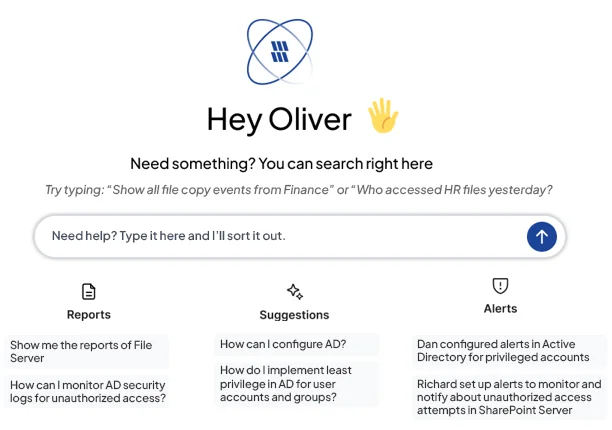
Instead of spending countless hours manually searching through reports to correlate changes, administrators can use natural language to query audits and get contextual explanations of what has happened, why it is important, and what needs to be addressed, which greatly reduces the time required for investigations and makes it easier for teams to prioritise areas of concern.
Additionally, alerts have been enriched with contextual information to help teams differentiate between normal activity and actual exposure. As the audit data is growing in volume and the number of IT environments continues to escalate in complexity, Lepide AI enables organizations with extracting actionable insights from their audit data without adding a significant amount of operational burden.
Explore Lepide AI
Securing Microsoft Copilot: Complete conversation visibility
Microsoft Copilot introduces a new dynamic into data security. By design, it accelerates how users discover and interact with information. However, it also amplifies any underlying permission issues that already exist. If a user has excessive access, Copilot can surface that data instantly.
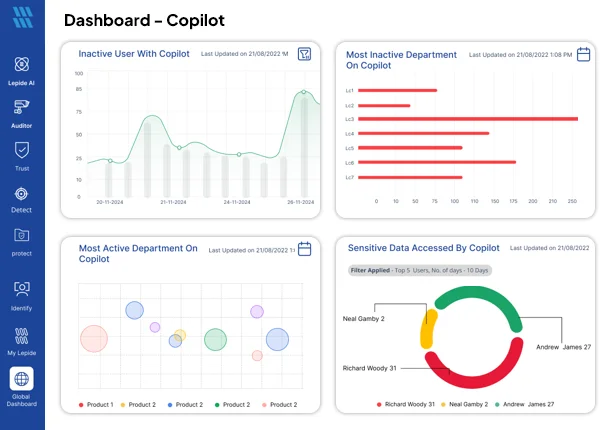
To overcome the problems associated with excessive access, the release includes purpose-built security features designed to give organizations increased visibility into AI-based permission controls.
With the new Copilot dashboard, security teams can get insight into how Copilot is being used across the organization. Security teams can monitor usage patterns, detect unusual behaviours and monitor the adoption of Copilot over time. Copilot automatically creates out-of-the-box alerts for all high-risk Copilot events and organizations can add their custom keyword monitoring based on sensitive terms or regulated content.
The most significant benefit is that teams will now have visibility into the conversations taking place in Copilot and can see how sensitive data is being accessed from Copilot. This capability is particularly important for companies in highly-regulated industries where governance and defensible oversight are mandatory.
These capabilities allow organisations to move forward with AI adoption without losing control of data access. Instead of reacting to incidents after the fact, teams can proactively monitor how AI tools intersect with identity and permissions risk.
Explore Copilot security
Group Policy Comparison: Reducing configuration risk
One of the most frequent causes of Active Directory exposure is misconfigured Group Policy objects. As you know, configuration drift can happen gradually in multi-domain and hybrid environments and often goes undetected until it causes a problem.
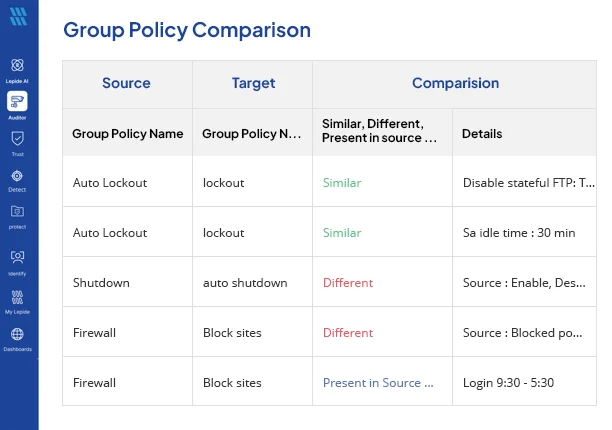
With the new Group Policy Comparison function, administrators can now easily and rapidly compare Group Policy Objects across multiple domains. By using a structured view within the platform, teams will be able to quickly identify any inconsistencies without having to export all of their settings and manually review them.
This makes it easier to detect risky deviations, enforce configuration standards, and maintain alignment across environments. For organisations subject to compliance requirements, it also provides clearer documentation of configuration consistency.
By eliminating some of the time-consuming effort of reviewing and validating the Group Policy settings, the Group Policy Comparison function helps security teams identify and remediate foundational risks that are often overlooked.
Explore Group Policy security