


Last Updated on July 17, 2026 by Satyendra
Hybrid identity environments are not inherently bad; the concern is that many businesses do not take the time to review how hybrid identity is currently being used by their organization, making them potentially subject to risk. Lepide’s State of Identity & Data Security 2026 research found that excessive permissions and inactive accounts remain widespread across enterprise environments, highlighting why regular identity reviews are essential in hybrid deployments.
What is a Hybrid Identity Environment?
Hybrid Identity Environments provide organizations with options to use Cloud Identity services (Microsoft Entra ID) and maintain on-premises Active Directories as well. This mechanism allows for one credential (a single-user signing into both platforms) to securely access all resources.
Most environments utilize applications like Microsoft Entra Connect Sync to connect On-Premise Users to Cloud Identity Services, allowing for changes made in the On-Premise Active Directory (Password Resets, Group Changes) to be automatically updated to the Cloud Directory with either One-Way or Two-Way Synchronization depending on how the environment has been configured; for instance, Active Directory Federation Services (AD FS) enable users of Cloud Services to authenticate with their On-Premise Credentials, or rely on Password Hash Synchronization, Pass-Through Authentication, or Single Sign-On (SSO).
Organizations want to have these Hybrid Identity Environments so they can:
- Have legacy systems work with new SaaS tools.
- Transition over time from On-Premise to the Cloud.
- Avoid having to retrain staff or change how users sign in.
- Enable faster development and deployment of Cloud Services.
However, with this type of hybrid approach, there is an increased level of Trust Vulnerability between the On-Premise Active Directory and Cloud Identity Services, which increases the Attack Surface for adversaries.
Where Risk Lives in Hybrid Identity
Below are the main areas where risk builds up quietly in hybrid environments.
1. Trust that travels both ways
When an on-premises directory trusts other directory services, those services become trusted by the cloud. If an attacker gains access to the on-premises system, modifies an existing user account, or creates a new user account, that information can synchronise to the cloud, allowing the attacker to gain unauthorized access from the cloud using an “on-premises” (or other trusted service) identity. When this happens, the attacker can modify or create a user account without knowing or logging in as a legitimate user; they can do this through the same synchronisation channel as the legitimate user, hence there is no indication that anything is wrong.
2. Sync and service accounts with too many rights
The service accounts that run the synchronisation tools usually have extensive read access. In some cases, they also have extensive write access. These accounts generally grant those who use them the ability to modify and view a large number of objects, leading to abuse of the privilege granted to that user account.
Many times, service accounts are assigned excessive privileges that they do not need; it is often the case that service accounts are never required to use multifactor authentication or rotate their passwords. Therefore, if an attacker compromises a service account, the attacker has the ability to exfiltrate data, create new users, assign them access, and hide activity.
3. Writeback that can travel back to on-prem
Write-back allows for any changes made in the cloud to be reflected in the local directory. While write-back can be used for password reset purposes, erroneous configuration or abuse of write-back functionality could allow an attacker with control over the cloud environment to manipulate the existing on-premise group membership or even passwords, thus creating a situation whereby an attack originating from the cloud has quickly transitioned into a more local attack scenario that may not necessarily generate an alarm for many monitoring solutions due to write-back’s normal operating profile.
4. Orphaned accounts and cloud-only leftovers
Over time, accounts are created in the cloud directly for contractors, tools, or tests. Those accounts can be missed by lifecycle processes. A former vendor account or a forgotten test user can keep access to apps. These orphaned accounts are rarely checked and often hold tokens, consent grants, or roles that let attackers reach more systems.
5. Drift between cloud and on-prem rules
Admins sometimes create roles or groups directly in the cloud for speed. Over months, cloud permission sets can go their own way. Policies that apply on-prem may not apply in the cloud. That mismatch makes audits harder. It also gives attackers a place to hide, because cloud roles may not follow the same review rules as on-prem groups.
6. Weak or missing multifactor checks
If one path enforces multifactor checks and another does not, attackers look for the weaker path. On-prem systems that still accept legacy logins may skip multifactor. In that gap, a stolen password becomes far more useful. An attacker can use that path to fetch tokens or to move laterally to cloud resources.
7. Legacy protocols and old keys that leak value
Older auth methods such as NTLM or anonymous LDAP binds may still be active to support old apps. These methods lack modern protections. Attackers can use relay techniques or pass-the-hash methods against these protocols. Keys used for ticket signing on the domain can also be a target. If those keys are exposed, an attacker can forge tickets and act as any user.
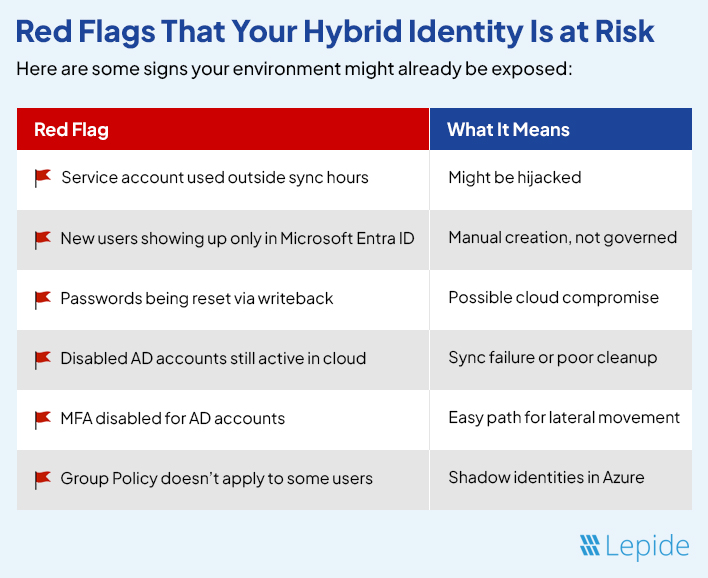
How to Lower the Risk
You don’t need to rebuild your whole identity setup. You just need to make it cleaner and tighter. Here’s how.
- Tighten the sync account and its scope: Make the sync account do only what it must. Limit the OUs it can read. Remove any write permissions that are not needed. Ensure its password is rotated and stored securely. Require a method that makes theft harder, such as using a managed account where the system rotates the secret. Also, make sure the sync host is patched and monitored.
- Turn off writeback features you do not use: If you only need password hash syncing, do not enable group writeback or device writeback. Each writeback feature adds a path from cloud to your on-prem system. Only enable what you truly need. Where writeback is required, log the activity and add an approval step for changes that touch privileged groups.
- Find and remove orphaned accounts: Run a comparison of accounts that exist only in the cloud and accounts that exist only on-prem. Flag the ones that have had no sign-in in the last 90 days. Assign owners to each cloud-only service principal and guest account. Remove or disable accounts that are unused or have no owner.
- Reduce permanent admin count and use time-limited elevation: Ask who really needs constant admin rights. Remove permanent admin rights where possible. Use a system that grants higher rights only when needed and only for a short time. Keep a strict separate account for admin tasks and do not allow that account to be used for email or web browsing.
- Replace static service secrets with managed identities: Where possible, move services to use managed identities or secrets stored in a vault that rotate automatically. This removes long-lived passwords that attackers can steal and reuse.
- Patch and limit legacy protocol exposure: Make an inventory of apps that use old protocols. Work with app owners to migrate to modern auth. Where migration is not possible, place the app in a restricted network segment and monitor the protocol use closely. Log any unexpected uses and require review.
Detection rules that matter and how to tune them
- Watch for replication and DCSync patterns from odd hosts: Replication calls and DCSync-like activity are rare in normal operations. Alert when such calls come from non-domain controller machines. This often points to an attacker using replication rights to pull hashes.
- Flag sudden spikes in Kerberos ticket requests: A burst of ticket requests for many service principals can mean a Kerberoast attempt. Set baselines to understand what normal traffic looks like. Alert on unusual spikes tied to a single account or machine.
- Alert for new high-privilege members added outside change windows: If a new admin appears outside a planned change window, flag it. Require that any such addition be tied to a ticket and an approver. Use automatic revocation if no approval is recorded within a short time.
- Monitor SYSVOL and GPO edits closely: Changes to group policy scripts and SYSVOL files are dangerous because they can deliver code widely. Alert on any file change in SYSVOL and require two-person checks before deployment to production.
- Track service account interactive use and off-hours logins: Service accounts should rarely sign in interactively. If one shows an interactive login, investigate immediately. Also, watch for service accounts logging in outside normal hours from unusual hosts.
- Reduce noise with tuned thresholds and focused teams: Tune alerts with sensible thresholds. Feed alerts to a small, trained group who can act fast. Too many low-value alerts lead to missed real incidents.
How Lepide Helps
Lepide gives you visibility across both on-prem AD and Microsoft Entra ID. You can monitor who made changes, when, and from where, across users, groups, GPOs, and more. It tracks account creation, permission drift, stale identities, and sync changes with clear reporting. This helps catch misconfigurations early, before they’re exploited.
It also lets you set real-time alerts for abnormal events, like changes to admin groups, updates to sync settings, or suspicious logins from legacy protocols. Lepide maps permissions over time so you can spot when access quietly expands. In a hybrid identity setup, that kind of continuous oversight is critical.
Related Article:
Conclusion
Hybrid identity makes life easier for users. It also raises the cost of a mistake. A single forgotten account or an overpowered sync account can let an attacker cross from on-prem to cloud and back again.
Fix the small things first. Limit sync scope. Rotate and manage service secrets. Cut permanent admin counts. Watch replication and writeback. Test restores often. Tune alerts so the team sees real threats, not noise.
If you do that, hybrid identity stops being a blind spot. It becomes a place you watch and control. Start with one fix this week and keep going. The risk falls fast when you act with steady care.
If you want clear visibility across both your on-prem and cloud identity layers, try Lepide in your own setup. You can book a demo to see how it spots risk in real time or launch online demo to test it in your environment. It takes only a few minutes to identify the weak points and see how quickly you can fix them.