Last Updated on May 20, 2026 by Ashok Kumar
Modern businesses are powered by Microsoft 365, yet auditing Microsoft 365 in 2026 involves more than just reviewing logs. IT and security teams need a comprehensive picture of how users interact with Teams, SharePoint, OneDrive, and Exchange, where thousands of cloud users may be located. Usually, in mid-sized and regulated environments, IT departments rely on Microsoft 365 auditing tools to get clear visibility, receive instant alerts, and have faster ways for investigation.
Tools like Lepide, preferred by mid-sized organisations tend to be chosen for these purposes because they allow comprehensive visibility across user activity, permissions, and collaboration data without the complexity that usually accompanies big enterprise tools. This blog analyzes the top Microsoft 365 auditing software for 2026 and helps in deciding the appropriate method depending on the organization’s size, risk profile, and requirements.
How to Choose the Best Microsoft 365 Auditing Tool for your Business
Determining the most suitable Microsoft 365 auditing tool for your organization depends on the way your business collaborates, ensures compliance, and efficiently manages the risks of security. Although every auditing tool will offer at least some insight into audit logs, they are totally different when it comes to live notifications, data storage duration, report generation, and investigation without much hassle The sections below outline the most common use cases, and which types of tools are typically preferred in each scenario.
Best for Monitoring User Activity across Collaboration Platforms
For organizations wanting to track user engagements throughout Teams, SharePoint OneDrive, and Exchange, software that offers consolidated activity oversight is usually the choice. Such comprehensive monitoring, for example, would include tracking file openings, sharing patterns, administrative changes, and login activities all from one interface. Solutions like Lepide tend to be highly favored in such cases since they integrate user activity surveillance with permissions exposure, thus assisting the teams in not just grasping the events but also assessing the correctness of the access.
Best for Real-Time Cloud Activity alerts
Real-time alerting is the key feature to rapidly detect suspicious behaviors when it matters most. Microsoft 365 native auditing is known for introducing delays, which may cause issues when you want to reply quickly to an incident. Normally, security teams are best helped by event monitoring tools that instantly notify you of risky behaviour such as mass downloading, changing privileges, or unusual logins. By highlighting priority events live, such software drastically reduces the time of investigations.
Best for Compliance and Audit Reporting
In compliance-driven environments, the focus is to deliver a steady stream of reports, retain records for the long haul, and have sufficient evidence to justify the audits. Tools with strong reporting engines, predefined compliance templates, and extended retention are typically preferred. In fact, network and similar solutions are the platforms most employed in these situations, especially when the only audit requirements are audit readiness and historical tracking.
Best for Organizations managing large Microsoft 365 environments
Organizations with a vast number of users and huge volumes of collaboration data need not only highly scalable solutions but also ones that will not compromise visibility and performance. They must be capable of fast searching of audit logs, support filtering of vast data sets, and enable cross-service activity investigations without the need for executing manual queries. In fact, such platforms that offer indexed data, reporting from the central point, and efficient querying are commonly chosen by such organizations.
Microsoft 365 auditing tools vs SIEM Platforms
Certain organizations utilize SIEM platforms to collect Microsoft 365 logs in the same place as their own security data. Although SIEMs can provide wide visibility and correlation across different systems, they are not designed specifically to give an in-depth understanding of Microsoft 365 activity. Primary auditing tools not only give more contextual information about collaboration activity, permissions, and user behavior but also require less configuration in many cases. Most organizations end up using both: SIEM for central logging and a dedicated auditing tool for deeper, faster visibility and investigations.
Comparison Table – Best Microsoft 365 Auditing Tools in 2026
Different Microsoft 365 auditing tools concentrate on various aspects of security, compliance, and visibility. Platforms like Lepide are frequently a good option for businesses trying to strike a mix between real-time intelligence, usability, and deployment speed. The comparison that follows shows how the top tools vary according to their ideal use case.
| Tool | Best For | Deployment | Core Strength | Limitation |
|---|---|---|---|---|
| Lepide Auditor for Microsoft 365 | Large-scale enterprises as well as mid-sized businesses who want real-time visibility of user behavior and permissions throughout Microsoft 365 | On-Prem, Hybrid, Cloud | Real-time alerts give a consolidated picture of user operations, authorizations, and admin changes across the various Microsoft 365 services | In complex environmental settings, notifications and policies might have to be altered initially |
| Microsoft Purview Audit | Companies in the Microsoft environment that want minimal auditing | Cloud | Native Unified Audit Log with with seamless integration across the various Microsoft 365 services | Only limited data is retained, it takes time to get visibility, and the reporting capabilities are quite basic |
| Netwrix Auditor for Microsoft 365 | Organizations focused on compliance and auditors looking for an in-depth reporting solution and audit trail | Cloud/Hybrid | Excellent compliance reporting and keeping audit records for the long term | Less focus capability for real-time event monitoring and investigation workflow |
| AdminDroid Microsoft 365 Auditor | IT teams desiring flexible dashboards and comprehensive reporting | Cloud | Tremendously customizable reporting across Microsoft 365 services | It might take a while to set up and understand large report sets. |
| Quest Change Auditor | Organizations adopting a SaaS-first approach for managing large Microsoft 365 deployments | Cloud | Managing administrative changes and user activity | Less in-depth permission context and access visibility |
| ManageEngine M365 Manager Plus | Suits teams that need powerful reporting and alerting features for Microsoft 365 | On-Prem/ Cloud | Offers a wide range of reports and strong alerting features | May need adjustments to lower the alert noise and enhance user-friendliness |
| SksKit Point | Companies that prioritize governance, tracking of configurations, and license management | Cloud | Provides excellent insights into configuration, permissions, and license usage | Less emphasis on live activity tracking and security alerting |
The 7 Best Microsoft 365 Auditing Tools for 2026
Below is the list of the best tools that are widely used for Microsoft 365 auditing.
1. Lepide Auditor for Microsoft 365
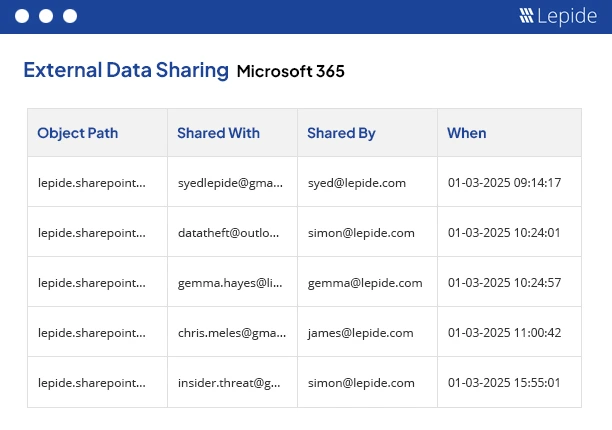
Lepide Auditor stands out as a unified solution designed for organizations that require comprehensive visibility over Microsoft 365. It fits best for organizations that want real-time visibility of user actions, permission changes, and collaboration data across Microsoft 365, and do not want to face complicated deployment. Thus, it is a feasible alternative to complex, legacy products, providing steady coverage of hybrid environments without the unnecessary complexity.
Key Strengths
- Detailed insight into permissions and document sharing access
- Real-time monitoring of activity across Teams, Sharepoint, Exchange, and OneDrive.
- Audit reports with ready-to-use investigation timelines and background
Best for: Keeping track of collaborative work, sensing possible threats, and real-time tracing of sensitive data access.
2. Microsoft Purview Audit
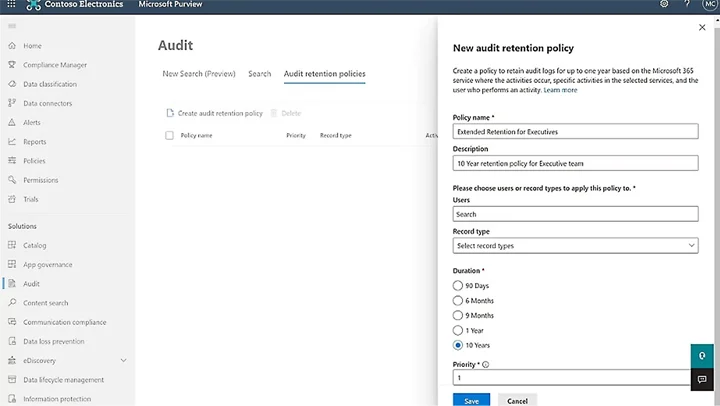
Microsoft Purview Audit is the native Microsoft 365 tool that records user and administrator actions across services like Exchange, Sharepoint, and Teams.Microsoft Purview is the fundamental built-in auditing capability for the Microsoft 365 platform, with the Unified Audit Log at its core.
Key Strengths
- Native logging throughout all Microsoft 365 service ecosystems
- No additional deployment required
- Integrated with Microsoft Compliance and security ecosystem.
Best for: It fits best forensic investigations, compliance reporting, detection of data breaches, and insider risk monitoring.
3. Netwrix Auditor for Microsoft 365
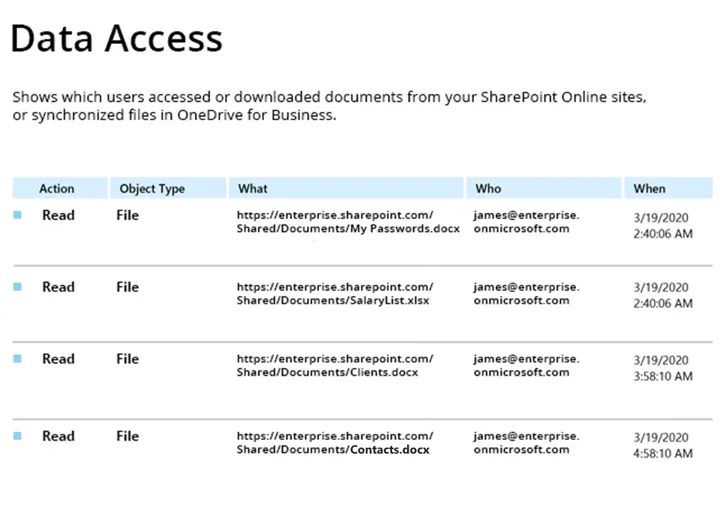
Netwrix is a security and compliance software designed to uncover user activities, permission changes, and configurations across Microsoft 365 environments. It is mainly employed in compliance-heavy environments where organized reporting and long-term audit trails are the main concern.
Key Strengths
- Exhaustive records of the user activity, changes, and permission logs
- Historical tracking across Microsoft 365 workloads
- Robust compliance reporting that is in line with regulations
Best for: Boosting security, tracing user activity, and making sure that compliance teams are equipped with audit-ready reporting and that they have long-term visibility.
4. AdminDroid Microsoft 365 Auditor
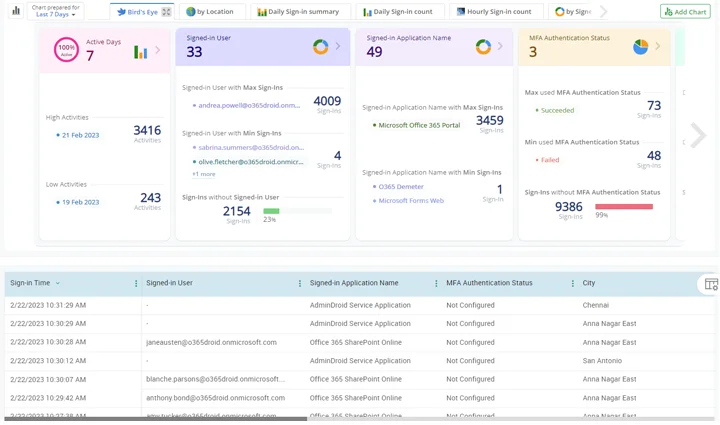
AdminDroid Microsoft 365 Auditor is a comprehensive auditing and reporting solution with many ready-to-run reports, which provide a profound understanding of M365 environments. AdminDroid is known for its extensive reporting and dashboard capabilities, offering deep visibility into Microsoft 365 activity.
Key Strengths
- Track file access, sharing and user activities in detail
- Customizable dashboards and multiple export formats
- A massive set of ready-to-go report templates across all Microsoft 365 services
Best for: IT departments looking for highly adjustable reports and in-depth activity information.
5. Quest Change Auditor
Quest Change Auditor is an on-premise auditing solution that provides visibility into changes across Microsoft 365 workloads, helping organizations monitor user and administrative activity and meet compliance requirements.
Key Strengths
- Thorough auditing of changes and activities across Microsoft 365 services, including users, roles, permissions, and configurations.
- Alerting and search capabilities based on Microsoft 365 audit logs to support investigations and incident response.
- Agentless deployment, customizable reports and dashboards for compliance and visibility.
Best for: Organizations looking for a single solution that delivers reporting, auditing, and operational transparency across Microsoft 365.
6. ManageEngine M365 Manager Plus
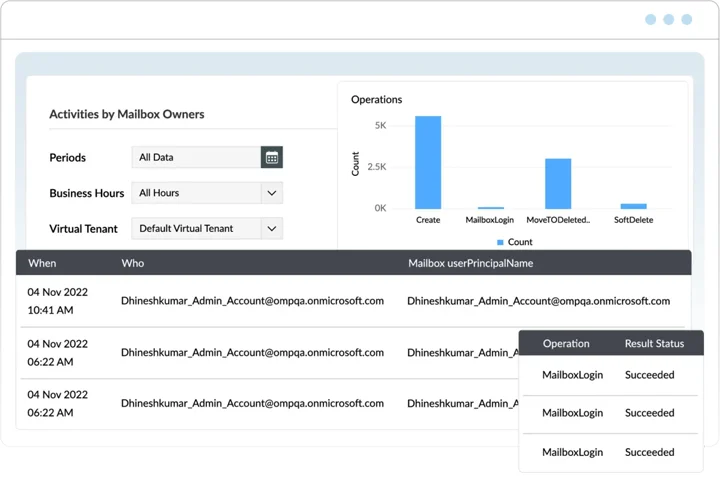
ManageEngine offers comprehensive features for reporting, monitoring, and administrative oversight of Microsoft 365.
Key Strengths
- Wide range of report templates and alerting options.
- Keeps record of mailbox access, permission changes, and user activities, which is compatible with automation and delegation.
Best for: Organization looking for a single solution covering reporting and operational transparency.
7. SysKitPoint
SysKit Point is a comprehensive Microsoft 365 management, security, and governance platform designed for deep visibility into M365 environments. It focuses primarily on permission tracking, governance, and configuration visibility across Microsoft 365.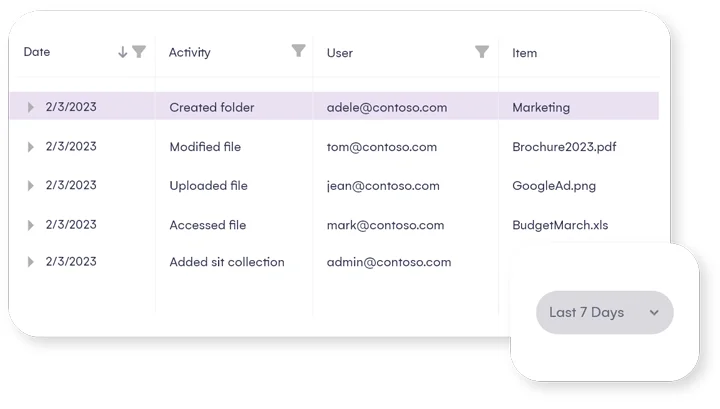
Key Strengths
- Helps identify risky access and governance issues
- Tracks user and admin activity across collaboration platforms
- Strong visibility into permissions, sharing, and configuration
Best for: Organizations focused on governance, permissions, and configuration control.
Conclusion
Choosing the right Microsoft 365 auditing tool finally relies on what is more important to you, whether it’s getting instant visibility, being able to produce compliance reports, or managing many users in a scalable way. Even though Microsoft’s native tools, such as Microsoft Purview, support you in building a foundation, additional functionalities to rapidly investigate activities, respond to risks in real-time, and have audit-ready records are the highly demanded features that most organizations need
For groups who find it difficult to get the right user activity, permission changes, and collaboration data insights on a regular basis or require a simple interface instead of complicated arrangements, platforms such as Lepide are usually the go-to-choice especially in medium-sized and regulated environments. There are other tools that would be more appropriate for certain use cases like preparing compliance reports or performing large-scale analytics, but in terms of mixing visibility, user-friendliness, and rapid deployment, Lepide offers a viable and efficient solution.
Frequently Asked Questions
Usually, the best tools are those that offer real-time visibility across Teams, SharePoint, OneDrive, and Exchange. Because they integrate activity monitoring with rights context and alerting, platforms like Lepide are frequently utilized.
Although SIEM platforms offer extensive log collection, they are not made for deep Microsoft 365 visibility. Dedicated auditing solutions are more suited for monitoring and investigation since they provide additional context regarding user activity, rights, and collaboration.
Tools that facilitate quick search, centralized reporting, and scalable service monitoring are usually preferred by organizations with thousands of users. The ideal option is frequently cloud-based solutions with indexed data.
Tools with robust reporting, long-term retention, and audit-ready exports are typically given top priority by compliance teams. When structured reporting is the main requirement, solutions like Netwrix are frequently utilized.
Enable the Unified Audit Log and mailbox auditing in Microsoft Purview to capture activity across Teams, SharePoint, Exchange, and OneDrive. This provides a baseline for monitoring and investigations.
Indeed. Numerous technologies assist businesses reduce wasteful expenses and maximize Microsoft 365 expenditure by giving them insight into idle users and unused licenses.