Last Updated on October 7, 2026 by Satyendra
Microsoft 365 Copilot works within a user’s existing permissions. If those permissions grant access to sensitive data, the tool can use it. To reduce the data exposure associated with Copilot, it is important to protect the underlying data permissions and access controls.
Why Can Microsoft 365 Copilot Surface Sensitive Data?
Microsoft 365 Copilot can ground its responses in organizational content that the user is authorized to access, including relevant Microsoft 365 data such as emails, chats, meetings, and files in SharePoint and OneDrive. This indicates that the safety of Copilot is highly dependent on the organization’s effectiveness in managing access rights, sharing, and permissions.
Copilot Works with Existing Microsoft 365 Permissions
Microsoft 365 Copilot respects the permissions assigned to the user and does not automatically grant access to content they cannot access. In generating answers, it can rely on information obtained from Microsoft 365 products that users are already entitled to use. This makes existing permission structures an important part of Microsoft 365 Copilot security.
Copilot Does Not Need to Bypass Permissions for Sensitive Information.
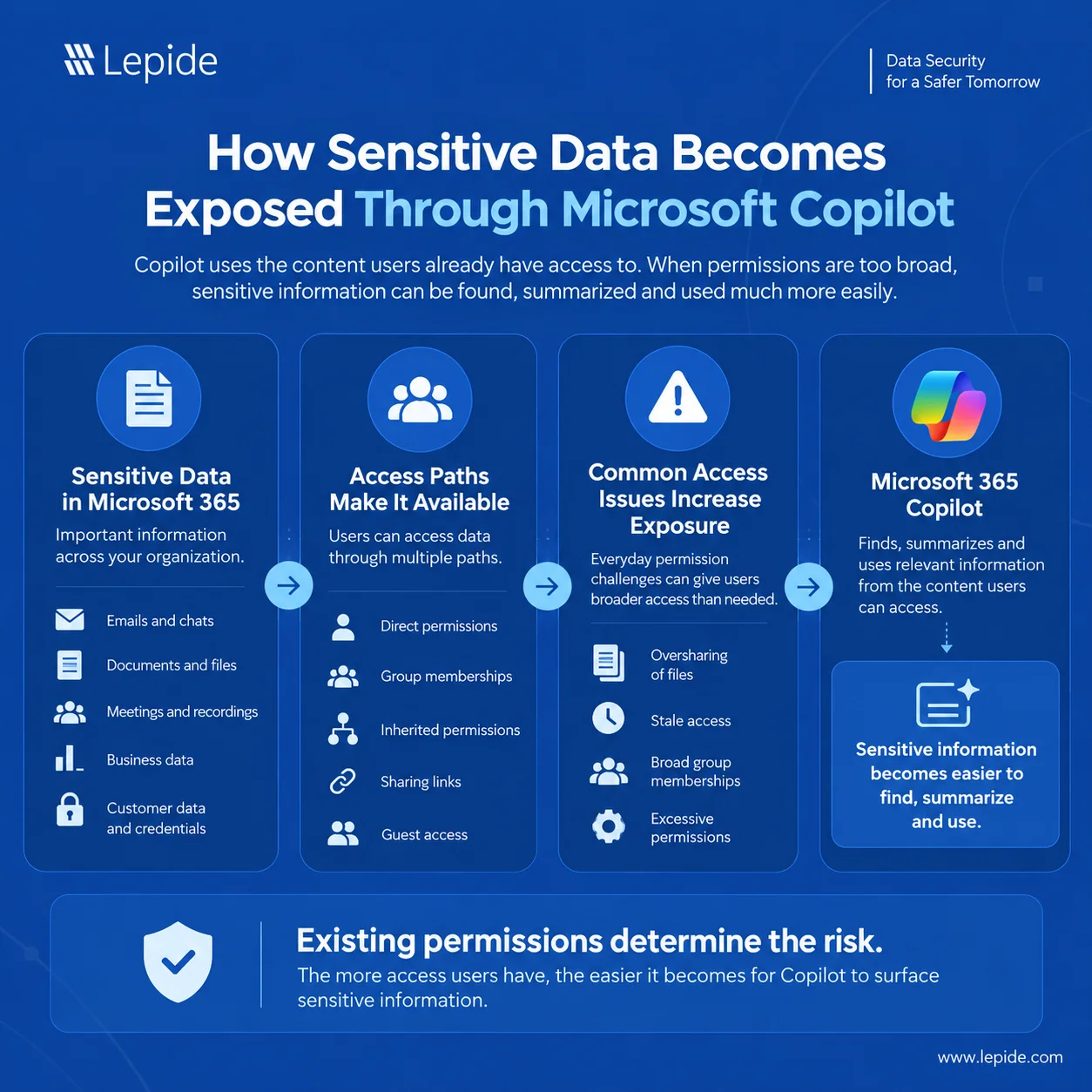
Copilot does not need to bypass security controls for sensitive information to be exposed. A user may already have legitimate technical access to sensitive content because of oversharing, broad group memberships, inherited permissions, or stale access. Copilot can make that already-accessible information easier to discover and use. The problem usually lies in excessive or inappropriate access to files rather than a permission bypass.
Excessive Permissions and Oversharing Increase Exposure.
Excessive permissions can give users access to far more information than they need for their roles. Overshared files, broad group memberships, inherited permissions, and stale access can expand their exposure across Microsoft 365. When AI can quickly retrieve and summarize accessible content, these existing data security weaknesses can become more visible and impactful.
Sensitive Unstructured Data Can Be Involved.
Sensitive unstructured data may be found in a variety of file formats, including document files, spreadsheets, presentations, and PDF files, all of which can be stored in Microsoft 365. Sensitive data can include anything from financial details to trade secrets to customer information and various types of credentials. If users already have access to these files, Copilot may use relevant content when responding to their prompts.
AI-Powered Summarizations Make Information Easier to Discover
Information that was technically accessible may previously have been difficult to locate because it was buried across files, folders, or large documents. AI-driven search features and summarization may help reduce the difficulty in accessing information by allowing users to filter out the relevant information much faster. Consequently, existing excessive permissions or oversharing can become more consequential even when the underlying access permissions have not changed.
Discover Sensitive Data and Understand Who Has Access
Organizations should begin with sensitive data discovery to understand where critical information resides and how it is currently exposed. This provides the foundation for effective data access governance and helps identify risks before they lead to data leakage or unauthorized access.
- Discover Sensitive Data across Microsoft 365: Locate sensitive information across SharePoint, OneDrive, Teams-connected content, and other relevant Microsoft 365 locations. It enables organizations to form an overview of where sensitive data is vulnerable.
- Classify Information based on Sensitivity: Implement data classification to classify data by its level of sensitivity and importance to the organization. This allows the organization to provide a higher degree of protection for the most sensitive data such as financial information, intellectual property, and personally identifiable information (PII).
- Identify Sensitive Unstructured Data: Determine where to find sensitive unstructured data such as documents, spreadsheets, and various types of files that are accessible to a large number of users. This is a key part of unstructured data security, as excessive access can increase the risk of accidental or unauthorized exposure.
- Determine Who Has Access and How: Analyze data access through direct permissions, group memberships, sharing links, guest access, and other access paths. Having insight into the overall permissions will help the organization discover access that is not apparent from an individual user’s permissions alone.
- Identify Users Who Do Not Genuinely Need Access: Compare users’ actual business requirements with the access they currently have. This helps organizations identify excessive or unnecessary permissions and supports a least-privilege approach to data access governance.
Apply Least Privilege and Strengthen Access Controls
One of the most efficient approaches to minimizing the potential for a data breach associated with Copilot is to limit unnecessary access. Because Copilot can surface information that a user is already authorized to access, strengthening access controls helps ensure that users can only access the data they genuinely need.
- Apply the Principle of Least Privilege: Grant users only the minimum level of access required to perform their job responsibilities. As a result, the amount of sensitive information accessible via a user’s permissions is reduced, thereby limiting Copilot’s ability to reveal potentially sensitive information.
- Identify and Remove Excessive Permissions: Regularly identify users who have more access than their roles require and remove unnecessary permissions. Sensitive data exposure through Copilot and other Microsoft 365 services can be reduced by removing excessive permissions.
- Review Broad Group Memberships: Broadly permissioned groups can give users access to information they do not need. Review group memberships regularly and remove users from groups when their access is no longer justified.
- Remove Stale Access after Role Changes: Permissions from previous roles, projects, or responsibilities are frequently retained by users. After a role change, it is important to remove stale access as soon as possible to avoid Copilot revealing private information that the user no longer needs.
- Restrict Privileged Access: Only authorized users should have administrative and other privileged access, and such access should be granted only when essential. Restrict administrative and other privileged access according to least-privilege principles. This reduces the potential impact of a compromised privileged account and limits unnecessary high-impact changes to permissions, sharing, and security settings.
- Perform Regular Access Reviews: Conduct periodic access reviews to verify that permissions, group memberships, and privileged access remain appropriate. These reviews help organizations identify and correct permission drift before it results in unnecessary exposure to Copilot.
- Ensure Access to Sensitive Information: Access to sensitive information should be based on a legitimate business requirement, whether that access is granted directly, through group membership, or through inherited permissions. This helps ensure that sensitive data is accessible only to users who have a legitimate business need for it, reducing the amount of sensitive content that Copilot may be able to surface to each user.
Related Article:
Reduce Oversharing and Strengthen Data Protection
Organizations can reduce the amount of sensitive information that is unnecessarily available across Microsoft 365 by following the steps below:
- Identify Overshared SharePoint Sites: Regularly determine which OneDrive files, libraries, and SharePoint sites contain sensitive data but are accessible to more people than necessary. This helps businesses identify Microsoft 365 oversharing before it results in unwanted data exposure.
- Review Broadly Accessible Sites, Groups, and Sharing Links: Examine sharing links, Microsoft 365 groups, and SharePoint permissions that grant access to sizable or ambiguous user groups. A least-privilege strategy is supported by eliminating unnecessary access and substituting specific permissions for broad access.
- Review Guest and External Access: Regularly review guest accounts and external users who have access to shared files, Teams, OneDrive, or SharePoint. Sensitive information is less likely to leave the organization’s regulated environment when inactive guest accounts are removed and unnecessary external sharing is restricted.
- Address Sensitive Files Stored in Locations: Sensitive files should not reside in folders, sites, or libraries where large groups of users have access by default. Organizations should move, restrict, or repermission these files to ensure sensitive data protection aligns with business requirements.
- Use Microsoft Purview Capabilities: Microsoft Purview sensitivity labels can classify and protect sensitive content, including through encryption and usage rights where configured. DLP policies can help detect and restrict inappropriate use or sharing of sensitive information. These controls can complement permissions by applying additional protection to sensitive data used in Microsoft 365 and Copilot scenarios.
- Use Data Protection Controls: Strong permissions restrict who has access to data, but they cannot eliminate the possibility of misuse or unintentional sharing. Even when authorized individuals have access, data protection measures like classification, sensitivity labeling, and DLP offer an extra line of defense and assist in minimizing data exposure.
- Use SharePoint Discovery and Access Controls: For SharePoint sites containing sensitive or overshared content, organizations can use capabilities such as Restricted Content Discovery to limit whether content from those sites appears in organization-wide search and Copilot experiences while permissions and oversharing risks are addressed. Restricted Access Control can also be used where access to a site needs to be limited to specified groups.
Monitor Access and Activity Around Sensitive Data
Microsoft Copilot security shouldn’t be viewed as a one-time permissions cleanup task. Organizations require constant visibility into who can access critical information and how that access is being used because people, roles, permissions, and data are constantly changing.
- Monitor Access to Sensitive Information: Monitor access to sensitive files, folders, and other relevant data sources, and identify changes that create unnecessary or inappropriate access. This helps security teams detect exposure risks that could affect what information users can discover through Copilot.
- Track Permissions and Sharing Changes: Keep an eye on modifications to sharing settings, group memberships, and permissions that may increase access to private information. This can help identify permission drift and reduce the likelihood that newly overshared sensitive information becomes discoverable through Copilot.
- Identify Unusual Access Patterns: Look for unusual access patterns, such as unexpected access to sensitive information, unusual volumes of file activity, or activity inconsistent with a user’s normal behavior or role.
- Monitor Privileged User Activity: Keep close visibility into administrators and other privileged users who can make high-impact access changes. Monitoring their activity helps detect unauthorized permission changes or misuse of elevated privileges.
- Detect Unusual Downloads: Identify bulk downloads, unusually high-volume access, or sudden activity involving sensitive information. These behaviors could indicate hacked accounts, data exfiltration, or other security threats.
- Investigate Suspicious Activity: When anomalous behavior is detected, examine the related user, data, permissions, and changes to determine what transpired. Security teams can respond more quickly by linking user activity to access and authorization events.
- Reassess Access for Users, Roles, and Permissions: Access that was appropriate yesterday may become excessive as employees change roles, projects end, or new data is added. Frequent access reviews help reduce unnecessary or excessive access, lowering the likelihood that Copilot surfaces sensitive information to users who no longer have a legitimate business need for it.
How Lepide Helps Reduce Copilot-Related Data Exposure Risk
Lepide assists organizations in addressing the underlying data security and access issues that may allow sensitive information to become accessible through products like Microsoft Copilot. Its insights into sensitive data, access rights, permissions, and user activity help security teams identify and minimize exposure.
- Discovering and Classifying Sensitive Data: Identify and classify sensitive information across the environment to understand what data requires stronger protection and monitoring.
- Understanding Where Sensitive Unstructured Data Resides: Locate sensitive data within unstructured repositories such as files, documents, and shared folders to identify where exposure risks may exist.
- Determining Who Has Access to Sensitive Information: Examine user and group access to sensitive data to determine who can access important information and whether that access is appropriate
- Identifying Excessive Access and Permissions: Detect excessive, unnecessary, or potentially risky permissions that could make sensitive information accessible to users who do not need it.
- Supporting Least-Privilege Access: Use access and permission insights to support least-privilege initiatives by identifying where access can be reduced without disrupting legitimate business needs.
- Monitoring Changes to Permissions and Sharing: Track changes to group memberships, permissions, and data-sharing settings to spot permission drift that can raise the risk of sensitive data exposure.
- Monitoring User Activity Around Sensitive Data: Monitor user activity involving sensitive information, including access and changes, to maintain visibility into how critical data is being used.
- Identifying Potentially Risky Behavior: Use auditing and activity insights to identify suspicious activity around sensitive data that may warrant further investigation.
- Supporting Investigation and Reporting: Assist security teams in understanding exposure, investigating suspected activity, and supporting compliance needs by providing audit trails, contextual insights, and reports.
Schedule a Demo to see how Lepide can help strengthen data security, access governance, least-privilege controls, and user activity monitoring to reduce the risks associated with sensitive data exposure through AI-powered tools.
Frequently Asked Questions
Microsoft 365 Copilot is designed to respect a user’s existing permissions. However, Copilot can facilitate the discovery and use of sensitive information to which a user already has access due to oversharing, group memberships, excessive permissions, or another access path.
Yes. Copilot uses the user’s current access rights. Sensitive information does not have to be compromised to pose a risk. Copilot may utilize content in supported scenarios if a user is authorized to access it.
Oversharing allows more people to access information than is necessary. Because Copilot can work with content a user is authorized to access, overly broad access can increase the amount of sensitive information that the user may discover through Copilot.
Least privilege ensures that users have only the necessary access. Users have less access to sensitive information when excessive permissions, stale access, unnecessary group memberships, and unnecessary privileged access are removed.
Organizations should apply least-privilege permissions, regular access reviews, appropriate sharing controls, group-membership governance, and restrictions on privileged access. These access controls can be complemented by data-protection measures such as sensitivity labels and DLP, along with ongoing activity monitoring.
Sensitive data should be found and categorized, access should be analyzed, excessive and stale permissions should be removed, sharing and guest access should be reviewed, proper data-protection controls should be implemented, and ongoing monitoring should be established.