


Last Updated on September 30, 2026 by Satyendra
Security teams can reduce insider risk around sensitive files by identifying sensitive data, limiting unnecessary access, monitoring file activity, detecting suspicious behavior, and investigating potential incidents.
Insider risk is difficult to eliminate because employees and other trusted users need access to sensitive files to do their jobs. The risk can come from malicious insiders, compromised accounts, or accidental actions, such as sharing a file with the wrong recipient.
Access controls are crucial because permissions define what users are allowed to do, while monitoring provides visibility into how that access is being used. Monitoring can help security teams detect potential misuse early and respond before it results in, or increases the impact of, a data breach.
Aidan Simister, CEO at Lepide
In this blog, we will discuss the key strategies security teams can use to identify, control, monitor, and investigate insider risk around sensitive files.
Five Ways to Reduce Insider Risk Around Sensitive Files
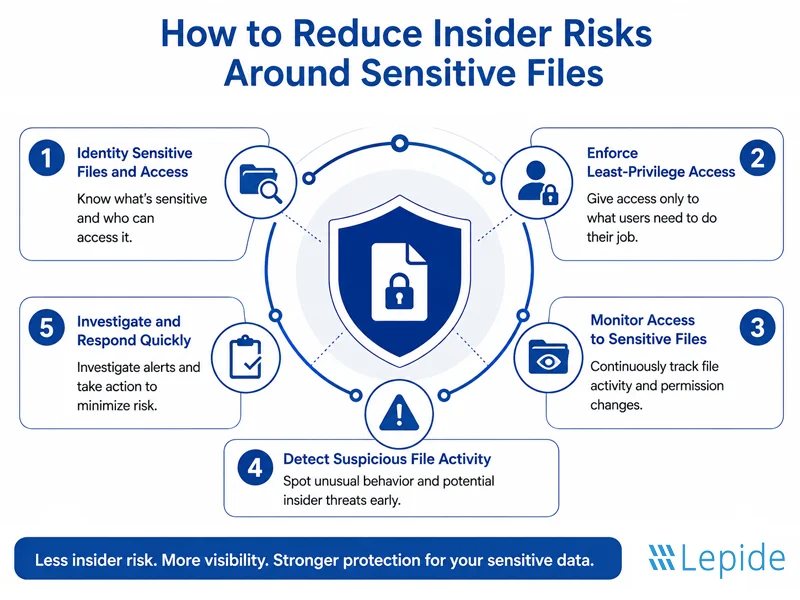
1- Identify Sensitive Files and Who Can Access Them
Knowing which files are sensitive is crucial to managing risk effectively. You must know which sensitive data you have to secure it, determine retention requirements, minimize exposure, and streamline compliance.
The first step in any insider risk program is to gain a comprehensive view of your data assets and access controls.
- Detect files and folders that contain sensitive data regarding the business, customers, finances, employees, and intellectual property.
- Determine who currently has access and who should have it.
- Identify any unnecessary, overly permissive, or outdated access permissions, including permissions from old projects or previous roles.
- Focus on high-risk data such as HR databases, finance systems, source code.
Key Takeaway: Security teams must be aware of both sensitive file locations and access to them. Without this baseline, every control that follows is guesswork.
2- Enforce Least-Privilege Access
Once it’s clear where the sensitive data resides and who can access it, the next logical step is to limit access to what is needed.
- Only give users access to the files and folders that are necessary for their roles.
- Review both direct permissions and group-based permissions.
- Remove access immediately when an employee’s role changes or when the employee leaves the company.
- Regularly review privileged and high-risk accounts, since they carry the greatest potential impact if misused.
- Avoid unnecessarily broad permissions that are easier to grant than to justify later.
Key Takeaway: The fewer people who can access sensitive files, the lower the potential insider risk exposure. Least privilege doesn’t eliminate risk, but it shrinks the blast radius when something does go wrong.
3- Monitor Access to Sensitive Files
Access control defines who can reach sensitive data. Monitoring clarifies what these people are doing with that access, which is where insider threat programs fail to deliver when they stop at access controls.
- Identify who is accessing sensitive files and folders and when.
- Monitor changes to permissions and security groups, as unexpected privilege changes can increase access to sensitive data and may precede or enable misuse.
- Monitor file read, write, create, and delete actions, not only logins.
- Create a benchmark for what is considered normal file activity for each user or role to make anomalies easier to identify.
- Prioritize detailed monitoring and alerting for sensitive data, privileged accounts, and higher-risk activity while maintaining sufficient broader audit coverage to detect unexpected behavior. This will help keep the number of alerts low while maintaining a high signal-to-noise ratio.
Key Takeaway: Security teams require constant visibility into their users’ file actions, not only their access rights.
4- Detect Suspicious File Activity
Now that monitoring is established, the next step is to determine how one will know when something is “suspicious.” Common indicators of potentially suspicious file activity include:
- Sudden access by a user to many sensitive files.
- File or folder access not related to job tasks.
- Activity taking place far outside normal work hours.
- Large-scale file alterations or deletions.
- Repeated failed or denied attempts to access sensitive files, particularly outside the user’s normal scope of access.
- Permission changes followed by subsequent access to sensitive information.
- Suspicious activity associated with privileged users or service accounts.
Key Takeaway: Individually, many of these actions may be completely benign, such as someone logging on during non-work hours, one failed attempt, or a permission change. The risk usually becomes visible when these events are viewed together rather than in isolation. A permission change followed shortly afterward by unusual bulk access, copying, or transfer of files from a sensitive location is a very different signal from either event on its own.
5- Investigate and Respond to Potential Insider Threats
Detection only has value if it leads to a clear, fast investigation. When suspicious activity is flagged, security teams typically need to:
- Identify which user and account was involved.
- Understand exactly when files were accessed, changed, or deleted.
- Know the user’s permissions and any recent changes in them.
- Examine activity before and after the suspicious event to understand the full sequence, not just the trigger.
- Determine whether the activity was legitimate, accidental, malicious, or the result of account compromise.
- Determine what action should be taken next, including removing unnecessary access or alerting the appropriate teams.
Key Takeaway: Audit trails provide evidence that helps security teams reconstruct what happened, identify which account performed the recorded actions, determine when they occurred, and understand which resources were affected.
How Lepide Helps Reduce Insider Risk Around Sensitive Files
Lepide helps security teams reduce insider risk by providing visibility into who has access to sensitive data, how that access is being used, and when user behavior becomes unusual. It monitors user interactions with sensitive data across key on-premises and cloud data stores and uses user behavior analytics and anomaly detection to identify changes in behavior that may indicate an insider threat or compromised account.
Security teams can identify privileged users, understand how they gained access, and find users with excessive access to sensitive data based on data usage patterns. Custom policies can also be used to automate the remediation of excessive permissions, helping organizations enforce least privilege and reduce the potential impact of compromised accounts.
For threat detection and response, Lepide combines real-time alerts with pre-defined threat models and workflows to identify suspicious activity and accelerate containment. When signs of account compromise are detected, response actions such as disabling the affected account can be automated.
Lepide also maintains searchable audit trails of events, changes, and user interactions, giving security teams the context needed to investigate what happened, which users or accounts were involved, and what data was affected.
Schedule a demo with our engineers to see how Lepide can help you identify excessive access, detect suspicious file activity, and reduce insider risk around your sensitive data.
Related Articles:
Frequently Asked Questions
Insider risk in file security is the possibility of employees or authorized personnel misusing their access privileges to sensitive organizational files, potentially leading to a data breach. This can involve a malicious employee, a compromised account, or someone making a genuine mistake.
Organizations can prevent unauthorized access to sensitive files by identifying where confidential data files are stored, implementing an approach in which users are given only the minimum level of permissions necessary, revoking unnecessary or outdated rights, and continuously checking who has access to high-risk data.
Security teams should monitor file creation, modification, deletion, and permission changes in vital system directories, configuration files, and sensitive data repositories, including changes to permissions and groups related to sensitive files and privileged accounts.
Security teams can establish baselines of normal behavior and look for meaningful deviations, such as unusual bulk file access, off-hours access, activity unrelated to a user’s role, or permission changes followed by data access.
File auditing offers the comprehensive activity log required to help security teams investigate incidents thoroughly, distinguish potentially normal activity from suspicious behavior, and provide evidence that supports applicable audit and compliance requirements.