Last Updated on October 20, 2026 by Satyendra
In agencies handling Criminal Justice Information (CJI), dedicated CJIS auditing software can reduce the time required to collect, investigate, and prepare audit evidence.
In this blog, I’ll teach you how to calculate audit costs, determine potential savings, estimate ROI, and make a business case.
Why CJIS Auditing Is a Business Problem, Not Just a Compliance Problem
Most organizations don’t calculate the cost of auditing as a line item of the budget. Most of the cost is distributed across security, compliance, and infrastructure teams and is incurred on a recurring basis. The reasons why CJIS auditing becomes a business concern are:
-
-
- Growing Audit Complexity
Relevant audit evidence may be distributed across Active Directory domain controllers, Microsoft Entra ID, Microsoft 365, file servers, security monitoring tools, and other systems that store, process, transmit, or support access to CJI. The business impact is clear: the more locations there are to search, the more employee hours are needed to find that needle in the haystack, resulting in longer investigation times and greater reliance on the expertise of administrators who know where to look. This leads to growing audit complexity.
- Manual Audit Preparation Consumes Employees’ Time
When the evidence is scattered, security and IT teams end up doing detective work. They search through various logs, compare events, export reports, check for permission changes, determine who can access what, rebuild historical activity and package it up for auditors. The main point is that even relatively small administrative tasks become expensive when they occur across multiple employees and systems.
- Raw Logs Don’t Always Provide Audit Answers
The distinction matters because collecting information and producing an actionable answer are two different activities.
An auditor or investigator will ask:
- Who accessed CJI?
- Who changed the permission?
- Who added this user to a privileged group?
- What did the user have access to?
- What changed before this incident?
- Was the activity expected?
- Audit Readiness Is Continuous
Waiting until an audit approaches to organize evidence creates predictable costs. Teams must interrupt planned projects, prioritize urgent requests, and resolve gaps under time pressure. Historical information may also be harder to reconstruct if relevant events are not adequately logged or retained. Prior events might be more difficult to piece together if nothing has been recorded or preserved. A continuous approach to auditing smooths the peaks.
The more manual interpretation required, the longer it takes to investigate changes, validate access, and respond to evidence requests.
For a broader view, see The Complete Guide to CJIS Compliance and Audit Readiness and CJIS Audit Requirements: What Activity Should You Login and Retain?
- Growing Audit Complexity
-
Calculate the True Cost of Your Current CJIS Auditing Process
The question to take into consideration is: at what cost do CJIS audits come to us today? Few organizations have ever done that calculation, as the cost is baked into job descriptions and everyone owns a piece. The six cost buckets are:
- Audit Preparation Costs: Costs related to gathering, validating, organizing, and presenting evidence for each audit cycle. This is calculated as Number of employees involved × Hours spent × Average hourly cost.
- Ongoing Monitoring Costs: These costs involve reviewing logs, investigating events, correlating activity, building reports, and responding to alerts.
- Access Review and Permission Analysis Costs: Costs that work out who has access, how they got it, whether they still need it, and whether privileged access is appropriate. The calculation is as follows: Annual access review cost = Number of reviews × Hours per review × Average hourly cost.
- Incident Investigation Costs: The incident investigation costs involve reconstructing Who → What → When → Where → How across disconnected systems.
- Tools and Infrastructure Costs: These costs relate to log handling, SIEM ingestion and storage, scripting, reporting tools, and maintenance overhead. The annual cost for each relevant resource should be noted and labeled as avoidable or unavoidable.
- Compliance Gap and Remediation Costs: Expenses tied to the lack of evidence, incomplete monitoring, overprovisioning, open findings, and emergency repairs.
The goal is to answer one question with credible evidence: What does our current auditing process cost us annually, and which parts of that cost could dedicated software realistically reduce?
Where Native and Manual Auditing Approaches Fall Short
Native logs provide an important source of audit evidence. Agencies should collect, protect, and retain relevant audit records according to applicable CJIS Security Policy requirements and documented retention policies. The issue is what it takes to convert that material into answers once you get more than a handful of systems. Here are the operational issues where these methods don’t cut it.
High Volumes of Raw Events
The systems may produce large quantities of event data. To locate a specific permission change or administrative action, a large number of the logs must be filtered and events sifted to identify relevant transactions from other system activity. Multiple analysts, systems, and event types make the task monotonous.
Limited Context
An event may show that a change occurred but may not provide all the context needed for an investigation, such as previous and current values, affected permissions, data sensitivity, or whether the activity was authorized. Auditing solutions designed specifically for this purpose can surface that context, but what exactly they will surface varies by product and source.
Difficult Event Correlation
Such an investigation might encompass activity across domain controllers, user accounts, file servers, and cloud environments over multiple timeframes. Without a means to search and link all that activity, investigators can be left to piece the timeline together manually, potentially dragging out an investigation and spending more time collecting data than analyzing security risks.
Reporting Requires Manual Work
Technical raw data may not always be fit for direct presentation to auditors, compliance officers, or senior management. Teams may have to implement filters on events, package evidence, and craft reports that answer specific questions. When those processes happen, reporting is an operation with a cost.
Hybrid Environments Increase Complexity
Organizations operating across on-premises and cloud environments may need to use different tools and interfaces to investigate related activity. This means additional effort if an event occurs across both locations. Specialized auditing tools can assist by consolidating supported activity, so make sure you understand what is included in this.
But the business case isn’t just that I need more logs in my company. It’s that I need to transform current security activity into actionable, relevant audit and risk information, with less manual effort.
What Capabilities Should CJIS Auditing Software Provide?
Once you have identified the most expensive or time-consuming activities, use them to define your software requirements. The goal isn’t to purchase the product with the longest feature list. It is to identify capabilities that address documented operational problems.
| Evaluation Criteria | What to Look For | What to Verify |
|---|---|---|
| 1. Centralized Auditing | A practical way to search relevant activity across supported systems from a common interface. | Measure whether it reduces the number of tools analysts must visit and the time required to assemble audit evidence. |
| 2. Identity and Access Visibility | Visibility into who has access to sensitive resources, how access was granted, and which groups or privileges are involved. | Verify whether the software can answer:
Confirm whether it reports effective permissions or only selected permission changes. These are not interchangeable. |
| 3. User and Administrative Activity Monitoring | Tracking of relevant changes involving accounts, groups, permissions, and other important administrative activity. | Evaluate coverage of the event types your organization actually needs to investigate. |
| 4. Permission Change Monitoring | Monitoring of file and folder permissions, group memberships, privileged access, and administrative configurations across supported systems. | Ask vendors to demonstrate how an analyst can identify a permission change and determine its potential impact. |
| 5. Real-Time Alerting | Configurable alerts that identify important activity without continuously searching raw logs. | Evaluate alert configuration, delivery options, context, and false-positive handling. Verify detection of audit logging failures, interrupted event collection, processing errors, and storage-capacity issues. |
| 6. Historical Search and Investigation | Ability to retrieve relevant historical events and establish an investigation timeline. | Measure how long it takes to answer representative investigation questions using actual or appropriately anonymized organizational data. |
| 7. Audit and Compliance Reporting | Reports that support organizational audit evidence requirements. | Check report contents, filters, export options, retention limitations, and manual preparation effort before evidence is ready for review. |
| 8. Hybrid Environment Support | Coverage of relevant on-premises and cloud platforms, including Active Directory, Microsoft Entra ID, file servers, and Microsoft 365. | Verify the specific capabilities supported for each platform rather than assuming equal coverage across all systems. |
| 9. Audit Trail Protection and Retention | Protection of audit records against unauthorized access, modification, and deletion, along with timely retrieval of historical evidence. | Verify support for applicable CJIS Security Policy audit-record requirements, including retention for at least one year where required, or longer for administrative, legal, audit, or operational purposes. |
Ultimately, every requirement should connect to a measurable outcome: less investigation time, faster evidence collection, improved visibility, or reduced administrative effort.
How to Calculate the ROI of CJIS Auditing Software
This is where the business case moves from identifying problems to evaluating an investment.
- Establish Your Current Annual Cost: Begin with the cost categories you have already measured and use consistent accounting rules to avoid double-counting employee hours or tool expenses.
Current annual cost = Audit preparation + Monitoring + Access reviews + Investigations + Reporting + Relevant administration costs
- Estimate Time That Could Be Reduced: The workload should be separated into two categories:
- Tasks that may become more efficient: This involves collecting audit evidence, searching historical events, investigating permission events, preparing recurring reports, and compiling access review information.
- Tasks that require human judgement: This involves approving access changes, determining whether activity was authorized, resolving security incidents, and validating findings and information.
This distinction is essential. Auditing software can reduce repetitive work, but it shouldn’t be assumed to eliminate the need for security professionals. Estimate time savings for each task separately, ideally using a proof of value rather than a vendor’s generalized savings claim.
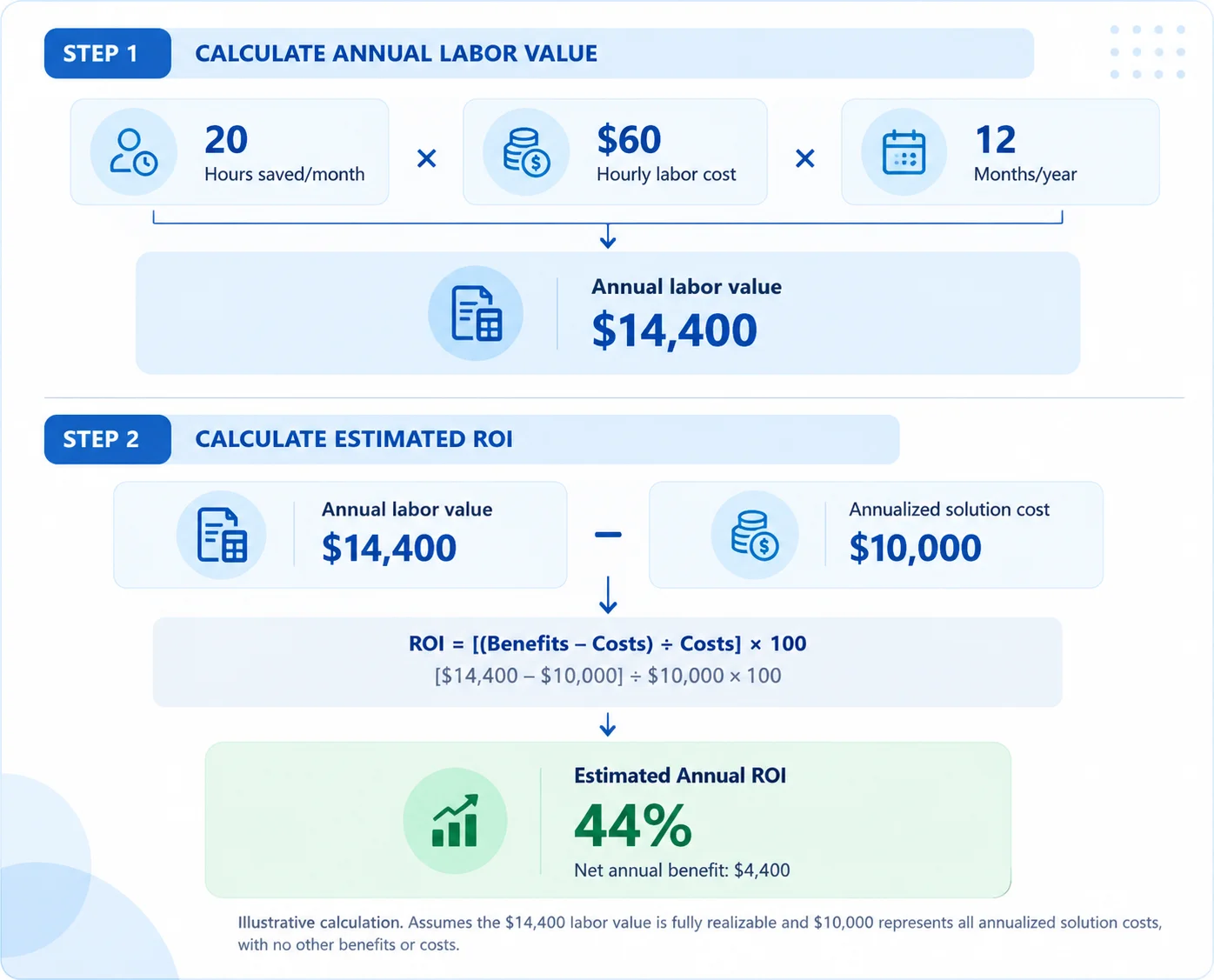
- Calculate Potential Labor Savings: Convert time into monetary value by applying this formula: Annual labor savings = Hours saved per month × Fully loaded hourly cost × 12. To calculate ROI, compare the estimated financial benefits over a defined period with the total cost of the solution over the same period. ROI (%) = [(Total Financial Benefits − Total Costs) ÷ Total Costs] × 100. Include only defensible monetary benefits and avoid counting the same savings more than once.
For example, if auditing software saves 20 staff hours per month at a fully loaded cost of $60 per hour, the annual labor value is $14,400. With an annualized total solution cost of $10,000, this produces an estimated ROI of 44%, assuming the labor value is fully realizable and no other costs or benefits apply.
The following example illustrates how annual labor value and solution costs are used to calculate ROI.
- Account for Existing Tool Costs: Assess the expenses of current tools and processes to determine if dedicated auditing software could increase efficiency and lower costs. Evaluate whether it can reduce the need for custom scripting, manual reporting, administrative tasks, redundant tools, and avoidable SIEM data ingestion or investigation activities.
- Add Risk Reduction: Identify potential security and compliance benefits that may be difficult to quantify financially, such as faster detection, improved investigations, reduced excessive access, and stronger audit evidence. Keep these benefits separate from direct cost savings unless a defensible financial estimate is available. Consider things like identifying threats more quickly, reducing investigation time, decreasing the number of users with elevated privileges, improving audit evidence, removing monitoring blind spots, and enabling faster remediation. All this improves security, reduces risk, increases compliance, and enables your organization to respond to risk faster.
- Compare Total Cost of Ownership: Compare the annual cost of the current auditing process with the projected cost of the proposed solution, including licensing, deployment, infrastructure, integrations, training, maintenance, and ongoing administration. Account for existing costs that will remain after implementation.
By evaluating all these factors, you can determine whether the software delivers long-term savings and value rather than choosing based on the license price alone.
How to Present the Business Case to Leadership
- Start with the Problem: Begin by highlighting the current challenges instead of immediately recommending a CJIS auditing tool. Explain issues such as time-consuming audit preparation, scattered evidence, manual investigations, and limited visibility across hybrid systems to demonstrate the need for improvement.
- Connect the Problem to Business Risk: Describe how these issues impact compliance, security, and operations. For example, delayed investigations, excessive user permissions, and a lack of a paper trail in audit evidence often mean increased security risks, compliance issues, and wasted employee resources.
- Present the Proposed Outcome: Educate management on how the suggested innovation will boost the current process by enabling automated, centralized auditing instead of manual, reactive processes. Demonstrate the benefits of sharing a consolidated report, contextual audit history, persistent access to permissions, and rapid security investigations.
- Use Measurable Success Criteria: Determine the criteria that will be used to assess whether the solution has delivered its expected benefits, such as: reports, dashboards, and other insights; decreased audit prep hours; more rapid investigations; less manual reporting; quicker permission changes; less time spent gathering audit evidence.
- Present Costs Transparently: Disclose your costs openly and explain them separately – licensing, deployment, training, management, and integration – and then compare with the manual process currently employed. Show how better time-to-value, efficiencies, and easier control will lead to a justifiable investment.
- Build a Short Proof of Value: Conduct a small-scale evaluation using your actual environment and highest-priority CJIS auditing requirements first to determine if the solution can generate evidence, pinpoint changes, speed up investigations, and deliver value before committing to a significant investment.
How Lepide Helps
Lepide helps organizations connect auditing capabilities to measurable operational outcomes, reducing investigation effort, improving visibility, and simplifying audit readiness.
- Reduce Manual Investigations: Lepide provides contextual audit trails that help teams quickly identify who changed what, when, and where, reducing the time spent reviewing raw events. This helps security teams investigate incidents faster, reduce manual workload, and improve operational efficiency.
- Improve Identity and Access Visibility: Gain visibility into user accounts, group memberships, effective permissions, and potentially excessive access across supported systems, depending on available data sources and configured capabilities. This helps organizations to detect access-related risks earlier, improve access governance and help support a least-privilege approach.
- Monitor Critical Changes Continuously: Track relevant changes to identities, groups, permissions, and administrative configurations across supported environments. This helps teams detect potentially unauthorized changes sooner and reduce the time between a change occurring and its investigation.
- Prioritize Risk with Contextual Alerts: Contextual alerts help security teams identify potentially significant activity without manually reviewing every audit event. This improves investigation prioritization, reduces alert-review overhead, and helps teams focus resources on higher-risk activity.
- Simplify Audit Evidence: Searchable audit trails and reporting help teams retrieve relevant records when responding to auditor questions or investigating security incidents. This reduces evidence-gathering effort, improves response consistency, and helps organizations prepare for CJIS-related audits.
- Improves Hybrid Visibility: Lepide combines related auditing visibility across supported environments like Active Directory, Microsoft Entra ID, file servers and Microsoft 365. This helps close visibility gaps in hybrid infrastructure and provides teams with a more consistent view of critical changes.
- Demonstrate Value Before Broader Adoption: Evaluate Lepide against measurable outcomes, such as privileged-change investigation effort, audit evidence collection effort, excessive-access detection and permission-change visibility. Tracking coverage on hybrid environments also enables companies to quantify what operational benefits they get, showcase value and develop a business case for wider deployment.
Schedule a demo with one of our engineers and discover how Lepide could help your organization reduce manual audit effort, improve visibility, and streamline evidence collection.
Conclusion
Ultimately, the business case for CJIS auditing may simply be the reduction in existing auditing expense, operational inefficiencies and security and compliance risk versus the cost of automation, demonstrable time savings, increased visibility and better audit preparedness. The true value will come from the ability to remove manual effort, improve security oversight, and ease audit evidence generation. Contact Lepide to see how these outcomes can be measured and demonstrated in your agency’s own environment.
Frequently Asked Questions
CJIS auditing software enables law enforcement agencies to monitor access to CJI, audit user activity, and ensure audit trail documentation. It assists with compliance reporting, conducting security investigations, and maintaining accountability for who has accessed sensitive information
Native logs can be distributed among different systems, which makes identifying security issues or suspicious activity, correlating events, and preparing audit reports a challenge. Dedicated auditing software can centralize visibility into relevant activity across supported systems, provide contextual audit trails, and automate aspects of evidence collection and reporting. Coverage depends on monitored systems, auditing configurations, and solution capabilities.
Not necessarily. While CJIS auditing software is mainly concerned with audit trail data and compliance, an SIEM platform supports security monitoring, event correlation, and threat detection. Dedicated auditing software generally complements rather than replaces a SIEM. Any replacement decision should be based on whether the proposed solution meets the agency’s monitoring, correlation, investigation, alerting, retention, and integration requirement
Calculate ROI by comparing savings from reduced manual auditing, faster investigations, and lower administrative costs against software, implementation, and maintenance expenses. Use the formula: ROI = (Total Benefits − Total Costs) ÷ Total Costs × 100.
Agencies should look for centralized auditing, relevant user and administrative activity monitoring, protected audit trails, configurable alerts, appropriate retention controls, historical search, and reporting that supports CJIS audit evidence requirements. Integration with relevant systems and role-based access controls should also be evaluated.