Last Updated on July 21, 2026 by Satyendra
There is a version of security confidence that feels earned but isn’t. It looks like this: your audit policies are enabled, your logs are flowing into a SIEM, your compliance team has signed off on your AD configuration, and your last audit report came back clean. On paper, you are auditing Active Directory. In reality, you may be doing something far less useful, collecting noise and calling it oversight.
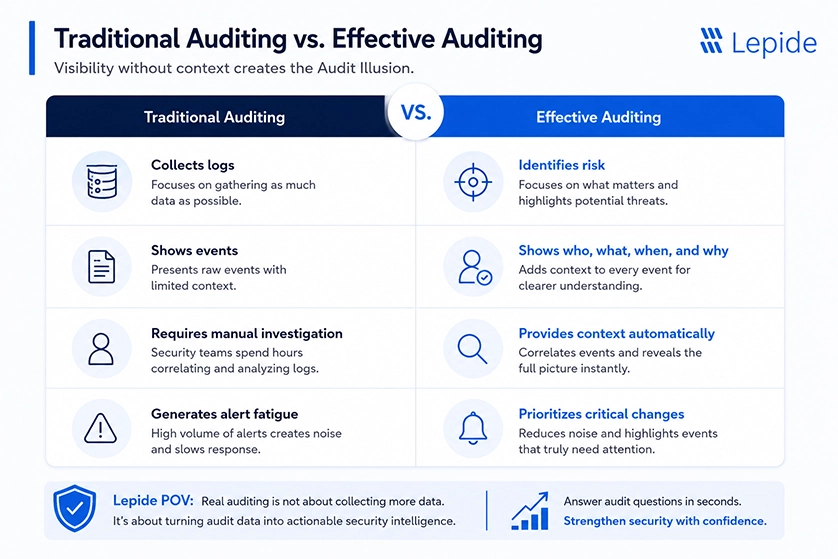
This phenomenon is often referred to as “the Audit Illusion.” The Audit Illusion is very dangerous to organizations today; however, it is dangerous for a good reason: organizations have logs and some type of audit process; however, there is much more of a difference between having a log versus actually auditing what is happening on the logs than most organizations understand.
This blog is written for you to see how auditing works in the Active Directory environment when it is done correctly; therefore, showing you how to see where auditing fails silently, what it should catch, but does not, and how to develop an automated audit program that can achieve the level of confidence your organization has in its audit process.
What Is Active Directory Auditing?
Active Directory auditing is the ongoing process of tracking, recording, analyzing, and alerting on changes and access events within an Active Directory environment, covering user accounts, groups, Group Policy Objects, organizational units, privileged roles, authentication events, and directory object modifications. As identity environments become increasingly complex and span both on-premises Active Directory and Microsoft Entra ID, effective auditing depends not only on collecting events but also on maintaining visibility into identities, permissions, and administrative activity across the environment.
However, there are three operationally different things that organizations call “Active Directory auditing,” and they are not interchangeable:
- Logging is the collection of raw event data from Windows Security logs. It requires enabling audit policies. It produces output. It is not auditing.
- Monitoring is the ongoing observation of log data, typically through a SIEM or dedicated tool, to surface events that meet predefined thresholds. It adds visibility. It is not auditing.
- Auditing is the systematic analysis of who did what, when, and whether that activity was authorized, mapped against policy, baseline behavior, and risk context. It requires intent, process, and interpretation. This is the hard part. This is what most organizations don’t actually have.
The reason this distinction matters operationally: an organization can have mature logging and basic monitoring infrastructure and still be completely unable to answer a fundamental audit question like “Which accounts were granted Domain Admin access in the last 30 days, and was each change authorized?” Answering that question requires more than logs. It requires context, correlation, and a system designed to surface answers rather than just events.
Active Directory Visibility Stack
To build real auditing capability, organizations need all four layers working together:
| Layers | What it does | What breaks without it |
|---|---|---|
| Log Collection | Captures raw event data from domain controllers | Blind spots; events never recorded |
| Event Correlation | Links related events across systems and time | Isolated signals; no attack chain visibility |
| Behavioral Context | Establishes baselines; identifies deviation | False positives drown real threats |
| Actionable Alerting | Prioritizes and routes findings for investigation | Everything becomes equally urgent |
Most organizations have Layer 1. Many have Layer 2. Very few have Layers 3 and 4 functioning at the level required for Active Directory, specifically, where the volume of events is extreme, the blast radius of a compromised account is enormous, and the difference between a routine admin action and a privilege escalation attempt can look identical in raw log data.
How Active Directory Auditing Works and How to Enable It Properly
Understanding the mechanics of AD audit policy configuration is not merely a technical exercise. The configuration decisions made here directly determine whether the Four Gaps described above exist in your environment.
Windows audit policies are delivered through Group Policy. They can be configured at two levels:
- Basic Audit Policy (9 categories) lives under
Computer Configuration > Windows Settings > Security Settings > Local Policies > Audit Policy
This was the original audit mechanism. It’s still functional, but it lacks granularity. - Advanced Audit Policy Configuration (53 subcategories) lives under
Computer Configuration > Windows Settings > Security Settings > Advanced Audit Policy Configuration
This is what organizations should be using. It provides subcategory-level control that makes it possible to capture exactly what you need without generating the noise volume that comes from broad category-level enabling.
Organizations that want a deeper technical walkthrough of how to properly enable and validate Active Directory auditing, including configuring Advanced Audit Policies, verifying domain controller coverage, and avoiding common audit configuration mistakes, can refer to this detailed Active Directory security auditing guide. The first operational mistake to avoid is enabling both simultaneously. When both are configured, Advanced Audit Policy wins on systems where both are applied, but the interaction isn’t always predictable, and having both configured creates documentation and compliance complexity. Use Advanced Audit Policy exclusively.
Top 10 Events, Logs, and Threat Scenarios to Monitor in Active Directory
The question of “what events to monitor” is almost always answered with a long list of Event IDs. That approach produces checklists, not security programs. The more useful framing is: which threat scenarios are you trying to detect, and which events map to each?
Here’s how to think about AD event monitoring organized by threat behavior rather than by Windows event category.
1. Privilege Escalation
This is the highest-value detection category in any Active Directory environment. Privilege escalation, moving from a standard user account or compromised service account to Domain Admin or equivalent, is the critical step in almost every serious AD-based attack.
What to watch:
-
- Event 4728 / 4756: Member added to security-enabled global or universal group. Filter specifically for additions to privileged groups:
- Domain Admins
- Enterprise Admins
- Schema Admins
- Backup Operators
- Account Operators
- Event 4728 / 4756: Member added to security-enabled global or universal group. Filter specifically for additions to privileged groups:
Any addition to these groups should trigger an immediate, high-priority alert.
- Event 4672: Special privileges assigned to new logon. Logged when an account with sensitive privileges logs on. A user account suddenly generating this event after never having done so previously is a strong signal.
- Event 5136 combined with 4662: Direct modification of the AdminSDHolder object. This is a persistence technique used by sophisticated attackers to ensure access survives privilege cleanup.
- Event 4703: User rights adjusted. Monitors changes to user rights assignments that may create alternate privilege escalation paths.
What good detection looks like:
A dormant service account is added to Domain Admins at 1:12 AM by an account that has not performed administrative activity in months. Minutes later, the same account generates Event 4672 from a workstation it has never accessed before. None of those events individually looks catastrophic. Together, they describe an active compromise chain.
2. Repeated Failed Logins and Password Spraying
Most credential attacks no longer rely on brute-force behavior loud enough to trigger obvious lockouts. Password spraying attacks deliberately stay slow and distributed to avoid detection.
What to watch:
- Event 4625: Failed logon attempts. Pay close attention to:
- multiple failures across many accounts
- failures from a single source targeting a privileged user
- unusual login timing patterns
- authentication attempts against dormant accounts
- Event 4771: Kerberos pre-authentication failed. Useful for identifying password-guessing attempts against Kerberos-enabled accounts.
- Event 4776: NTLM authentication failures. Important for environments still relying on legacy authentication mechanisms.
What good detection looks like:
A single workstation generates low-frequency failed authentication attempts across 34 user accounts over several hours, followed by one successful login against an administrative account. That pattern often matters more than the raw failure volume itself.
3. Inactive or Disabled Accounts Becoming Active Again
Inactive accounts are dangerous because organizations frequently forget they still exist, while attackers actively search for them.
What to watch:
- Event 4722: User account enabled.
- Event 4723 / 4724: Password reset attempts.
- Event 4624: Successful logons from accounts with no recent authentication history.
- Event 4738: User account changed.
What good detection looks like:
An account disabled 18 months ago suddenly becomes active during non-business hours, resets its password, and accesses systems it has never touched. In many environments, that would blend into normal operational noise unless the historical context is understood.
4. Group Policy Object (GPO) Modifications
GPOs can silently alter security posture across the entire domain. Small changes here can create massive exposure very quickly.
What to watch:
- Event 5136: Directory object modification affecting GPOs.
- Event 4739: Domain policy changed.
- Event 4719: System audit policy changed.
- Event 4902 / 4907: Auditing settings changed.
What good detection looks like:
A GPO change disables PowerShell logging and weakens endpoint security policies outside scheduled maintenance windows. Ten minutes later, multiple systems begin generating suspicious process execution events. That sequence matters far more than the policy change alone.
5. Service Account Abuse
Service accounts are among the least-governed identities in enterprise environments because organizations are often afraid to modify them after years of undocumented dependencies.
What to watch:
- Event 4624 Type 2 or Type 10: Interactive logons using service accounts. Most service accounts should never log in interactively.
- Event 4738: Service account modifications
- Event 4672: Privileged logon activity from service accounts.
- Kerberos TGS requests (Event 4769): Unusual ticket requests can indicate Kerberoasting activity.
What good detection looks like:
A service account historically used only for SQL replication suddenly authenticates interactively to multiple workstations and begins accessing file shares containing HR data. That is not “weird activity.” That is likely credential abuse.
6. Permission and Delegation Changes
One of the biggest Active Directory risks today is not permission changes. It is authorized access. Permission changes are a natural part of any Active Directory environment, but if they are not fully understood, they often create long-term exposure that organizations do not catch until after an incident.
What to watch:
- Event 5136: Directory object modifications affecting permissions or delegation.
- Event 4662: Operations performed on sensitive AD objects.
- ACL inheritance changes involving privileged OUs or sensitive groups.
- Delegation changes affecting administrative relationships.
What good detection looks like:
A delegated helpdesk group quietly receives write permissions over privileged organizational units through inherited ACL changes. No malware is involved. No attacker is detected. But the attack path now exists.
7. Suspicious Account Creation and Administrative Drift
Attackers frequently create secondary accounts for persistence after gaining privileged access.
What to watch:
- Event 4720: User account created.
- Event 4728 / 4732: New account added to privileged groups.
- Event 4738: Account modifications.
- Event 4725 / 4726: Accounts disabled or deleted shortly after creation.
What good detection looks like:
An administrative account creates a new user outside of onboarding workflows, immediately assigns elevated privileges, and authenticates to infrastructure systems it has never previously accessed. Temporary administrative access that quietly becomes permanent is also a major source of long-term exposure.
8. Replication Abuse and DCSync Activity
Sophisticated attackers increasingly abuse legitimate AD replication functionality because it blends into normal directory traffic.
What to watch:
- Event 4662 with replication-related permissions.
- DCSync indicators involving:
- DS-Replication-Get-Changes
- DS-Replication-Get-Changes-All
- DS-Replication-Get-Changes-In-Filtered-Set
- Unexpected replication requests originating from non-domain-controller systems.
What good detection looks like:
A workstation account suddenly performs replication-style requests normally associated only with domain controllers. That is a major red flag for credential theft activity.
9. Track Frequent Account Lockouts
Repeated account lockouts are often a sign of brute-force attempts, password spraying, or users cycling through stale credentials. They can also point to service accounts or privileged accounts being misused.
What to watch:
- Event 4740: Account locked out
- Lockouts affecting privileged users or service accounts
- Repeated lockouts from the same source or workstation
- Lockouts occurring outside normal business hours
What good detection looks like:
A small cluster of lockouts from one endpoint affects multiple accounts over a short period, including one privileged account. That pattern can point to credential attack activity or an operational issue that needs immediate review.
10. Organizational Unit (OU) Changes
The scope of policies depends on Organizational Units, which separate areas and determine management boundaries. OU change tracking helps stop unauthorized model modification, which is a typical method used by privilege abusers.
What to watch:
- Event 5136: Directory object modification affecting OUs
- Event 5137: OU created
- Event 5141: OU deleted
- Event 5139: OU moved or renamed
- Event 4662: Changes to OU permissions or delegated rights
What good detection looks like:
An OU containing privileged users, servers, or workstations is moved, renamed, or has its permissions modified outside an approved change window. Shortly afterward, unexpected Group Policy changes, permission assignments, or administrative actions occur. That sequence may indicate an attempt to alter administrative boundaries or weaken security controls without drawing attention.
Why Active Directory Auditing Is Important for Security and Compliance
Usually, when people talk about compliance expectations, they refer to requirements defined in the various compliance mandates, like AD (Active Directory) auditing. However, there is often no context given on what these compliance frameworks actually require or why just relying on native logging won’t be sufficient for demonstrating compliance for your organization.
- HIPAA (Health Insurance Portability and Accountability Act of 1996) requires audit controls used to monitor and audit activity taking place in the systems housing ePHI (electronic personal health information). Typically, the controls managed by Active Directory (AD), determine how access is granted to ePHI, and therefore are subject to HIPAA. Under HIPAA, the requirement is not just collecting logs, but having the ability to show that a thorough review of the logs, and appropriate action taken as a result of any irregularities identified, occurred.
- PCI DSS adds another strong reason to audit Active Directory properly. If AD controls access to cardholder data environments, organizations need evidence that access is restricted, monitored, and reviewed regularly. In practice, that means being able to show who has access, who changed it, and whether those changes were authorized.
- GDPR (General Data Protection Regulation) reflects accountability requirements for the processing of data; the accountability for compliance with this regulation exists under Article 5(2). Organizations need to provide evidence of compliance with the principle of data protection by showing that any individual with access rights to the systems containing personal data, and any modifications of access over time.
- NIST 800-53 and Zero Trust Architecture go further, requiring continuous validation of access, least privilege enforcement, and the ability to detect privilege escalation and unauthorized configuration changes in real time.
Where AD Auditing Typically Goes Wrong
Understanding what AD auditing should catch is straightforward. Understanding why it frequently doesn’t, even when organizations are investing in it, requires a more honest conversation.
The Identity Debt Problem Nobody Budgets For
Most organizations don’t inherit a clean, well-governed Active Directory. They inherit years of organic growth: accounts created by admins who no longer work there, group memberships granted for projects that ended, service accounts created with Domain Admin rights because it was easier than scoping them correctly, and nested groups where no one fully understands the transitive membership implications.
This is Identity Debt, the accumulated weight of ungoverned access decisions that individually seemed reasonable at the time and collectively represent a sprawling, poorly understood permissions landscape.
Identity Debt makes AD auditing harder in a specific, practical way: when the baseline state of your Active Directory already includes permissions that shouldn’t exist, anomaly detection becomes extremely difficult. You can’t establish “what changed” if you don’t know what the correct state was to begin with. Auditing change events is only half the program. The other half, regularly validating the current state of permissions, group memberships, and account configurations against what’s actually authorized, is something most audit programs don’t include.
Organizations typically discover the depth of their Identity Debt during one of three events: a security incident that requires forensic investigation, a compliance audit where an external reviewer asks questions about specific access, or a deprovisioning project where they try to clean up AD and realize they can’t determine what’s safe to remove.
Why Hybrid Environments Break Most Existing Audit Programs
Organizations running hybrid AD, on-premises Active Directory synchronized with Entra ID, are operating two partially overlapping identity systems with different audit mechanisms, different log locations, different retention defaults, and different administrative interfaces. An AD audit program designed for on-premises infrastructure captures on-premises events. The cloud component generates its own audit trail in Entra ID audit logs and sign-in logs, accessible through the Azure portal or Microsoft Graph.
The operational problem: when an attacker or insider moves between on-premises and cloud resources, the activity trail is split. An account compromise that starts with a phishing attack (Entra ID sign-in logs), escalates through an on-premises service account (Windows Security logs), and ultimately results in data exfiltration from SharePoint (Entra ID audit logs) produces evidence in three separate systems, likely with three separate investigation workflows, possibly with three separate teams responsible for each.
Organizations that haven’t explicitly built a unified hybrid audit capability, one that correlates on-premises AD events with Entra ID events and understands the synchronization relationship between the two, have a structural blind spot that no amount of on-premises audit policy configuration will address.
Alert Fatigue Is a Prioritization Problem, Not a Volume Problem
Alert fatigue is widely acknowledged as a problem. What’s less frequently acknowledged is that alert fatigue is not primarily a volume problem; it’s a prioritization problem.
Organizations that reduce alert volume by narrowing their detection scope have solved the wrong problem. They’ve made their alert queue manageable by reducing coverage. The alerts that remain are easier to process, but the events that were removed from alerting didn’t stop happening; they just stopped being visible.
The correct response to alert fatigue in an AD auditing context is behavioral baselining that reduces the false positive rate rather than scope reduction that reduces event coverage. An alert on “Domain Admin group membership change” should be low volume because Domain Admin changes should be rare. If it’s generating constant alerts, the problem is that you have too many people making unauthorized or untracked changes to privileged groups, which is itself a security issue that needs addressing, not suppressing.
Active Directory Audit Best Practices That Hold Up at Scale
- Separate audit policy reviews from alert response workflows: Audit policy reviews should happen periodically as a governance activity, while alert response is a daily operational function. Combining the two usually weakens both.
- Validate coverage, not just configuration: Periodically perform test actions, like password resets or group membership changes, and confirm the expected events appear in your logs. Configured policies do not always equal effective coverage
- Create dedicated monitoring for privileged accounts: Domain Admins, Enterprise Admins, service accounts, and accounts with Tier 0 access should have stricter monitoring baselines than standard users.
- Update monitoring after privileged access changes: Whenever privileged accounts, groups, or service accounts are added or modified, ensure they are included in the appropriate monitoring scope to avoid blind spots.
- Audit the audit system itself: Monitor events like Event 4719 (audit policy changed) and Event 1102 (security log cleared). If attackers can disable logging, the entire audit program becomes unreliable.
- Build compliance reporting from security monitoring, not the other way around: Effective AD auditing should focus on security visibility first, then map compliance reporting to the data already being collected.
- Review dormant privileged accounts regularly: Privileged accounts inactive for 90+ days are high-risk because they often retain powerful access while receiving little operational scrutiny. Quarterly reviews help identify forgotten or unnecessary privileged accounts.
How Lepide Closes the Gaps Your Current AD Audit Program Misses
The gap between having logs and actually auditing isn’t a knowledge problem. Most security teams understand what they need to capture. The challenge is operational: native Windows tooling was designed for system administration, not security operations. It produces events, not answers.
Lepide Auditor for Active Directory closes the Four Gaps that create the Audit Illusion, from configuration validation and hybrid AD coverage to behavioral baselining and context-aware alerting. It surfaces what matters, maps it to compliance requirements, and gives your team the ability to respond before a privilege escalation becomes a breach.
If you’re not certain your current AD audit program would catch what the scenarios in this guide describe, that’s the right question to be asking, and it’s exactly what a Lepide demo is designed to answer. Schedule a demo to see how Lepide audits Active Directory
Frequently Asked Questions
Critical AD events should be monitored continuously through automated alerts, while security teams should perform daily reviews for high-priority activity and quarterly reviews of audit policies and privileged accounts.
Native AD auditing generates raw logs but lacks contextual analysis, behavioral baselines, centralized visibility, and effective prioritization, making it difficult to quickly identify meaningful threats.
Without proper AD auditing, organizations may fail to detect privilege escalation, insider threats, unauthorized access, suspicious configuration changes, and compliance violations until after a security incident occurs.
Retention periods vary by compliance requirements and organizational policy, but most enterprises retain critical audit logs for several months to support investigations, forensic analysis, and regulatory audits.