


Sensitive data is often spread across multiple IT environments, including Active Directory, file servers, and Microsoft 365, so collecting audit evidence can be challenging.
IT teams need to spend valuable time gathering logs, investigating user activity, and preparing compliance evidence when faced with manual auditing and fragmented reporting processes, and this can also make it harder to identify security risks and maintain consistent oversight.
To streamline these processes, Lepide provides a centralized solution for data access auditing and compliance reporting, helping organizations to consolidate audit information, monitor critical activities, and simplify audit preparation across supported environments.
Why Choose Lepide for Compliance Reporting?
Compliance reporting consists of more than just collecting system logs. Clear visibility is needed into who accesses sensitive information, what changes are made, and whether security controls are working as intended.
Lepide helps simplify this process by bringing auditing and reporting capabilities together across supported data sources, including Active Directory, file servers, Exchange, and Microsoft 365.
The key advantages of using Lepide include:
- Centralized auditing: Consolidation of audit information from supported on-premises and cloud environments.
- Predefined compliance reports: Access to ready-made reports covering common auditing and regulatory requirements.
- Data access visibility: Gain visibility into who accessed sensitive files and how users interacted with data.
- Permission and privileged activity monitoring: Track changes to permissions, user accounts, groups, and configurations.
- Automated reporting and alerting: Schedule reports and configure alerts to highlight suspicious activities.
By reducing reliance on manual audit log collection, Lepide helps IT and security teams improve audit visibility and prepare more efficiently for compliance assessments.
Key Compliance Reporting Features of Lepide
Lepide combines auditing, reporting, and security monitoring capabilities to help organizations understand how users interact with sensitive data and identify changes that could become a threat. The following features show how the Lepide solution provides more straightforward compliance reporting across hybrid IT environments.
Centralized Auditing Across Multiple Data Sources
Organizations often manage data across several platforms, making it difficult to provide a complete audit trail. Lepide brings auditing information together through a centralized console, supporting environments such as Active Directory, Microsoft Entra ID, Windows file servers, Exchange, SharePoint, and Microsoft 365.
Administrators can, therefore, use consolidated audit reports to investigate changes and user activity across supported platforms rather than having to investigate separate logs across different systems.
This centralized approach helps security teams establish a clearer picture of their IT environment, identify potential security gaps, and collect relevant evidence for internal and external audits.
Data Access and User Activity Monitoring
Understanding who accessed sensitive information is essential for demonstrating accountability and investigating potential security incidents.
Lepide monitors user interactions with files and folders, providing details about who performed an activity, what the activity was, and when and where it occurred. Depending on the data source and configured auditing, activities can include:
- File and folder access attempts.
- File creation, modification, and deletion.
- Copying, moving, and renaming files.
- Access to sensitive information in supported Microsoft 365 services.
- Unusual or unauthorized access attempts.
These audit trails help administrators investigate potential data exposure, identify unexpected user behavior, and establish whether access to sensitive information was appropriate.
Important: The availability and completeness of audit events depend on the data source, auditing configuration, and activities supported by Lepide. Organizations should ensure that relevant data sources are configured and the required auditing is enabled before relying on these records for compliance reporting.
Predefined and Customizable Compliance Reports
Preparing compliance evidence manually can be time-consuming, particularly when auditors request specific information about users, permissions, or historical changes.
Lepide addresses this by providing hundreds of predefined audit reports covering different platforms and security activities. These include reports relating to Active Directory modifications, file server activity, permissions changes, and Microsoft 365 events.
Administrators can use available filtering and search functionality to narrow results by relevant criteria, such as users, resources, activities, and reporting periods. Custom reports can also help teams focus on specific changes or events that are important to their organization.
Reports can be exported for further analysis and shared with relevant stakeholders. Supported reporting workflows also allow administrators to schedule reports, helping maintain consistent audit documentation.
Permission Changes and Privileged Activity Auditing
When changes are made to access permissions and privileged accounts, they can introduce significant security risks if they go unnoticed.
Lepide audits changes to user accounts, security groups, permissions, and system configurations across supported environments. Administrators can investigate when a user was added to a privileged group, when access rights were modified, and which account performed the change.
This visibility helps organizations identify unexpected privilege escalation, excessive permissions, and unauthorized access changes.
By reviewing these events regularly, security teams can strengthen access governance, support least-privilege practices, and provide evidence that access-related changes are being monitored.
Real-Time Alerts and Security Monitoring
Periodic compliance reports are useful, but they cannot always provide the immediate visibility needed to investigate emerging threats.
Lepide supports configurable alerts that notify administrators about important security events. These can include suspicious file activity, privileged group membership changes, failed logons, and unusual permission modifications.
Alerts can be configured around relevant activities and thresholds, helping teams prioritize events that require investigation. Depending on the configuration, notifications can be delivered through email, the Lepide interface, or supported mobile notifications.
Combined with searchable audit trails and reporting, these capabilities provide visibility, helping organizations move toward continuous compliance monitoring rather than relying entirely on periodic audit reviews.
How Lepide Supports Major Compliance Regulations
Regulatory frameworks differ in their requirements for organizations to demonstrate appropriate access controls, accountability, and visibility into sensitive information. The Lepide solution provides auditing and reporting capabilities that can help organizations collect evidence relevant to several major compliance requirements. These are described below:
| Regulation | Reporting capabilities |
|---|---|
| GDPR | Audit access to personal data and investigate relevant user activities and permission changes. |
| HIPAA | Monitor access activity involving protected health information (PHI) and review privileged user behavior. |
| PCI DSS | Collect evidence of access activity, permission changes, and other security-relevant events affecting cardholder data environments. |
| SOX | Audit access and changes affecting financial data, user accounts, and relevant systems. |
| ISO 27001 | Support access control reviews, activity monitoring, and security audit evidence collection. |
| NIS2 | Support relevant security monitoring, access oversight, and incident investigation requirements. |
These capabilities can help organizations gather relevant evidence and demonstrate how security controls operate. However, using Lepide does not automatically establish regulatory compliance. Organizations must also assess their wider policies, technical controls, processes, and applicable regulatory obligations.
How to Generate Compliance Reports Using Lepide
Lepide simplifies compliance reporting by providing predefined reports and filtering capabilities through its auditing interface. Although the exact navigation may vary depending on the product version and data source, the general workflow is straightforward.
The steps are described below:
Step 1: Select the relevant data source.
Before you begin: Ensure that the relevant data source has been added to Lepide and that the required auditing is enabled. Reports can only display activities captured from the configured environment.
Open the Lepide console and select the environment you want to investigate, such as Active Directory, a Windows file server, or Microsoft 365.
Step 2: Open the appropriate audit or compliance report.
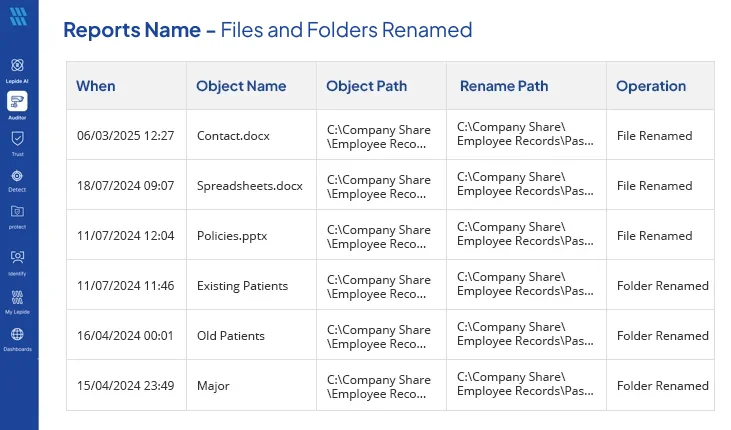
In the Lepide Web Console, select Lepide Auditor and navigate to the relevant report category. For example, expand File Server and select the required report, such as Files and Folders Renamed. Select the reporting period and generate the report using the available controls.
Step 3: Apply the required filters.
Narrow the results using available filters, such as usernames, activities, resources, servers, and date ranges.
The following is an example of the Files and Folders Renamed Report. It was generated using a custom date range and shows all files and folders renamed during the specified period.
Step 4: Review the audit events.
Examine the results to identify relevant activities. Review available event details to understand who performed an action, what changed, and when it occurred.
Step 5: Export or schedule the report.
Export the results for audit documentation and further analysis. Where supported, configure scheduled report delivery to maintain regular compliance records.
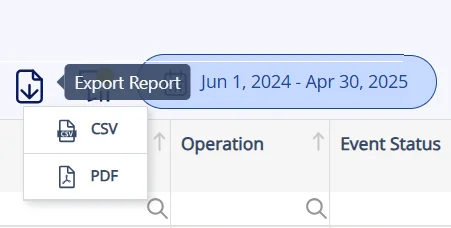
The report can be exported in PDF or CSV format using the button at the top of the screen:
Lepide vs. Native Auditing Tools
Native auditing tools provide useful visibility into system activity, but organizations managing multiple platforms may need additional capabilities to simplify reporting and investigations.
For example, Microsoft provides auditing through Microsoft Purview and platform-specific administrative tools. Lepide builds on available auditing information with centralized reporting and additional auditing capabilities across supported environments.
| Capability | Native Microsoft auditing tools | Lepide |
|---|---|---|
| Active Directory auditing | Available through native Windows auditing and event logs | Centralized AD change auditing and reporting |
| Microsoft 365 auditing | Available through Microsoft Purview Audit | Centralized Microsoft 365 auditing and reporting |
| File access monitoring | Available through Windows auditing configuration | Detailed file interaction auditing, including copying and modification events |
| Compliance reports | Provides searchable audit records, filtering, and CSV export through Microsoft Purview Audit. Additional processing or consolidation may be needed for specific compliance reporting requirements. | Hundreds of predefined reports and customizable reporting |
| Permission change tracking | Available through native audit events | Dedicated permission auditing and reporting |
| Alerts | Available through supported Microsoft security tools and configurations | Configurable alerts across supported environments |
| Cross-platform visibility | Depends on individual services and integrations | Consolidated visibility across supported data sources |
Note: Microsoft Purview Audit provides centralized auditing across supported Microsoft 365 services, while Windows auditing supports on-premises activity monitoring. Lepide provides additional centralized auditing and reporting across its supported data sources. The capabilities available through native Microsoft tools depend on the services, licensing, and configurations in use.
Native Microsoft tools are still a useful option, particularly for organizations with Microsoft-focused environments and established auditing processes. It’s worth noting that Microsoft Purview also provides searchable audit records and export capabilities.
However, the Lepide solution offers an additional layer of centralized reporting and visibility, particularly for organizations that need to monitor activity across different supported data sources. The most suitable approach depends on the existing infrastructure, licensing, reporting requirements, and security objectives.
Simplify Compliance Reporting with Lepide
Managing compliance reporting doesn’t have to involve manually collecting logs and investigating disconnected systems. Lepide brings together centralized auditing, predefined reports, data access monitoring, and security alerts to improve visibility across supported IT environments. By simplifying audit evidence collection and helping teams investigate important security events, Lepide can make compliance preparation more manageable
Are you ready to simplify your compliance reporting process? Schedule a demo with Lepide and discover how its auditing and reporting capabilities can support your organization’s security and compliance objectives.
Frequently Asked Questions
The best tool depends on your existing infrastructure and compliance requirements. Lepide is an option for organizations seeking centralized data access auditing, predefined compliance reports, permission change tracking, and security monitoring across supported on-premises and cloud environments.
Lepide provides reporting and auditing capabilities mapped to frameworks including GDPR, HIPAA, PCI DSS, SOX, and ISO 27001. These capabilities help organizations collect relevant audit evidence, monitor access activity, and demonstrate security controls.
Yes. Lepide provides predefined reports and supports customized reporting. Administrators can filter audit information, export results, and schedule reports for periodic delivery where necessary. This helps reduce repetitive reporting tasks and maintain consistent audit documentation.
Microsoft provides centralized audit searching across supported Microsoft 365 services through Microsoft Purview, alongside Windows auditing for on-premises systems. Lepide offers centralized auditing, predefined reports, and configurable alerts across its supported data sources, including Active Directory, file servers, and Microsoft 365.