- Executive Summary
- About This Research
- By the Numbers
- Key 10 Findings
- Identity Lifecycle Management Remains One of the Weakest Areas of Enterprise Security
- Administrative Access Is Broader Than Organizations Realize
- Permission Sprawl Continues to Increase Organizational Risk
- Authentication Noise Is Making Genuine Threats Harder to Detect
- Organizations Consistently Underestimate How Much Sensitive Data They Hold
- Organizations Lack Confidence in Who Can Access Their Most Sensitive Data
- Organizations Lack Visibility Into How Sensitive Data Is Being Used
- AI Is Exposing Existing Governance Weaknesses, Not Creating New Ones
- Security Teams Still Struggle to Answer Basic Security Questions
- Modern Identity and Data Security Has Outgrown Manual Security Operations
- Conclusion: The Identity-Data Disconnect
- About Lepide
- References
Identity Lifecycle Management Remains One of the Weakest Areas of Enterprise Security
Headline Benchmark Statistics
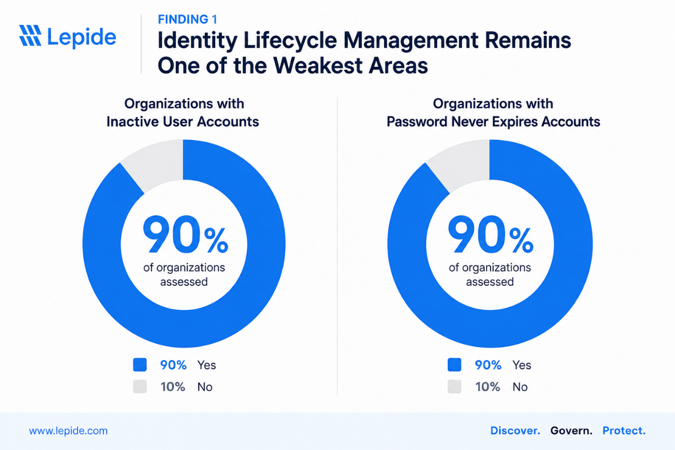
- 90% of organizations assessed had enabled inactive user accounts.
- More than 5,900 inactive accounts were identified across the environments reviewed.
- The median organization contained more than 600 inactive accounts.
- 90% of organizations had accounts configured with Password Never Expires.
- More than 13,800 accounts were configured with non-expiring passwords across the organizations assessed.
- Several environments contained accounts that had not been used for multiple years, while others included accounts that had never logged on.
What We Observed
Identity lifecycle management emerged as one of the most consistent weaknesses across the organizations included in this research. Nine out of ten assessments identified significant numbers of enabled user accounts that had not been used for extended periods, often remaining active long after employees had left the organization, changed roles, or no longer required access.
While the number of inactive accounts varied between organizations, the underlying problem was remarkably consistent. Dormant accounts accumulated gradually over time as onboarding, role changes, contractor management, and offboarding processes failed to keep pace with business operations. In several environments, accounts had remained inactive for hundreds of days, while others showed no evidence of ever being used.
Credential hygiene presented a similar pattern. Nearly every organization contained accounts configured with passwords that never expire, including standard user accounts, service accounts, and shared administrative accounts. In some environments, credentials had remained unchanged for more than a decade, creating long-lived identities that would be difficult to detect if compromised.
These findings demonstrate that identity lifecycle management is rarely a one-time cleanup exercise. Without continuous visibility into inactive accounts, privileged identities, and stale credentials, organizations gradually accumulate identity risk that often remains unnoticed until an audit, security incident, or major transformation project exposes the problem.
Why It Matters
Inactive identities represent one of the easiest attack paths for threat actors. Because these accounts are rarely monitored by users or administrators, compromised credentials can remain undetected for extended periods while continuing to provide access to corporate resources.
Poor lifecycle management also creates operational challenges. Excess identities complicate access reviews, increase audit effort, and reduce confidence that users only retain the access required for their current role. As organizations adopt cloud services, Microsoft 365, and AI-powered technologies such as Microsoft Copilot, unmanaged identities also increase uncertainty around who can discover, access, and interact with sensitive information.
Ultimately, identity lifecycle management is not simply an identity governance issue—it is the foundation upon which least privilege, Zero Trust, compliance, and data security all depend.
Benchmark
| Metric | Benchmark |
|---|---|
| Organizations with enabled inactive accounts | 90% |
| Organizations with Password Never Expires accounts | 90% |
| Median inactive accounts per organization | 607 |
| Median Password Never Expires accounts | 610 |
| Highest inactive account count observed | 1,421 |
| Highest Password Never Expires count observed | 4,697 |
| Organizations with multi-year dormant accounts | 80% |
| Organizations reporting accounts that had never logged on | 40% |
Recommendations
Organizations should treat identity lifecycle management as a continuous governance process rather than a periodic cleanup exercise.
Priority actions include:
- Establish automated processes to identify inactive user accounts based on defined inactivity thresholds.
- Integrate onboarding, role changes, and offboarding with identity governance processes to reduce orphaned accounts.
- Review all accounts configured with Password Never Expires and remove exceptions wherever possible.
- Document ownership and business justification for long-lived service and shared accounts.
- Perform regular identity hygiene reviews as part of access certification and compliance programs.
- Continuously monitor identity changes rather than relying solely on periodic manual audits.
How Lepide Helps
Lepide continuously monitors Active Directory and Microsoft Entra ID to identify inactive users, stale credentials, privileged accounts, and other identity hygiene risks before they become security issues. Rather than relying on periodic scripts or manual reviews, security teams receive continuous visibility into identity changes, automated reporting, and actionable recommendations that help maintain a clean and well-governed identity environment.
By combining identity information with permissions, user activity, and sensitive data discovery, Lepide enables organizations to understand not only who an identity belongs to, but also what it can access, how it is being used, and whether it continues to represent an acceptable level of risk.
Administrative Access Is Broader Than Organizations Realize
Headline Benchmark Statistics
- 100% of organizations assessed had opportunities to strengthen privileged access governance.
- More than 219 privileged accounts were identified across the environments reviewed.
- The median organization had 20 administrative accounts.
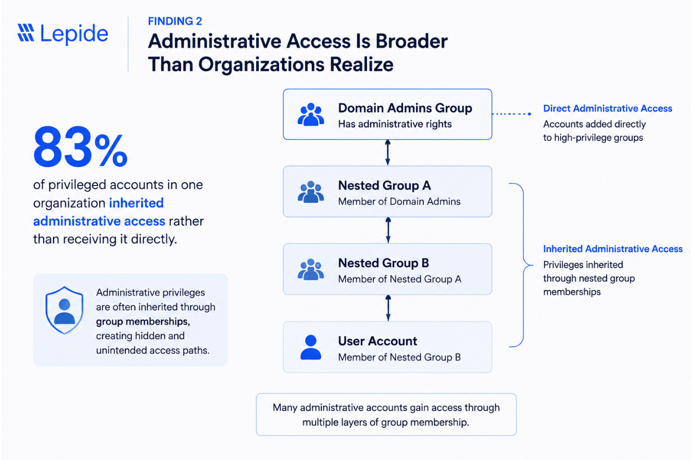
- 80% of organizations identified administrative privileges granted through indirect or inherited group membership.
- One organization found 83% of its privileged accounts inherited administrative access rather than receiving it directly.
- 70% of organizations identified privileged service accounts with elevated permissions that required additional governance.
What We Observed
Every organization included in this research had opportunities to improve how administrative access was governed. While the total number of privileged accounts varied considerably between organizations, the more significant finding was how those privileges had accumulated over time.
Administrative access was frequently granted through nested security groups, delegated administration, inherited permissions, and long-standing operational exceptions. In several environments, organizations were confident they understood who their Domain Administrators were, but had far less visibility into the users and service accounts that inherited equivalent privileges through indirect group membership.
Privileged service accounts represented another recurring theme. Many organizations relied on service accounts with permanent elevated permissions to support business applications, automation, synchronization, and legacy infrastructure. In many cases these accounts had static credentials, limited ownership documentation, and infrequent review cycles.
These findings demonstrate that privileged access is rarely a static list of administrator accounts. Instead, it evolves organically as organizations grow, implement new technologies, integrate applications, and delegate administrative responsibilities. Without continuous visibility into how privileges are granted and inherited, organizations can quickly lose confidence in who truly holds administrative access.
Why It Matters
Privileged identities represent the most valuable targets for attackers because they provide unrestricted access to critical systems, sensitive data, and security controls. When administrative access is granted indirectly or inherited through complex group structures, organizations may unintentionally expand their attack surface without realizing it.
Traditional access reviews often focus on direct group membership but fail to account for nested groups, delegated administration, or inherited permissions. As a result, users can retain elevated privileges long after their business need has changed, while service accounts continue to operate with excessive permissions that are rarely questioned.
This lack of visibility also creates operational challenges. Security teams struggle to demonstrate least privilege during audits, investigate privilege escalation events, or confidently answer a fundamental question:
Who actually has administrative access today?
Without that visibility, implementing Zero Trust, enforcing least privilege, and responding quickly to security incidents becomes significantly more difficult.
Benchmark
| Metric | Benchmark |
|---|---|
| Organizations with opportunities to improve privileged access governance | 100% |
| Organizations with indirect or inherited administrative privileges | 80% |
| Organizations with privileged service accounts | 70% |
| Median administrative accounts per organization | 20 |
| Highest administrative account count observed | 69 |
| Lowest administrative account count observed | 6 |
| Highest proportion of inherited privileged access | 83% |
| Organizations recommending privileged access reviews | 100% |
Recommendations
Organizations should continuously review both direct and inherited administrative access to ensure privileges remain aligned with business need.
Priority actions include:
- Inventory all privileged users and service accounts across Active Directory and Microsoft Entra ID.
- Review nested group memberships to identify indirect administrative privileges.
- Apply the principle of least privilege by removing unnecessary standing administrative access.
- Establish documented ownership and business justification for every privileged account.
- Review privileged service accounts regularly and rotate credentials according to organizational policy.
- Perform recurring privileged access reviews rather than relying on annual certification exercises.
- Continuously monitor changes to privileged groups and administrative memberships.
How Lepide Helps
Lepide provides complete visibility into privileged access across Active Directory and Microsoft Entra ID, helping organizations identify both direct and inherited administrative permissions. Security teams can quickly understand how privileged access has been granted, who ultimately inherits elevated rights, and where excessive permissions introduce unnecessary risk. By correlating privileged identities with permissions, user activity, authentication events, and sensitive data access, Lepide enables organizations to move beyond simply identifying administrators to understanding the real impact of privileged access across the environment – so that you can better govern access. This allows security teams to enforce least privilege, simplify access reviews, reduce investigation time, and maintain continuous visibility into one of their most critical security controls.Permission Sprawl Continues to Increase Organizational Risk
Headline Benchmark Statistics
- 100% of organizations assessed identified opportunities to strengthen permissions governance.
- 80% of organizations identified excessive or over-permissioned access to sensitive data.
- More than 74,000 permission changes were observed across Active Directory and file servers during the assessment periods.
- More than 15,000 security group modifications were recorded across the environments reviewed.
- Multiple organizations identified business-critical file shares where users had Full Control or broad inherited access beyond business need.
- Every organization recommended strengthening least-privilege controls and improving visibility into effective permissions.
What We Observed
Permission management emerged as one of the most consistent themes throughout this research. Regardless of industry, organization size, or assessment scope, every environment contained opportunities to improve how access to data was granted, reviewed, and governed.
n many cases, excessive permissions were not the result of poor security practices, but years of operational change. New projects, departmental restructuring, application deployments, mergers, and user role changes gradually increased access over time without corresponding cleanup. As permissions accumulated, organizations became progressively less confident in who could access sensitive information and why that access still existed.
The challenge was compounded by permission inheritance. While inherited permissions simplify administration, they also make it significantly more difficult to understand effective access. Several organizations had relatively simple group structures on paper, yet users ultimately inherited access to sensitive data through multiple nested groups and inherited permission paths.
Large volumes of permission and security group changes further complicated governance. Thousands of changes were recorded across Active Directory, file servers, and Microsoft 365 during relatively short assessment periods, making manual validation impractical. Without centralized visibility, security teams struggled to determine which changes represented routine administration and which introduced genuine security risk.
Across almost every assessment, one conclusion became clear: organizations generally knew where their data was stored, but had far less confidence in who could actually access it.
Why It Matters
Permissions define the effective security boundary around sensitive information. Even the strongest identity controls provide little protection if users retain unnecessary access to critical business data.
Permission sprawl increases both operational and security risk. Excessive access expands the potential impact of compromised accounts, insider threats, and accidental data exposure, while also making compliance significantly more difficult. During audits, organizations are increasingly expected to demonstrate not only who has access to regulated information, but why that access exists and whether it remains appropriate.
As organizations continue adopting cloud services, Microsoft 365, and AI-powered technologies, permission governance becomes even more important. Modern platforms inherit existing permissions rather than replacing them, meaning historical access decisions increasingly influence future security exposure.
Without continuous visibility into effective permissions, organizations cannot confidently implement least privilege or accurately assess the true exposure of their sensitive data.
Benchmark
| Metric | Benchmark |
|---|---|
| Organizations with permissions governance improvements identified | 100% |
| Organizations with excessive permissions identified | 80% |
| Permission changes observed | 74,000+ |
| Security group modifications observed | 15,000+ |
| Organizations with Full Control permissions requiring review | Multiple |
| Organizations recommending least-privilege remediation | 100% |
| Organizations identifying inherited permission complexity | 80% |
| Organizations requiring permissions modernization | 100% |
Recommendations
Organizations should treat permissions governance as an ongoing security process rather than a periodic cleanup exercise.
Priority actions include:
- Regularly review effective permissions on business-critical folders and sensitive data repositories.
- Remove unnecessary Full Control permissions and broad inherited access wherever possible.
- Implement least-privilege principles based on business roles rather than historical access decisions.
- Continuously monitor permission and security group changes to identify unexpected modifications.
- Eliminate direct user permissions wherever practical and manage access through well-governed security groups.
- Perform periodic access reviews for sensitive repositories across file servers and Microsoft 365.
- Correlate permissions with data sensitivity to prioritize remediation based on business risk rather than permission counts alone.
How Lepide Helps
Lepide provides complete visibility into effective permissions across Active Directory, Windows File Servers, SharePoint Online, OneDrive, and Microsoft Teams. Rather than simply reporting configured permissions, Lepide shows who can actually access sensitive data after inheritance, nested groups, and delegated access have been applied.By combining permissions analysis with identity, user activity, and sensitive data discovery, Lepide enables organizations to identify excessive access, validate least-privilege policies, and confidently reduce unnecessary permissions without disrupting legitimate business operations. This allows security teams to move beyond permission reporting toward continuous access governance based on real business risk.
Authentication Noise Is Making Genuine Threats Harder to Detect
Headline Benchmark Statistics
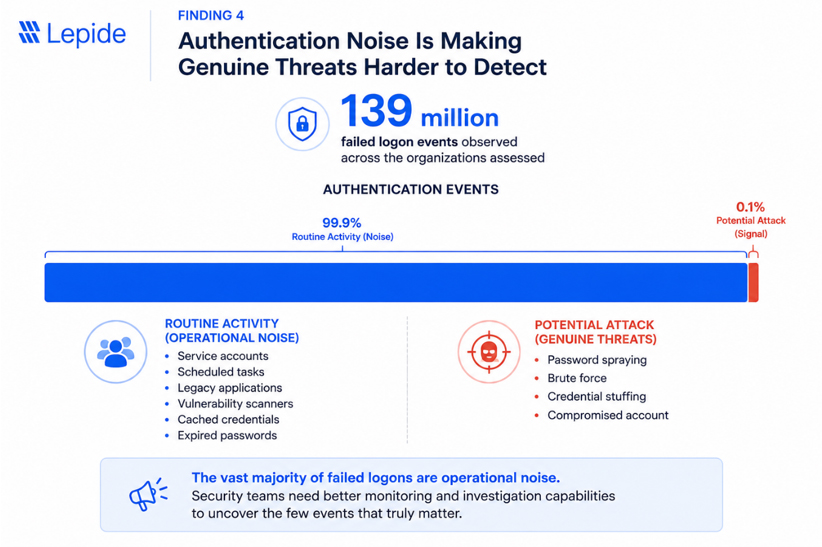
- More than 139 million failed logon events were observed across the organizations assessed.
- One organization recorded over 108 million failed logons during the assessment period.
- Another organization recorded more than 26 million failed logons in just 20 days.
- 80% of organizations identified authentication noise as a significant operational challenge.
- Multiple organizations traced authentication failures to service accounts, legacy applications, vulnerability scanners, cached credentials, and expired passwords rather than malicious activity.
- Every organization recommended improving authentication monitoring and investigation capabilities.
What We Observed
Failed authentication events were one of the largest sources of security data generated across the environments assessed. While the overall volume varied considerably between organizations, a consistent pattern emerged: the majority of failed logons were not indicators of active compromise but the result of routine operational activity.
Legacy applications continued attempting to authenticate using expired credentials. Service accounts generated repeated failures after password changes. Automated vulnerability scanners, scheduled tasks, printers, synchronization tools, and other infrastructure components produced large volumes of expected authentication failures that accumulated over time.
This operational noise created a much bigger challenge than the failures themselves. Security teams were often unable to quickly distinguish expected authentication activity from events that genuinely required investigation. Millions of routine failures masked the comparatively small number of events that could indicate password spraying, credential stuffing, brute-force attacks, or compromised accounts.
Several organizations acknowledged that these authentication patterns had become accepted as "normal," despite significantly reducing confidence in their ability to detect suspicious activity quickly.
Why It Matters
Authentication is one of the earliest indicators of malicious activity. Attackers frequently generate failed logons while attempting password spraying, credential stuffing, or brute-force attacks before successfully compromising an account.
When security teams are forced to investigate environments producing hundreds of thousands—or even millions—of routine authentication failures, meaningful security signals become buried within operational noise. This increases investigation time, contributes to alert fatigue, and delays the identification of genuine threats.
Authentication noise also places a significant operational burden on IT teams. Repeated account lockouts, stale service account credentials, expired passwords, and legacy systems consume valuable administrative time while making it increasingly difficult to establish a reliable security baseline.
Organizations should not aim to eliminate failed logons entirely. Instead, they should strive to understand which authentication failures represent expected operational behavior and which require immediate investigation.
Benchmark
| Metric | Benchmark |
|---|---|
| Total failed logons observed | 139 million+ |
| Highest failed logon volume | 108 million+ |
| Second highest failed logon volume | 26 million+ |
| Organizations identifying authentication noise as a challenge | 80% |
| Organizations identifying service account authentication issues | 70% |
| Organizations identifying stale or expired credentials | 70% |
| Organizations recommending improved authentication monitoring | 100% |
Recommendations
Organizations should focus on reducing operational authentication noise while improving the ability to identify genuinely suspicious activity.
Priority actions include:
- Investigate accounts generating persistent failed logon activity.
- Review service accounts following password changes to identify stale credentials.
- Eliminate legacy authentication dependencies wherever possible.
- Correlate failed logons with account lockouts, password resets, and privileged access activity to improve investigation context.
- Baseline normal authentication behavior and investigate significant deviations.
- Continuously monitor authentication failures across Active Directory and Microsoft Entra ID.
- Prioritize investigation based on user risk, authentication source, and failure patterns rather than event volume alone.
How Lepide Helps
Lepide centralizes authentication activity across Active Directory and Microsoft Entra ID, enabling security teams to analyze failed logons in context rather than as isolated events. By correlating authentication failures with user identities, privileged access, account changes, and user activity, Lepide helps organizations quickly distinguish routine operational noise from behavior that may indicate credential misuse or active attack.
Rather than overwhelming administrators with millions of individual events, Lepide provides the visibility needed to prioritize investigations, identify recurring authentication problems, and reduce the operational burden associated with large-scale identity monitoring.
Organizations Consistently Underestimate How Much Sensitive Data They Hold
Headline Benchmark Statistics
- 80% of organizations assessed identified sensitive or regulated data requiring additional governance.
- More than 230,000 sensitive files were discovered across the environments reviewed.
- One organization identified over 151,000 files containing regulated information.
- Another organization identified more than 77,000 files containing sensitive personal information.
- Sensitive data was consistently found within HR, Finance, Payroll, Legal, and operational business repositories.
- Every organization with Microsoft 365 workloads identified opportunities to improve sensitive data governance before expanding AI or cloud collaboration initiatives.
What We Observed
One of the most consistent findings across this research was not simply that organizations stored sensitive data, but that they lacked complete visibility into where that data existed and how broadly it was accessible.
Sensitive information was discovered across file servers, SharePoint Online, OneDrive, and Microsoft Teams, often spread across multiple departments and business units. Common data types included Social Security numbers, driver's license information, passport details, banking information, payroll records, employee records, customer information, and other regulated personal data.
Perhaps more importantly, organizations frequently underestimated both the scale and distribution of this information. Rather than existing in isolated repositories, sensitive data was often duplicated across multiple locations, inherited through legacy file structures, or retained long after its original business purpose had ended.
Several organizations were surprised by the volume of regulated information identified during the assessments, particularly within legacy file shares and collaborative Microsoft 365 environments where historical data had accumulated over many years.
The challenge was rarely discovering a single sensitive document. It was understanding the overall exposure created by hundreds of thousands of files distributed across multiple platforms, each with different permissions, owners, and levels of business oversight.
Why It Matters
Sensitive data cannot be effectively protected if organizations do not know where it exists.
As organizations generate increasing volumes of unstructured data, traditional approaches to data governance become increasingly difficult to sustain. Historical file shares, collaborative workspaces, cloud storage, and departmental repositories often grow independently, resulting in duplicated information, inconsistent permissions, and limited ownership.
This lack of visibility creates operational, security, and compliance challenges. Security teams struggle to prioritize remediation efforts, compliance teams cannot confidently demonstrate control over regulated information, and incident response becomes significantly more complex when organizations cannot immediately determine whether sensitive information has been exposed.
The rapid adoption of AI technologies further increases the importance of data visibility. AI assistants inherit existing permissions and make information easier to discover, meaning organizations must first understand what sensitive information exists before they can effectively govern how it is accessed.
Ultimately, organizations cannot secure what they cannot see.
Benchmark
| Metric | Benchmark |
|---|---|
| Organizations discovering regulated or sensitive data | 80% |
| Sensitive files identified | 230,000+ |
| Highest number of classified files observed | 151,750 |
| Second highest number of classified files observed | 77,514 |
| Organizations identifying sensitive HR data | 80% |
| Organizations identifying sensitive financial data | 80% |
| Organizations recommending improved data governance | 100% |
| Organizations preparing for AI or Microsoft 365 governance improvements | Multiple |
Recommendations
Organizations should establish continuous visibility into sensitive data across both on-premises and cloud environments.
Priority actions include:
- Continuously discover and classify sensitive data across file servers and Microsoft 365.
- Identify repositories containing regulated information and assign clear business ownership.
- Remove obsolete, duplicated, and unnecessary sensitive data where appropriate.
- Prioritize remediation based on both data sensitivity and business impact.
- Regularly review access to sensitive repositories to ensure permissions remain aligned with business need.
- Incorporate sensitive data discovery into AI readiness and broader governance initiatives.
- Monitor how sensitive information is accessed, copied, shared, and modified over time.
How Lepide Helps
Lepide automatically discovers and classifies sensitive information across Windows File Servers, Microsoft 365, SharePoint Online, OneDrive, and other supported repositories. By combining data classification with permissions analysis, identity intelligence, and user activity monitoring, organizations gain a complete understanding of where sensitive data resides, who can access it, and how it is being used.
This enables security teams to prioritize remediation based on real business risk, strengthen compliance, reduce unnecessary data exposure, and confidently prepare for initiatives such as Microsoft Copilot and broader AI adoption.
Organizations Lack Confidence in Who Can Access Their Most Sensitive Data
Headline Benchmark Statistics
- 100% of organizations assessed identified opportunities to improve access governance for sensitive data.
- Multiple organizations discovered users with unnecessary access to HR, Finance, Payroll, Legal, and executive data.
- Several assessments identified Full Control permissions on business-critical folders that exceeded operational requirements.
- Sensitive data was frequently accessible through nested groups, inherited permissions, and legacy access assignments.
- Every Microsoft 365 assessment recommended reviewing permissions before expanding AI capabilities such as Microsoft Copilot.
What We Observed
While organizations generally understood where their critical business data was stored, they were often far less confident about who could actually access it.
Across both on-premises and Microsoft 365 environments, sensitive repositories commonly accumulated access over many years. Departmental restructuring, application deployments, temporary projects, and staff changes resulted in permissions that were rarely removed once granted. As a result, access to sensitive information frequently expanded beyond the users who genuinely required it.
Several assessments identified business-critical folders containing HR records, financial information, payroll data, legal documentation, and operational records where access extended well beyond the intended business owners. In many cases, inherited permissions, nested security groups, and historical administrative decisions made it difficult to determine whether access remained appropriate.
The issue was not simply excessive permissions. It was a lack of confidence. Organizations could not quickly answer fundamental governance questions, including:
- Who currently has access to this sensitive data?
- Why do they have access?
- Is that access still required?
- How did they inherit those permissions?
Without clear answers, access reviews became time-consuming manual exercises rather than routine governance activities.
Why It Matters
Access governance sits at the center of modern data security.
Every unnecessary permission increases the potential impact of compromised credentials, insider threats, ransomware, and accidental data exposure. Even well-managed identities become security risks when users retain access to information beyond their current responsibilities.
The challenge becomes even greater as organizations adopt cloud collaboration platforms and AI technologies. Microsoft Copilot and similar tools respect existing permissions—they do not validate whether those permissions remain appropriate. As a result, historical access decisions can significantly expand the information users are able to discover through natural language queries.
Organizations that cannot confidently explain who has access to sensitive information are unlikely to satisfy the principles of least privilege, Zero Trust, or modern compliance frameworks.
Benchmark
| Metric | Benchmark |
|---|---|
| Organizations identifying excessive access to sensitive data | 100% |
| Organizations identifying inherited permission complexity | 80% |
| Organizations identifying Full Control permissions requiring review | Multiple |
| Organizations recommending access reviews before AI adoption | 100% |
| Organizations identifying unnecessary access to HR or Finance data | 80% |
| Organizations recommending least-privilege remediation | 100% |
| Organizations requiring improved permissions visibility | 100% |
Recommendations
Organizations should regularly validate not only where sensitive data is stored, but also who can effectively access it.
Priority actions include:
- Review effective permissions on all repositories containing sensitive or regulated information.
- Remove unnecessary Full Control and broad inherited permissions.
- Replace direct user permissions with role-based security groups wherever possible.
- Perform recurring access certifications for high-value data repositories.
- Correlate permissions with data classification to prioritize remediation based on business risk.
- Validate permissions before deploying AI technologies that increase data discoverability.
- Continuously monitor permission changes and access to sensitive information.
How Lepide Helps
Lepide provides complete visibility into effective access across Windows File Servers, Microsoft 365, SharePoint Online, OneDrive, and Microsoft Teams. By combining permissions analysis with sensitive data discovery, identity intelligence, and user activity monitoring, organizations can quickly determine who has access to critical information, why that access exists, and whether it remains appropriate.
This enables security teams to enforce least privilege with confidence, simplify access reviews, reduce compliance effort, and strengthen governance before sensitive data is exposed through cloud collaboration, AI, or unauthorized access.
Organizations Lack Visibility Into How Sensitive Data Is Being Used
Headline Benchmark Statistics
- More than 170,000 file copy events were identified across the environments assessed.
- More than 35,000 file rename events were observed during the assessment periods.
- One organization recorded over 700,000 after-hours file activities.
- Multiple organizations identified high-volume users transferring thousands of files within short periods.
- Several assessments identified automated service accounts generating significant file activity without clear business context.
- Every organization recommended improving visibility into user activity involving sensitive information.
What We Observed
One of the most consistent operational challenges across the assessments was not determining who could access sensitive data, but understanding how that data was actually being used.
Organizations routinely generated hundreds of thousands of file operations across Windows File Servers and Microsoft 365, including file copies, moves, renames, downloads, and modifications. While the overwhelming majority of this activity represented legitimate business operations, security teams often lacked sufficient context to distinguish expected behavior from activity that warranted investigation.
Several organizations identified users copying unusually large volumes of files, while others discovered service accounts generating extensive automated activity. Large-scale file operations frequently occurred outside normal business hours, yet few organizations had established behavioral baselines that would allow these events to be evaluated quickly.
The challenge was not a lack of audit data. In most environments, the audit trail already existed. The problem was transforming millions of individual events into meaningful operational insight.
As a result, organizations often became aware of unusual user activity only after a security incident, audit request, or compliance investigation had already begun.
Why It Matters
Understanding user behavior is becoming just as important as understanding permissions.
Modern cyberattacks frequently involve legitimate credentials rather than malware. Once attackers obtain valid user accounts, their activity often resembles normal business behavior—copying files, accessing shared folders, downloading documents, and moving information between repositories.
Insider threats present a similar challenge. Employees, contractors, or compromised accounts may legitimately possess access to sensitive information, making behavioral anomalies one of the few reliable indicators of elevated risk.
Without continuous visibility into how sensitive information is being accessed and used, organizations struggle to detect data exfiltration, identify compromised accounts, or investigate suspicious activity before significant damage occurs.
Monitoring user activity is therefore no longer simply an audit requirement. It has become a critical component of modern identity and data security.
Benchmark
| Metric | Benchmark |
|---|---|
| File copy events observed | 170,000+ |
| File rename events observed | 35,000+ |
| Organizations identifying unusually high-volume user activity | 70% |
| Organizations identifying significant service account activity | 70% |
| Highest recorded after-hours activity | 702,202 events |
| Organizations recommending improved user activity monitoring | 100% |
| Organizations identifying potential insider-risk indicators | Multiple |
Recommendations
Organizations should continuously monitor how sensitive information is accessed and used, rather than relying solely on permissions reviews.
Priority actions include:
- Establish behavioral baselines for normal user and service account activity.
- Monitor high-volume file copying, downloads, renames, and deletions involving sensitive data.
- Investigate unusual after-hours activity involving business-critical repositories.
- Differentiate expected automated processes from unexpected user behavior.
- Prioritize investigations involving privileged users and sensitive repositories.
- Correlate user activity with identity, permissions, and authentication events to provide investigation context.
- Implement real-time alerting for high-risk user activity rather than relying exclusively on retrospective audit reviews.
How Lepide Helps
Lepide continuously monitors user activity across Windows File Servers, Microsoft 365, SharePoint Online, OneDrive, and Microsoft Teams, providing complete visibility into how sensitive information is accessed, copied, modified, moved, and shared.
By correlating user behavior with identities, permissions, authentication events, and sensitive data classification, Lepide enables security teams to quickly distinguish routine business activity from behavior that may indicate insider threats, compromised accounts, or data exfiltration. This allows investigations to begin with meaningful context rather than millions of isolated audit events, significantly reducing response times while improving confidence in security decisions.
AI Is Exposing Existing Governance Weaknesses, Not Creating New Ones
Headline Benchmark Statistics
- Every Microsoft 365 assessment identified opportunities to improve governance before expanding AI adoption.
- Multiple organizations discovered sensitive HR, Finance, Payroll, and Legal data that would become more discoverable through AI-powered search.
- 100% of Microsoft Copilot readiness assessments recommended reviewing permissions before deployment.
- Sensitive information was frequently accessible through legacy permissions, inherited access, and historical collaboration settings rather than intentional AI configuration.
- Every organization preparing for Microsoft Copilot identified permissions governance as a higher priority than AI security itself.
What We Observe
Artificial intelligence emerged as a recurring business driver across several assessments, particularly among organizations preparing to deploy Microsoft Copilot. However, the assessments consistently demonstrated that AI itself was not introducing new security vulnerabilities.
Instead, AI highlighted governance challenges that already existed.
Organizations discovered sensitive information stored across SharePoint Online, OneDrive, Microsoft Teams, and file servers that had accumulated over many years. Permissions originally granted for collaboration, temporary projects, or historical business requirements remained in place long after their original purpose had ended.
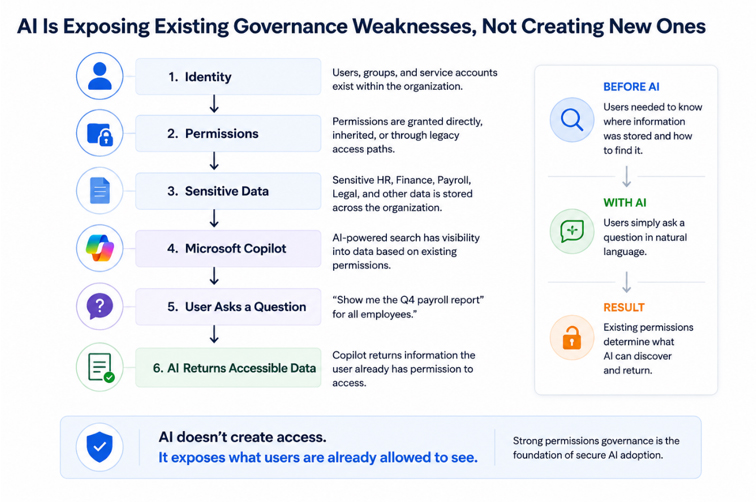
As a result, organizations were often surprised by how easily sensitive information could be surfaced through natural language search. The underlying issue was not Microsoft Copilot—it was incomplete visibility into sensitive data, excessive permissions, and limited confidence in who could access critical information.
Across every Copilot readiness assessment, organizations reached the same conclusion: successful AI adoption depends on strong identity governance, effective permissions management, and continuous visibility into sensitive data.
Why It Matters
AI fundamentally changes how users discover information.
Historically, users needed to know where information was stored before they could access it. AI assistants remove much of that friction by allowing users to locate information through natural language questions.
While AI respects existing permissions, it dramatically increases the discoverability of information users already have permission to access. This means historical permission decisions become significantly more important than they were in traditional file browsing environments.
Organizations that have not established effective identity governance, least privilege, and sensitive data management risk exposing information more broadly than intended—not because AI bypasses security controls, but because existing access decisions become easier to exploit.
Preparing for AI therefore requires organizations to strengthen governance long before deploying new technology.
Benchmark
| Metric | Benchmark |
|---|---|
| Organizations recommending permissions reviews before AI adoption | 100% |
| Organizations identifying sensitive business data requiring governance improvements | 100% |
| Organizations discovering excessive access to sensitive repositories | 100% |
| Organizations identifying Microsoft 365 governance improvements | 100% |
| Organizations identifying legacy permissions affecting AI readiness | Multiple |
| Organizations concluding governance—not AI—represented the primary security challenge | 100% |
Recommendations
Organizations should view AI readiness as a governance initiative rather than a technology deployment.
Priority actions include:
- Review permissions on all Microsoft 365 repositories before enabling AI services.
- Discover and classify sensitive information across SharePoint Online, OneDrive, Microsoft Teams, and file servers.
- Remove unnecessary access to HR, Finance, Legal, and executive repositories.
- Validate effective permissions using least-privilege principles rather than assumed access.
- Eliminate legacy sharing links and historical collaboration permissions that are no longer required.
- Continuously monitor how AI-accessible information is being accessed and used.
- Treat AI readiness as an extension of identity and data governance rather than an isolated security project.
How Lepide Helps
Lepide helps organizations prepare for Microsoft Copilot by providing complete visibility into sensitive data, effective permissions, and user access across Microsoft 365 and on-premises environments. Rather than focusing solely on AI, Lepide enables organizations to understand what information exists, who can access it, and whether that access remains appropriate before AI increases its discoverability.
By combining sensitive data discovery, permissions analysis, identity intelligence, and user activity monitoring, Lepide gives security teams the confidence to adopt AI while maintaining strong governance, reducing unnecessary exposure, and enforcing least-privilege access across the enterprise.
Security Teams Still Struggle to Answer Basic Security Questions
Headline Benchmark Statistics
- of organizations assessed identified opportunities to improve operational visibility.
- Every assessment recommended replacing or reducing manual investigation processes.
- Multiple organizations relied on Event Viewer, PowerShell scripts, spreadsheets, or native logs to investigate security events.
- Several organizations reported investigations taking hours or days to answer relatively simple audit questions.
- Every assessment identified gaps between collecting audit data and generating actionable security insight.
What We Observed
Regardless of industry, organization size, or technology stack, one operational challenge appeared consistently throughout the research: security teams struggled to answer fundamental questions quickly.
Questions such as:
- Who changed this permission?
- Who accessed this file?
- When was this account added to Domain Admins?
- Who shared this document externally?
- Why did this account become locked out?
- Who currently has access to this folder?
Although the underlying audit information often existed somewhere within Active Directory, Microsoft 365, Windows Event Logs, or file server logs, retrieving meaningful answers frequently required manual correlation across multiple systems.
Several organizations relied heavily on PowerShell scripts, Event Viewer, spreadsheets, or native Microsoft tools to investigate security events. Others had previously deployed auditing solutions that no longer met operational requirements or had become too complex to maintain.
As environments expanded across Active Directory, Microsoft Entra ID, Microsoft 365, cloud collaboration platforms, and unstructured data repositories, the effort required to investigate routine security questions increased significantly.
The result was not necessarily a lack of audit data.
It was a lack of operational visibility.
Why It Matters
Modern security operations depend on speed.
Whether responding to ransomware, investigating suspicious user activity, preparing for an audit, or validating compliance, security teams must be able to quickly establish what happened, when it happened, who performed the action, and what systems were affected.
When investigations require manual log collection and correlation across multiple platforms, incident response slows considerably. Valuable analyst time is spent gathering information rather than assessing risk and coordinating remediation.
Limited visibility also increases compliance effort. Demonstrating access controls, producing audit evidence, and validating security changes becomes increasingly resource-intensive when organizations cannot generate answers quickly and consistently.
Ultimately, organizations cannot effectively manage identity and data security if operational visibility is fragmented across multiple disconnected systems.
Benchmark
| Metric | Benchmark |
|---|---|
| Organizations recommending improved operational visibility | 100% |
| Organizations relying on manual investigation processes | 100% |
| Organizations identifying fragmented audit data | 100% |
| Organizations recommending centralized auditing | 100% |
| Organizations identifying investigation delays | Multiple |
| Organizations requiring improved compliance reporting | Multiple |
Recommendations
Organizations should focus on reducing investigation time by centralizing identity, permissions, user activity, and audit information.
Priority actions include:
- Consolidate audit data from Active Directory, Microsoft Entra ID, Microsoft 365, and file servers into a single investigation platform.
- Replace manual log correlation with centralized reporting and search capabilities.
- Monitor identity, permissions, authentication, and sensitive data activity from a unified view.
- Automate reporting for compliance frameworks and routine access reviews.
- Establish standardized investigation workflows for common security incidents.
- Continuously review investigation metrics to identify opportunities to reduce response times.
- Ensure security teams can answer common audit and incident response questions within minutes rather than hours.
How Lepide Helps
Lepide centralizes auditing, reporting, permissions analysis, identity monitoring, sensitive data discovery, and user activity into a single platform, enabling security teams to investigate incidents without switching between multiple native tools.
By correlating identities, permissions, authentication events, file activity, Microsoft 365 changes, and sensitive data exposure, Lepide provides complete operational visibility across the environment. This enables organizations to answer security and compliance questions in minutes, accelerate incident response, simplify audit preparation, and make more informed security decisions based on a single source of truth.
Modern Identity and Data Security Has Outgrown Manual Security Operations
Headline Benchmark Statistics
- 100% of organizations assessed relied on at least some manual processes to investigate identity and data security risks.
- More than 1.3 million Microsoft 365 and infrastructure changes were observed in a single environment.
- More than 139 million failed authentication events were recorded across the environments assessed.
- More than 230,000 sensitive files were identified during the assessments.
- More than 74,000 permission changes were observed across Active Directory and file servers.
- Every organization identified opportunities to improve operational efficiency through centralized visibility and automation.
What We Observed
Across every assessment, one conclusion became increasingly clear: modern IT environments are generating more security data than security teams can realistically analyze using traditional tools and manual processes.
Organizations were managing hybrid Active Directory environments, Microsoft Entra ID, Microsoft 365, Windows File Servers, cloud collaboration platforms, and rapidly growing volumes of unstructured data. Every change to a user account, permission, security group, file, or collaboration workspace generated additional audit information that required interpretation.
The challenge was no longer collecting data. Organizations already had access to Windows Event Logs, Microsoft audit logs, native reporting tools, and security alerts. The difficulty was bringing that information together into a complete picture that allowed security teams to understand risk quickly.
As environments became larger and more interconnected, manual investigations, PowerShell scripts, spreadsheets, and periodic access reviews became increasingly difficult to sustain. Teams often spent significant time gathering information before they could begin analyzing the security issue itself.
This operational complexity appeared consistently across organizations of different sizes and industries, suggesting that it is becoming a common challenge rather than an isolated operational issue.
Why It Matters
Identity and data security are becoming increasingly interconnected.
A single security investigation may require understanding identity changes, authentication activity, permissions, sensitive data exposure, Microsoft 365 collaboration, and user behavior simultaneously. When this information exists across multiple disconnected systems, investigations become slower, more resource-intensive, and more prone to human error.
As organizations continue adopting cloud services, AI technologies, and hybrid infrastructure, this complexity will continue to grow. Security teams that rely primarily on manual processes will find it increasingly difficult to maintain visibility, respond quickly to incidents, and demonstrate compliance.
The challenge is no longer simply collecting more audit data.
It is transforming that data into actionable security intelligence that enables organizations to make faster, more confident decisions.
Benchmark
| Metric | Benchmark |
|---|---|
| Organizations relying on manual investigation processes | 100% |
| Organizations recommending centralized visibility | 100% |
| Largest Microsoft 365 and infrastructure change volume | 1.3 million+ events |
| Total failed authentication events observed | 139 million+ |
| Sensitive files identified | 230,000+ |
| Permission changes observed | 74,000+ |
| Organizations identifying operational visibility as a strategic priority | 100% |
Recommendations
Organizations should modernize security operations to match the scale and complexity of today's hybrid environments.
Priority actions include:
- Centralize identity, permissions, data, and user activity into a single operational view.
- Replace manual investigations with automated reporting and continuous monitoring.
- Prioritize risks based on business impact rather than event volume.
- Correlate identities, permissions, authentication, sensitive data, and user activity to accelerate investigations.
- Continuously review operational metrics to identify inefficiencies and governance gaps.
- Reduce dependence on disconnected native tools and manual evidence collection.
- Build security operations around continuous visibility rather than periodic reviews.
How Lepide Helps
Lepide provides a unified view of identity, permissions, sensitive data, user activity, and security events across Active Directory, Microsoft Entra ID, Microsoft 365, Windows File Servers, and other critical platforms.
By bringing these previously disconnected data sources together, Lepide enables security teams to investigate incidents faster, prioritize the risks that matter most, simplify compliance, and maintain continuous visibility across their entire identity and data security ecosystem.
ather than adding another point solution, Lepide helps organizations understand how identities, permissions, data, and activity interact—giving security teams the context they need to make informed decisions at the speed modern environments demand.