


Last Updated on July 2, 2026 by Ashok Kumar
The presence of orphaned and risky permissions is one of the most overlooked challenges in hybrid environments. These hidden access rights can become an opportunity for unauthorized access, privilege escalation, and compliance violations if left neglected.
Hybrid environments are becoming increasingly complex, often consisting of a combination of on-premises Active Directory, File Servers and Microsoft Entra ID along with other business applications. With individual platforms maintaining their own permissions model, it can make centralized visibility very difficult. A user may appear to have limited access to one system while inheriting powerful privileges elsewhere.
Clear visibility across all three systems is therefore critical as without it access sprawl can result along with orphaned and excessive permissions.
What Are Orphaned and Risky Permissions?
Orphaned permissions are access rights that are still assigned even though the related user or group no longer exists. Risky permissions, on the other hand, are access rights that are often excessive and can create unnecessary security exposure. One of the most dangerous characteristics of orphaned and risky permissions is their lack of visibility as access is rarely given directly but is inherited in various ways such as nested groups and share permissions.
So, the challenge is not just that these permissions exist, it is also that they are often difficult to see, understand, and manage. However, attackers actively target inactive accounts and excessive permissions as entry points into an organization’s environment making them a significant security risk.
Orphaned Permissions can occur in the following ways:
- An account becomes inactive for reasons such as an employee leaving a company, but their account is not removed.
- When user accounts are deleted from Active Directory or local Windows systems, their permissions on files and folders don’t automatically disappear. Instead, these permissions remain in place, but they display as cryptic Security Identifiers (SIDs) rather than readable account names. These are referred to as orphaned SIDs or unresolved SIDs.
- Disabling accounts within Active Directory can result in another potential source of orphaned permissions and so should also be avoided. Even though the account is disabled, permissions over a higher-privilege account can provide alternative access. For example, having privileges such as “WriteDACL” or “GenericAll” can enable an attacker to exploit a disabled account by re-enabling it and making use of the escalation path as if it were never disabled.
- Security groups need to be monitored carefully as a security group for a project may be created but over time it becomes unnecessary. These groups, which contain permissions to resources that are no longer required, can linger unmaintained and are essentially hidden in the domain posing a significant security risk.
Why Hybrid Environments Make Permission Management Difficult
Organizations that have an environment consisting of a combination of Microsoft 365 and Entra ID with an on-premises Active Directory are operating two identity systems that logically belong together but from a technical perspective function differently.
One stores groups and users on domain controllers, the other in a cloud platform with its own policies, tokens, and access layers.
This creates difficulties between control, speed, and security. When identities are maintained in parallel across both systems it is easy for administrators to quickly lose visibility. This situation is inefficient and creates a significant security risk. Every inconsistent identity represents a potential attack path.
As organizations adopt cloud services while maintaining on-premises infrastructure, managing access and permissions becomes increasingly complex. Security groups can simplify access management by using permission inheritance but while these mechanisms are essential for scaling access control, as environments grow, group nesting and inheritance structures can become increasingly complex, creating hidden security risks that are difficult to identify and manage.
Even with reporting and management tools, there is often a lack of a unified view of across the hybrid environment. This fragmented visibility creates security issues that make it difficult to understand who has access to what, why they have access, and whether that access is still relevant.
Any manual processes used to review permissions across Active Directory, Microsoft Entra ID and Windows file servers become impractical as organizations grow and adopt hybrid environments. In environments which consist of thousands of users and countless permission assignments across on-premises and cloud systems, manual auditing increases the likelihood of overlooked risks, excessive permissions, and compliance gaps.
The Real Problem Is Disconnected Identity Visibility, Not Orphaned Permissions
Many organizations see orphaned permissions as an access clean-up exercise. In fact, they represent a much larger problem: disconnected identity visibility. Permissions are not dangerous because they are old. They are dangerous because organizations lose track of who they belong to. In hybrid environments, identities, groups, and permissions are distributed across Active Directory, Microsoft Entra ID, file servers, and SaaS applications, making it hard to know who actually has access to what. Until identity and data are one, orphaned permissions will continue to pile up faster than they are cleaned up.
How to Detect Orphaned and Risky Permissions in Active Directory, File Servers, and Entra ID
Organizations rely on Active Directory (AD), Windows file servers, and Microsoft Entra ID to manage identities, permissions, and access to critical business resources. Over time, however, permissions naturally accumulate as employees change roles, projects begin and end, and new applications are deployed.
Without regular monitoring, these accumulated permissions can become unmanageable and increase the risk of security incidents; and as many of these permissions are hidden, it is difficult to identify them through manual reviews.
The following section explains how to detect orphaned and risky permissions across Active Directory, Windows file servers, and Microsoft Entra ID in more detail:
Active Directory
For many organizations, Active Directory is the basis for access management. File servers, applications, and cloud services often rely on AD groups, so any issues within Active Directory can cause problems across the network and so needs to be monitored carefully.
How to detect orphaned and risky permissions in Active Directory:
- Identify Inactive User Accounts: Finding and removing these accounts will help to remove any orphaned permissions
- Identify disabled users with active group memberships: Any disabled users within groups need to be identified and removed by Administrators as disabled users, who are still part of active groups, can pose security risks by retaining access to sensitive resources.
- Detect unresolved SIDs in group memberships: Deleting user accounts from Active Directory doesn’t remove their permissions on files and folders. These permissions display as cryptic Security Identifiers (SIDs) rather than readable account names. It is essential, therefore, to identify and remove these so that they don’t become an easy way for an attacker to gain access to sensitive data.
- Find stale or unused security groups: Unused security groups are a security vulnerability as they increase the attack surface that hackers could exploit. So, admins should find empty groups in Active Directory and delete them from the domain.
- Review privileged group memberships (Domain Admins, etc.): One of the most significant security issues that organizations face with Active Directory is the large number of accounts with privileged access to a domain via groups. Access to privileged groups, like Domain Admins, should be limited to just a few accounts and only used when necessary.
Windows File Servers
How to detect orphaned and risky permissions in File Servers:
- Identify orphaned SIDs in NTFS permissions: Even if user accounts and security groups are regularly reviewed, the presence of orphaned Security Identifiers (SIDs) within NTFS permissions is often overlooked. Identifying and removing orphaned SIDs is an important part of maintaining a secure file server environment and helps to avoid difficulties with permission analysis.
- Detect legacy folder permissions from old projects or teams: Outdated permissions increase the risk of data exposure, complicates audits, and makes it difficult to enforce least-privilege access and so need to be identified and removed to increase security and remain compliant.
- Find permissions granted via obsolete groups: Obsolete groups can become a hidden source of excessive permissions and so identifying file server permissions granted through outdated or unused groups is a crucial step in maintaining a secure and well-governed access model.
- Review broad access to sensitive file shares: Constantly monitoring broad access to sensitive file shares is a critical step in reducing data exposure, enforcing least-privilege access, and strengthening overall security.
Microsoft Entra ID
How to detect orphaned and risky permissions in Entra ID:
- Identify inactive users with assigned access: The presence of inactive users who continue to retain access to applications, groups, roles, and organizational resources is one of the most common security risks in Microsoft Entra ID environments. It is critical therefore to regularly identify and review inactive users with assigned access.
- Detect stale guest accounts: Many guest accounts remain active long after projects end and these stale guest accounts can become a source of excessive permissions and therefore a compliance risk. Regularly reviewing stale guest accounts is a critical part of maintaining a secure Entra ID environment.
- Review role-based access assignments: Role-Based Access Control (RBAC) is an effective way to manage access in Microsoft Entra ID. Assigning permissions through predefined or custom roles means that organizations can manage resources and enforce least-privilege access more efficiently. However, to avoid issues with excessive permissions, regular reviews are essential.
What Organizations Often Get Wrong About Permission Reviews
One of the biggest misconceptions is that orphaned permissions are something you discover during a quarterly audit. In practice, they are created continuously as users change roles, projects end, groups evolve, and cloud services are adopted. By the time a scheduled review takes place, the permission landscape has already changed. The challenge isn’t simply identifying orphaned permissions, it’s maintaining continuous visibility into how access changes over time so excessive permissions, dormant access, and new attack paths are identified before they become security incidents.
How to Automate the Detection of Orphaned and Risky Permissions with Lepide
Manual reviews to detect orphaned and risky permissions can help identify some issues, but they are not enough in modern IT environments. An automated approach is essential to be able to continuously detect and remediate permission risks.
As systems grow, periodic audits become reactive rather than proactive. Automation provides continuous monitoring across AD, File Servers and Entra ID making the complexity of managing a hybrid environment more manageable.
Orphaned accounts and unresolved SID’s can be detected in real-time, and any potential security issues can be resolved immediately reducing the chance of a data breach and so keeping systems more secure.
Automation increases the visibility over on-premises and cloud environments providing a clear understanding over who has access to what and excessive and risky permissions can be identified and revoked in real-time, reducing the attack surface and keeping systems secure.
To provide clear visibility over your hybrid environment, it is good practice to use a solution designed to streamline this process. The Lepide Data Security Platform is one such solution and helps to simplify the following:
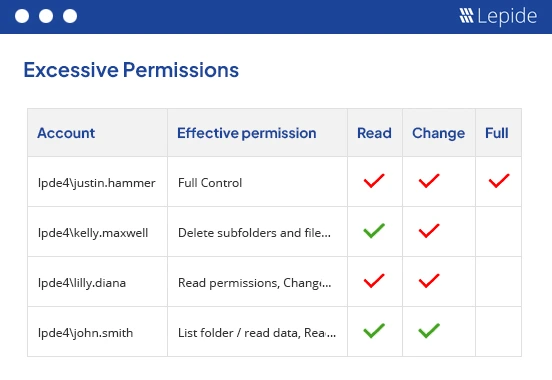
- Permission visibility: Lepide provides several different permission reports including excessive permissions to deliver complete visibility over who has access to what.
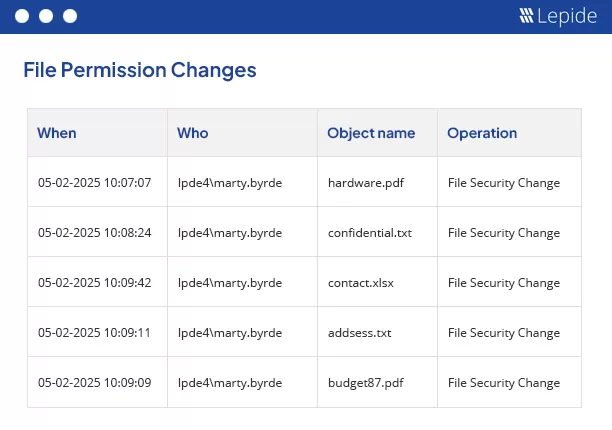
- Change tracking: The Lepide reports include clarity over all permission changes. This report includes information about who made the change and why it was made.
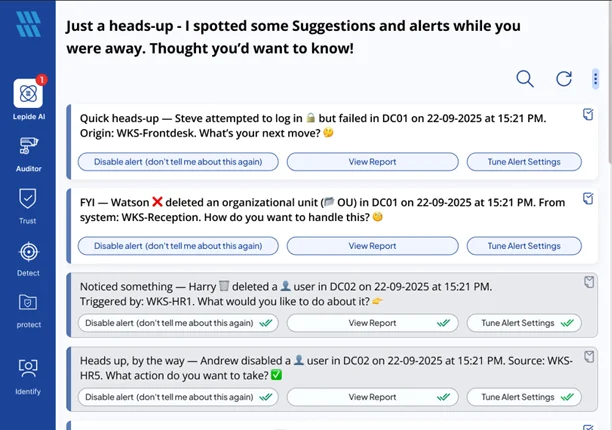
- Security reporting and alerting: There are many reports included within the Lepide Data Security Platform to make security reporting easy and efficient. Real-time alerts provide visibility over what is happening in your system so that a response can be made immediately so mitigating any further damage.
Best Practices for Preventing Orphaned and Risky Permissions
Orphaned and risky permissions usually appear gradually over time. Generally, they accumulate as employees leave or change roles and projects end. Without appropriate control, access rights can become outdated and excessive.
A proactive approach is required to combine visibility, accountability, automation, and regular reviews. By instigating strong permission management practices, organizations can reduce risk, remain compliant, and maintain a least-privilege access model across Active Directory, Windows file servers, Microsoft Entra ID, and other business systems.
In summary, best practices include:
- Implement a least privilege access model
- Regularly review and clean up inactive accounts
- Remove unused groups and stale permissions
- Establish ownership for all security groups
- Continuously monitor privileged access
- Enforce periodic access reviews
- Automate auditing and reporting wherever possible
Conclusion
Orphaned and risky permissions are among the most common but also the most overlooked security challenges in modern hybrid environments. As access across Active Directory, Windows file servers, and Microsoft Entra ID builds up, organizations often lose visibility into who can access sensitive resources and whether that access remains justified increase the risk of permission sprawl.
Orphaned and risky permissions are often hidden but highly dangerous. But by identifying inactive accounts, obsolete groups, orphaned SIDs, excessive permissions, and hidden access paths, organizations can significantly reduce their attack surface and strengthen their security posture.
However, detection alone is not enough. Prevention and automation are essential processes to have in place to ensure that systems remain secure and compliance regulations are met.
Continuous visibility across AD, File Servers, and Entra ID is key to reducing risk. It will ensure that effective access governance is maintained, data exposure is reduced, and that permissions remain aligned with legitimate business needs.
Frequently Asked Questions
Orphaned permissions are access rights that are still assigned even though the related user or group no longer exists.
They can become an easy way for an attacker to gain access to sensitive data if they are not identified and removed.
Risky permissions in hybrid environments are often caused by the gradual accumulation of access rights across Active Directory, file servers, Entra ID, and other cloud applications.
Privilege creep can be identified by running reports such as the Excessive Permissions by User Report from Lepide. This will show users with excessive permissions so they can be remediated to reduce your attack surface.
The most effective approach to permission auditing is continuous visibility and monitoring of permissions across Active Directory, Windows file servers, Entra ID, and cloud applications.
Automation is crucial for managing permissions in modern hybrid environments, but it should not completely replace manual reviews. Determining whether access is still appropriate requires business context and human decision-making.