Last Updated on October 30, 2026 by Satyendra
Identifying sensitive data that Microsoft 365 Copilot could potentially surface requires discovering sensitive content and evaluating the permissions, group memberships, and sharing settings that determine who can access it.
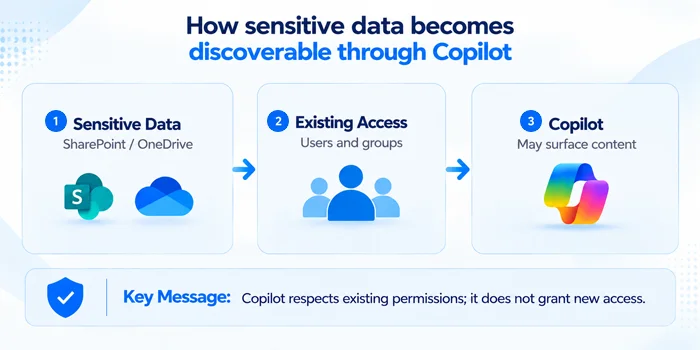
Copilot can make existing access risks easier to discover because users can use natural-language prompts to find and summarize information they are already authorized to access, without necessarily knowing where the underlying content resides.
The article answers two questions every security team should be asking:
- What sensitive data could users potentially access through Copilot?
- What sensitive data has been accessed through Copilot?
How to Identify Sensitive Data Microsoft Copilot Can Potentially Access
Understanding the potential Copilot exposure starts with a simple principle: Sensitive data discovery must be connected to user access. The broader a user’s access to content available to Microsoft 365 Copilot, the more information Copilot may potentially retrieve and surface on that user’s behalf.
A practical assessment can be broken down into five steps:
Discover Sensitive Data → Locate It → Identify Who Has Access → Find Overexposure → Assess Copilot Exposure
- Discover Sensitive Data: The first step is to identify sensitive information stored across your Microsoft 365 environment, particularly in SharePoint Online and OneDrive. This involves Personally Identifiable Information (PII), Financial Data, Employee and HR Data, customer data, credentials and legal documents and many others. Manual discovery can be difficult at scale. Organizations can use data classification and sensitive-data discovery capabilities to identify sensitive information based on content, patterns, classifiers, and existing sensitivity labels.
- Identify Where Sensitive Data is Stored: Once sensitive information has been identified, determine where it resides within Microsoft 365. Map each of the findings to their locations, which would be the site, document library, folders, and even individual files and OneDrive accounts.
- Determine Who Has Access: Identify which users and groups can access sensitive information and how that access is granted. Evaluate direct permissions, inherited permissions, group memberships, and sharing links to understand effective access. In most cases, actual access may be quite different from intended access, so examine effective access rather than relying only on the permissions originally assigned.
- Identify Overexposed Sensitive Data: Having determined the sensitive information and its accessibility, it is time to match the data sensitivity level to the extent of the user’s access rights. Focus on sensitive data that is broadly accessible, externally shared, exposed through outdated permissions, or accessible to users who no longer have a business need for it. These situations create a gap between what users should be able to access and what they can actually access.
- Prioritize High-Risk Exposure: Assess and Prioritize Copilot Exposure: Not every accessible document presents the same level of Copilot-related risk. Assess whether sensitive content is available to Copilot through existing user permissions, then prioritize exposure based on data sensitivity, accessibility, and business impact. This strategy helps the security team to address exposures that matter most without trying to get rid of every form of excessive access.
Copilot May Reveal an Access Problem, Not Create One
Copilot does not inherently grant users new permissions to sensitive data. However, it can make information they are already authorized to access easier to discover, retrieve, and summarize, subject to applicable information protection and Copilot access controls. This is an important distinction when considering risks associated with Copilot.
The question should be: why does a user have access to sensitive data in the first place, if it is possible to make it available using Copilot? This could result from overly broad permissions, excessive group memberships, outdated access rights, or overshared content in SharePoint Online, OneDrive, and other supported Microsoft 365 locations. Thus, in addition to identification of data, Copilot risks assessment needs to identify identities and access mechanisms involved.
How to Reduce the Risk of Copilot Exposing Sensitive Data
Having determined the exposure of sensitive data, the organization can now start working on reducing unnecessary access through:
| Action | What to Do |
|---|---|
| Remove unnecessary permissions | Remove permissions from users who no longer need access. |
| Review group memberships | Clean up overly broad or stale groups. |
| Restrict broadly accessible SharePoint sites and libraries | Restrict access to sites and libraries that hold sensitive content. |
| Remove unnecessary external access | Remove access for guests and third parties who no longer need it. |
| Review sharing links | Remove broadly accessible or “Anyone” sharing links where they aren’t required. |
| Apply least-privilege access | Ensure users have only the access their role requires. |
| Apply appropriate data protection controls | Where required and supported, configure Microsoft Purview sensitivity labels, encryption, DLP policies, and Copilot-specific controls to limit how sensitive content can be accessed, processed, or used in Copilot interactions. |
| Periodically reassess access | Review access regularly because permissions and data change constantly. |
Copilot Data Exposure Self-Assessment
Practical Example: Accessible Doesn’t Mean Accessed
An employee has permission to access a confidential HR document stored in SharePoint. Microsoft 365 Copilot may be able to retrieve and summarize that document on the employee’s behalf.
However, having permission to access the document doesn’t mean the employee has actually retrieved or viewed it through Copilot.
Key Takeaway: Permission analysis shows what Copilot could potentially access, while Copilot activity auditing helps determine what users actually accessed or interacted with.
How To See What Sensitive Data Has Actually Been Accessed Through Copilot
Understanding what Copilot could potentially access is only one part. It doesn’t tell you what users have actually done with it. There is a completely separate question that requires its own visibility. Potential access represents an assessment of what Copilot might be able to surface. Actual Copilot activity provides evidence of user interactions and, where recorded, the resources referenced or accessed during those interactions. However, a file being accessed or referenced during an interaction does not necessarily mean that all its contents were displayed to the user. Reviewing the associated prompt and response provides additional context.
- Who is using Copilot?
- What prompts or queries are they submitting?
- What sensitive information or files were referenced or accessed during Copilot interactions, and what information was included in the responses?
- Which files were involved?
- When did the activity occur?
- Whether any queries were potentially risky, for example requests aimed at salaries, credentials or confidential projects?
This visibility matters for investigations, compliance and spotting compromised accounts. If an attacker compromises a user’s account, they may be able to use Copilot to discover or summarize sensitive information that the compromised account is already authorized to access.
Microsoft Purview Audit can record Microsoft 365 Copilot interactions, including details such as the user, timestamp, application, and available references to resources involved in the interaction. The information available depends on the event type, audit configuration, and applicable licensing. Third-party platforms such as Lepide can provide additional reporting, data-access context, and security monitoring capabilities.
How Lepide Helps Monitor Sensitive Data Accessed Through Copilot
Gain visibility into Microsoft 365 Copilot usage, sensitive data access, and related permission risks. With Lepide, gain insights into Copilot usage and interactions, audits, detection of sensitive data, and monitoring of access permissions from one platform.
- Monitor Sensitive Data Accessed by Copilot: Use the Sensitive Data Accessed by Copilot report to identify the user, file name, URL, sensitivity label, search query, and date associated with sensitive data accessed through Copilot.
- Investigate Sensitive Data Access with Copilot Conversation Context: Review reports of sensitive files accessed through Copilot, including available details such as the user, file, sensitivity, timestamp, source IP, and tenant. Where supported, investigate associated Copilot prompts and conversation context to better understand the activity.
- Audit Copilot-Related Access and Changes: Review available audit records for Copilot-related access, licensing, and sensitivity label changes, and identify users with assigned Copilot licenses who may no longer require them.
- Detect Potentially Risky Copilot Queries: Configure keyword-based alerts for supported Copilot query activity to identify prompts that may warrant investigation, such as searches involving credentials or confidential information.
Together, these abilities allow organizations to not only consider the question of “What could Copilot access?” but also “What confidential information is being accessed via Microsoft 365 Copilot?“
Schedule a demo with one of our engineers and know what Microsoft 365 Copilot can access and what sensitive data it actually interacts with
Related Articles:
- Identify Overexposed Permissions Before Enabling Copilot
- How To Monitor What Users Are Accessing Through Microsoft Copilot
- How to Monitor Copilot Usage Using Lepide
- Microsoft Copilot Security Checklist
- Top 7 Tools for Microsoft Copilot Security
- How to Reduce the Risk of Copilot Exposing Sensitive Information
Frequently Asked Questions
No. Microsoft 365 Copilot operates within the user’s existing permissions and does not automatically grant access to all Microsoft 365 data. However, overshared or excessive permissions can allow users to surface sensitive information through Copilot that they already have permission to access
No. Microsoft 365 Copilot respects existing user permissions and security controls. It does not grant users new access to content they are not authorized to access. The risk arises when users already have excessive, stale, or overly broad access to sensitive content.
Yes, potentially, if the user has the proper authorization to access such information. There could be sensitive data stored in SharePoint and OneDrive in an organization, which could include finances, HR details, intellectual property, customer details, and any confidential data. If a user already has permission to access that sensitive data, Copilot may be able to retrieve and surface it in response to an appropriate interaction.
While permission analysis may help to understand what is accessible by users, it still does not help to figure out what data has been accessed in Copilot already. Microsoft Purview provides native auditing for Copilot interactions, while Lepide provides dedicated Copilot reporting that can show sensitive files accessed by Copilot, including the user, file, URL, sensitivity label, query, and date, along with conversation context.