Last Updated on October 12, 2026 by Satyendra
Ransomware can encrypt or delete thousands of files within minutes, especially when attackers compromise accounts with broad access. But what if your data protection tools could do more than just spot strange behavior? In that case, wouldn’t they be able to automatically help limit the threat before it causes even more harm?
Some security tools can detect abnormal data or file activity and trigger predefined response actions, such as disabling an affected user account or executing a response script. Although they are not always perfect and should not replace the rest of your security infrastructure, they may speed up the process of containing the incident.
Here’s how these controls work, what they can do, and what their limitations are.
What Does It Mean to Contain a Ransomware Event?
Detection, response, and containment are related but distinct parts of managing a ransomware incident:
- Detection involves identifying activity that may indicate ransomware. For example, an unusually high volume of file modifications within a short period may indicate suspicious activity.
- Response involves taking actions after suspicious activity is identified, such as alerting security teams, investigating the activity, disabling an account, or initiating remediation.
- Containment aims to limit the attacker’s ability to continue malicious activity or spread further by restricting access, disabling compromised accounts, isolating affected systems, or taking other predefined protective actions.
Containment does not necessarily involve removing ransomware or cleaning up the endpoint. In a data-access context, it can mean blocking a specific access path, such as preventing a compromised account from continuing to access or modify files.
How Can Data Security Tools Detect Ransomware Activity?
Ransomware does not always behave like normal user activity. As ransomware starts to access and modify files on a large scale, certain patterns could emerge that can be detected using data security technologies.
Common Indicators That May Signal Ransomware Activity:
- Large volumes of file modifications within a short period.
- Mass file renaming or deletion.
- Unusual increases in file activity.
- Access to repositories or files the user does not normally access
- Abnormal access to sensitive or business-critical data.
- Significant deviations from established user behaviour.
For instance, an employee who usually only opens a few documents in the course of the day may suddenly make a series of changes to several files within minutes. This may represent a deviation from the user’s established activity pattern, particularly when the volume, frequency, or type of file activity changes significantly.
Behavioral monitoring can establish baselines for normal user activity and identify significant deviations from those baselines, while threshold-based rules can detect predefined patterns such as unusually high volumes of file activity.
Can Data Security Tools Automatically Contain Ransomware Activity?
Some data security tools can automatically initiate a predefined response when activity matches configured ransomware indicators, behavioral conditions, or thresholds. Detection can be automated when a platform uses predefined thresholds, behavioral analytics, threat models, or other detection logic to identify suspicious activity
That’s where automated response comes in. Where a platform supports it, a security tool can take predefined protective action the moment suspicious behavior meets specified conditions or thresholds. A simple flow looks like this:
Suspicious file activity → Anomaly or ransomware indicator detected → Detection rule/threshold triggered → Automated protective action → Security team alerted → Investigation/remediation
The protective action depends on the capabilities of the platform and may include disabling a user account, triggering a response workflow, executing a configured action, or integrating with another security control to take additional action. The key benefit is reducing the time between detection and containment. When evaluating tools, it’s worth asking exactly what the automated response can and can’t do.
How Does Disabling a Compromised Account Help Contain Ransomware?
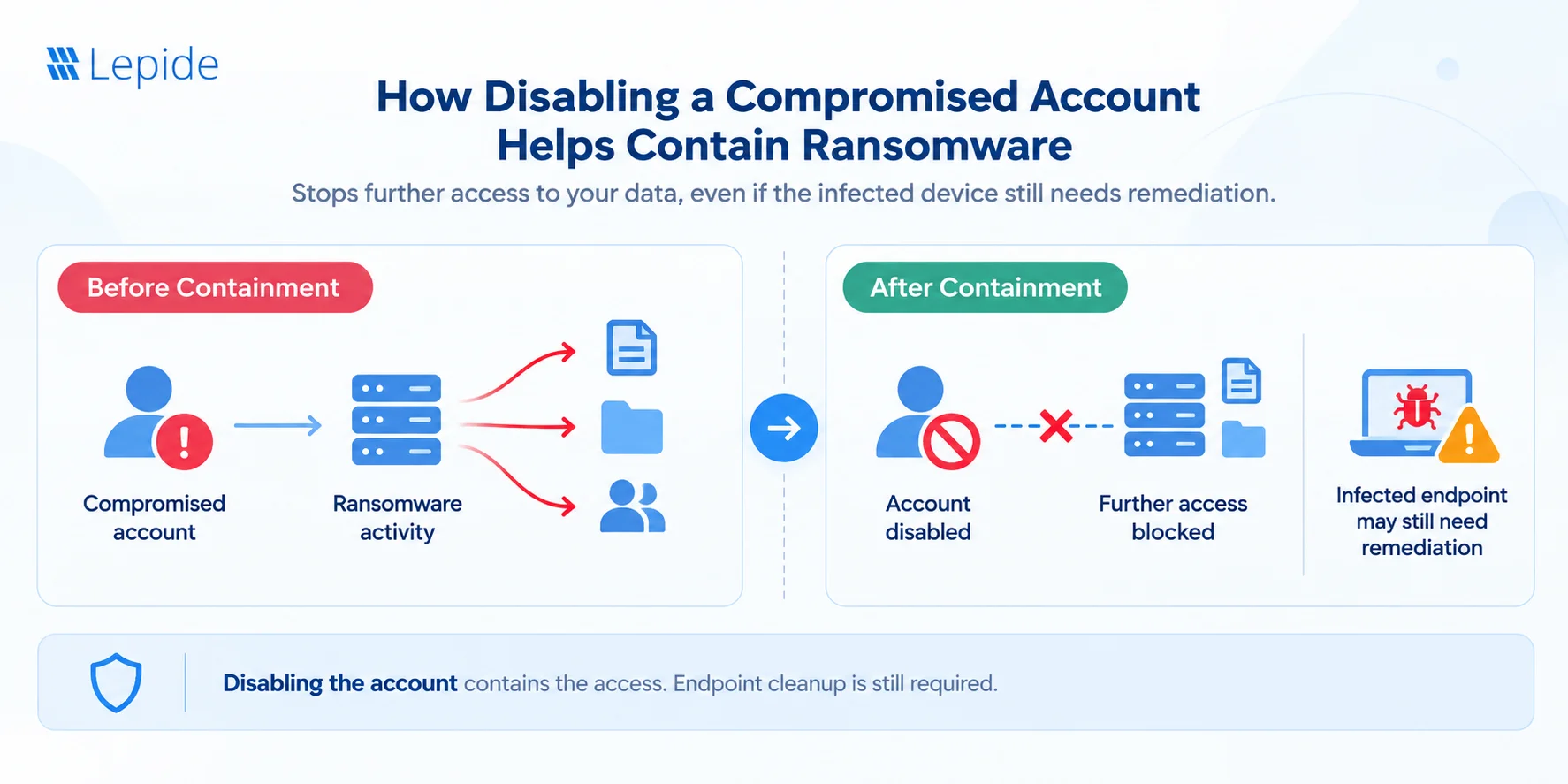
Consider a scenario where an attacker compromises a user’s credentials. The account has access to several business-critical repositories. The attacker begins rapidly modifying or encrypting files using those credentials.
The data security tool detects an unusually high volume of file activity that matches configured ransomware indicators or behavioral thresholds. If automatic containment is configured, the platform will disable that particular user’s account.
Once the disablement takes effect, the compromised credentials can no longer be used to authenticate as that account for new access, subject to the identity and access controls governing the affected resources.
This can help:
- Reduce the time between detection and response.
- Restrict further access through the affected account.
- Limit the number of additional files potentially affected.
- Give security teams time to investigate the incident.
Please Note: Disabling an account contains activity associated with that account. However, it doesn’t eliminate the ransomware infection on the endpoint. This is like shutting the door but not cleaning the room.
Containment Starts With Understanding Identity Risk
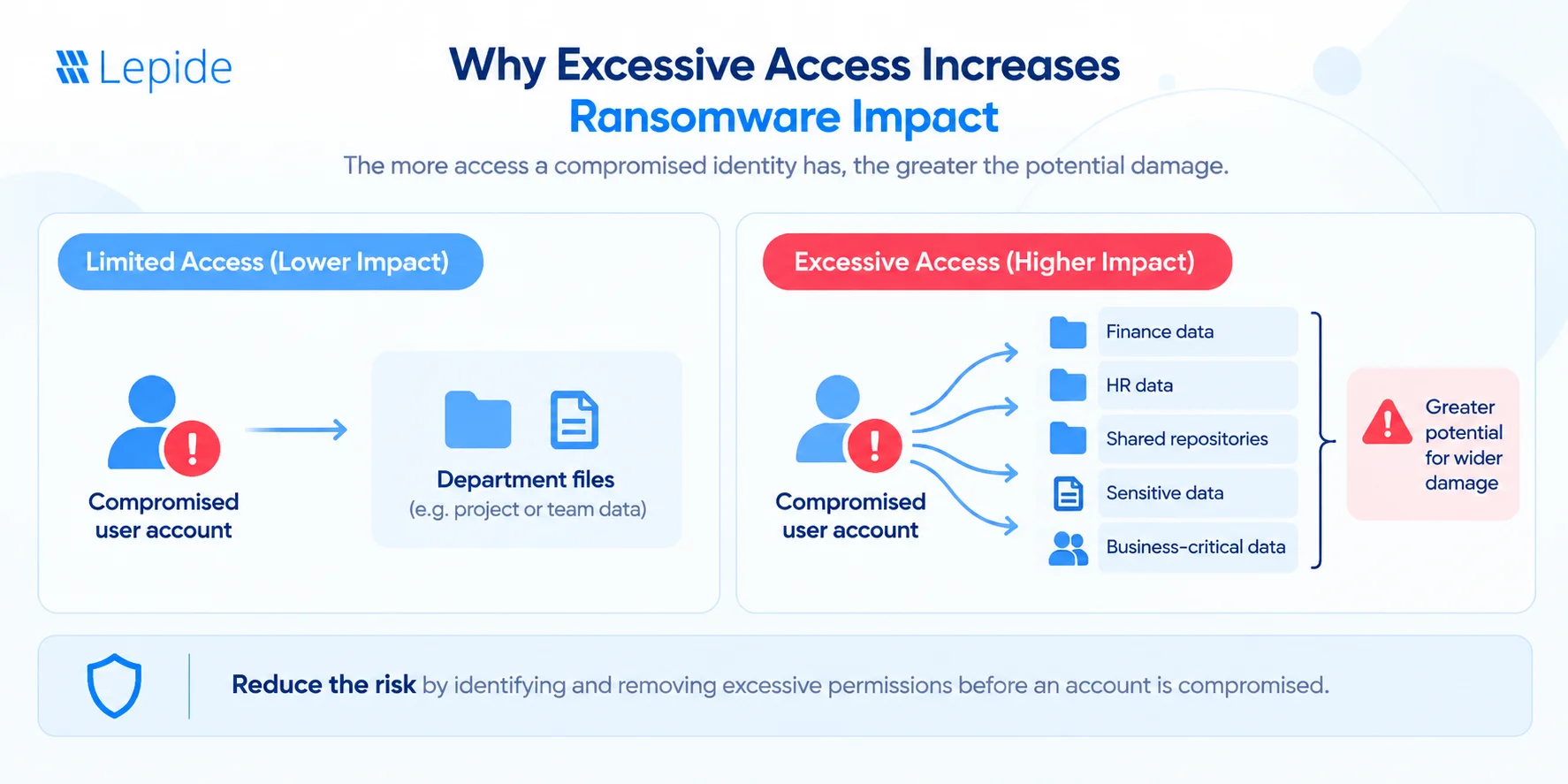
Disabling a compromised account can restrict further activity performed through that identity, but the more important question is: Why did the account have access to so much data in the first place? If a user account has accumulated excessive permissions or access to multiple sensitive data repositories, a compromised credential can give an attacker access to a broader set of resources, increasing the potential impact of the incident. This is why investigating suspicious activity, as well as the permissions and access rights behind it, is beneficial when dealing with ransomware.
Why Real-Time User and File-Activity Monitoring Matters
Ransomware containment is highly time-sensitive. The longer a compromised account continues accessing and modifying files, the greater the potential scope of the incident. This makes real-time monitoring particularly important.
A data security tool can help security teams identify suspicious activity by providing visibility into the following areas:
| Capability | How It Helps |
|---|---|
| Real-Time File Activity | Continuous monitoring can reveal sudden increases in file modifications, deletions, renames, or other unusual activity. |
| User Behaviour and Anomaly Detection | Behavioural baselines can help identify activity that differs significantly from a user’s normal patterns. |
| Sensitive Data Monitoring | Monitoring activity involving sensitive or business-critical data provides additional context when evaluating suspicious behaviour. |
| Immediate Alerts | Real-time alerts help security teams identify potentially malicious activity before the damage spreads further. |
| Detailed Activity Context | Details about who performed the activity, what changed, when it occurred, and which files or resources were affected help analysts assess the scope and impact of an incident. |
Together, these capabilities can reduce the time required to move from suspicious activity to investigation and containment
What Are the Limitations of Automated Ransomware Containment?
Automated containment can reduce response time, but it has important limitations.
- Some Files May Already Be Affected: Some files may already have been changed or encrypted before suspicious activity reaches the configured detection or response threshold and the automated action takes effect.
- Account Disablement Only Addresses That Account: Disabling one compromised account does not stop activity performed through another compromised user or service account, an already-established access path, or another attack vector.
- Data Security Tools May Not Isolate Endpoints: Depending on their capabilities and integrations, data security platforms may be able to disable an account or initiate another access-related response, but they do not necessarily terminate malicious processes or isolate an infected endpoint from the network.
- Attackers Can Use Multiple Attack Paths: When multiple identities have been compromised by attackers or the attacker has moved laterally within the environment, disabling one account may not suffice.
- Poorly Configured Thresholds Can Create False Positives: Legitimate activities such as data migration, bulk file processing, backup operations, or administrative scripts can resemble ransomware-like mass file activity.
- Automated Containment Is Not a Replacement for Layered Security: Different controls should be in place for ransomware protection. Data security monitoring should supplement EDR/XDR, identity security, least-privilege controls, secure backups, network security, and incident response.
The objective is not to make one tool responsible for stopping every stage of a ransomware attack. Instead, each security layer should reduce a different part of the attack surface or response time.
What Should Organizations Look for in a Data Security Tool for Ransomware Detection and Containment?
What Should Organizations Look for in a Data Security Tool for Ransomware Detection and Containment?
Organizations evaluating data security tools for ransomware protection should look beyond basic alerting capabilities.
Important capabilities include:
- Real-time user and file activity monitoring to identify suspicious changes quickly.
- Behavioral baselining to understand normal user activity.
- Anomaly detection to identify significant deviations from established behavior.
- Mass file activity detection to identify potentially destructive or anomalous activity at scale.
- Real-time alerts to notify security teams when suspicious behavior occurs.
- Automated response capabilities to initiate predefined protective actions.
- Sensitive data context to help determine the potential impact of suspicious activity.
- Investigation and audit trails to establish what happened and which accounts or files were involved.
- Configurable thresholds and policies to reduce unnecessary automated responses.
- Integration with the wider security ecosystem so data security controls can work alongside endpoint, identity, SIEM, and incident-response technologies.
Automated response is particularly important when the goal is not only to detect signs of ransomware activity but also to reduce the time required to limit that activity.
How Lepide Helps Detect and Contain Ransomware
Lepide helps organizations detect and respond to potential ransomware activity by monitoring user and file activity, identifying anomalous or threshold-based patterns, and triggering predefined response actions.
- Detect: Lepide monitors user and file activity and can identify ransomware indicators such as high-volume file changes, file renames, failed file reads, and anomalous user behavior.
- Alert and Investigation: Lepide uses anomaly detection, threshold alerting, and a dedicated ransomware threat model to identify suspicious activity and provide real-time alerts and contextual information for investigation.
- Contain: Lepide can execute configured response actions when ransomware indicators are detected, including custom responses designed to shut down the affected user account or computer, helping restrict further malicious activity.
Lepide is one layer of a broader ransomware defense strategy and is designed to help reduce the time between detecting suspicious activity and initiating a configured response.
Want to see how it works in your environment? Schedule a demo with Lepide today
Can Automated Containment Stop Ransomware Completely?
Automated containment can help limit ransomware activity, but it cannot guarantee that an attack will be stopped completely. For example, automatically disabling a compromised account can restrict further access through that identity, but it does not terminate ransomware already running on an infected endpoint or address other compromised identities or attack paths
Frequently Asked Questions
Yes. Ransomware activity can be partially contained through automated security controls. Depending on the platform, automated responses may disable compromised accounts, restrict access, isolate devices, terminate processes, or trigger other response actions. The specific containment capabilities depend on the security controls deployed
Data security tools can monitor user and file activity for indicators such as unusually high volumes of file modifications, mass file renaming or deletion, abnormal access patterns, and significant deviations from established user behavior.
Disabling a compromised user account can prevent further access through that account, which may limit additional file changes. However, it does not guarantee that ransomware will stop encrypting files because malicious processes may already be running, other accounts may be compromised, or the endpoint may remain infected. Endpoint isolation and process termination may require EDR/XDR or other security controls.
Containment involves taking action to limit or stop further malicious activity. For example, detecting unusually high-volume file changes is detection; automatically disabling the account responsible for those changes is a containment action.
No. Data security tools and EDR address different aspects of ransomware defense. Data security tools can provide visibility into data access and file activity and may automate access-related response actions. EDR focuses on endpoint activity, including detecting malicious processes and, depending on the product, isolating devices and supporting remediation